

For solo massage therapists and small clinic owners in the U.S., Expressbook is the editor’s pick for 2026. It combines online booking, automated reminders, intake and SOAP form support, payments, and a native QuickBooks and Xero accounting sync in one platform, with a dedicated mobile app for both clients and admins, a voice agent for visually impaired clients, and prepaid credits with no monthly fee. No other platform on this list pairs full practice management with that level of accounting automation and accessibility out of the box.
If your situation calls for something more specific, here are three alternate picks by use case:
- Solo practitioners on a tight budget: Marketplace-first platforms offer low upfront costs and built-in client discovery, though they trade some practice-management depth for exposure.
- Small multi-therapist clinics: Full-feature scheduling platforms with HIPAA-aware workflows and clinical documentation tools are the right fit.
- Multi-location or enterprise operations: Enterprise-grade platforms with multi-site reporting and franchise controls are built for that scale.
Table of Contents
- How the best massage booking software compares side by side
- Profiles of the top massage appointment software picks
- How to choose the right massage booking software for your practice
- Key takeaways
- What small massage clinics actually need from their software
- Expressbook is built for U.S. massage therapists who want less admin work
- Sources and further reading
How the best massage booking software compares side by side
The table below covers all 16 platforms evaluated for this guide. Vendors were selected based on U.S. market presence, mentions in industry publications including Massage Magazine and WellnessLiving’s 2026 roundup, and availability verified against vendor sites and product documentation in early 2026. Pricing reflects published starting rates; actual costs vary by plan tier, staff count, and add-ons.
Pricing caveats to keep in mind:
- Many platforms charge additional fees per staff member beyond a base plan.
- Payment processing fees (typically 2.6%–3.5% per transaction) are separate from subscription costs.
- Add-on modules for SOAP notes, marketing, or reporting can add $20–$60/month per feature block.
- Confirm whether a free trial includes full-feature access or restricts key modules before committing.
| Platform | Best for | Key features | Integrations | Pricing / Free trial | Mobile app | Marketplace | Ease of use | HIPAA support |
|---|---|---|---|---|---|---|---|---|
| Expressbook | Solo practitioners & small clinics | Online booking, SOAP/intake, payments, reminders, POS, client portal, AI analytics | QuickBooks, Xero, Google Calendar, payment processors | Prepaid credits, no monthly fee | Yes (admin + client) | No | High | Yes |
| MassageBook | Solo massage therapists | Booking, intake forms, client notes, reminders | Limited | Paid plans from ~$25/mo; free trial | Yes | Limited | High | Limited |
| Mindbody | Multi-location studios | Booking, POS, memberships, marketing, reporting | Broad ecosystem | From ~$129/mo; demo available | Yes | Yes (large) | Moderate | Limited |
| ClinicSense | Documentation-focused clinics | SOAP notes, intake forms, scheduling, reminders | Limited | From ~$29/mo; free trial | Yes | No | High | Yes |
| Vagaro | Salons & spas with POS needs | Booking, POS, marketing, payroll, memberships | QuickBooks, Google Calendar | From ~$30/mo; free trial | Yes | Yes | Moderate | Limited |
| Fresha | Marketplace-first businesses | Booking, POS, marketing, inventory | Payment processors | Free subscription; transaction fees apply | Yes | Yes (large) | High | No |
| Jane | Allied health clinics | Charting, scheduling, billing, telehealth | Payment processors, Google Calendar | From ~$74/mo; free trial | Yes | No | Moderate | Yes |
| SimplePractice | Telehealth & billing-focused therapists | Telehealth, billing, intake, scheduling | Insurance, payment processors | From ~$29/mo; free trial | Yes | No | Moderate | Yes |
| GlossGenius | Solo beauty & wellness pros | Booking, payments, client portal | Payment processors | From ~$24/mo; free trial | Yes | No | Very high | No |
| Mangomint | Boutique spas & high-volume clinics | Booking, POS, staff scheduling, reporting | Square, payment processors | From ~$165/mo; free trial | Yes | No | High | No |
| WellnessLiving | Membership-based wellness centers | Memberships, POS, booking, marketing | QuickBooks, Zoom | From ~$89/mo; demo available | Yes | Limited | Moderate | Limited |
| Zenoti | Enterprise & franchise operations | Multi-site management, reporting, marketing | Broad enterprise integrations | Custom pricing; demo only | Yes | Limited | Low | Yes |
| Square Appointments | Payment-first small businesses | Booking, POS, payments, reminders | Square ecosystem, Google Calendar | Free for individuals; paid from ~$29/mo | Yes | No | Very high | No |
| Booker by Mindbody | Established spa operations | Booking, POS, marketing, Mindbody marketplace | Mindbody ecosystem | Custom pricing; demo available | Yes | Yes (Mindbody) | Moderate | Limited |
| Schedulicity | Independent practitioners | Booking, reminders, class scheduling | Payment processors | From ~$34/mo; free trial | Yes | No | Very high | No |
| Acuity Scheduling | Calendar-first solo practitioners | Scheduling, intake forms, calendar sync, payments | Google Calendar, Zoom, QuickBooks, Stripe | From ~$20/mo; free trial | Yes | No | Very high | Limited |
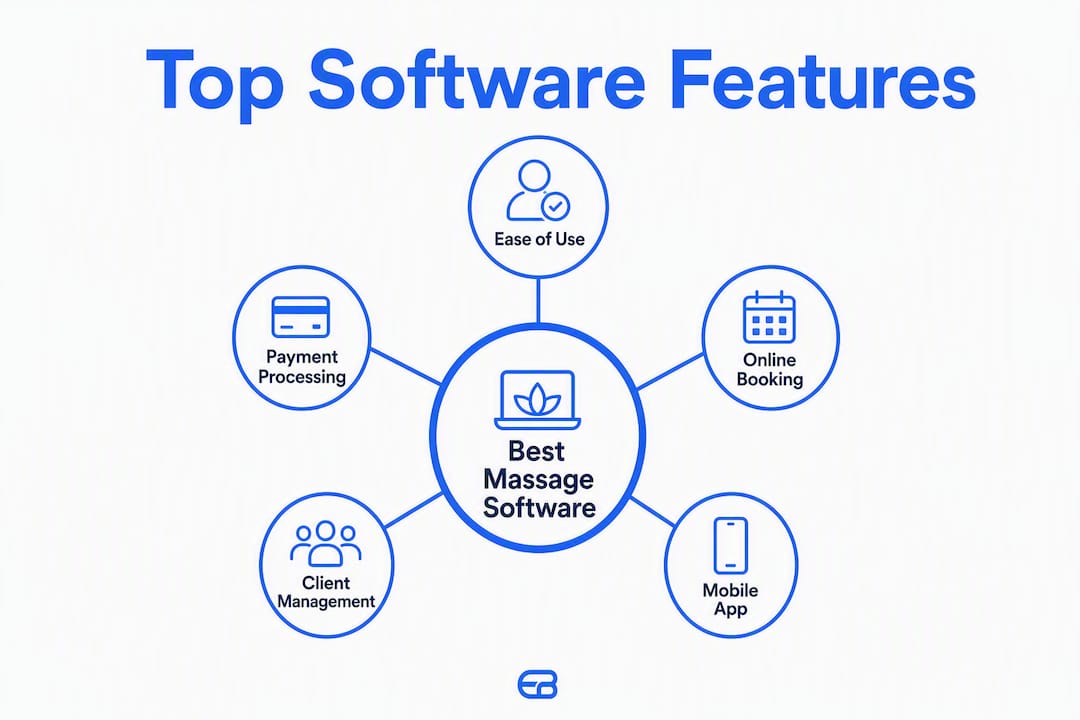
Profiles of the top massage appointment software picks
Expressbook
Expressbook earns the top spot because it addresses the full operational stack a massage practice needs, not just scheduling. Online booking, intake and SOAP form configuration, automated reminders and deposit collection, payments, and a client portal are all included. The automatic two-way sync with QuickBooks and Xero eliminates manual reconciliation at month end, a genuine time saver for solo practitioners doing their own books. The dedicated mobile app covers both admin and client-side access, and the voice agent lets visually impaired clients book appointments and get answers about the business without staff assistance. There is no subscription: a small credit top-up covers the full platform while you validate fit, including the voice agent and accounting sync.
- Mobile app: Yes, admin and client apps
- Accounting integrations: QuickBooks, Xero (automatic sync)
- Pricing: Prepaid credits, no monthly fee
Pro Tip: Use Expressbook’s spa and wellness booking system templates to pre-configure intake forms and service menus before your credit-funded test run. It cuts setup time significantly.
MassageBook
MassageBook is purpose-built for massage therapy, which shows in its intake form templates and client communication flows. Solo therapists who want software that speaks their workflow without a steep learning curve will find it comfortable from day one. Paid plans start around $25/month, and a free trial is available. It lacks deep accounting integrations, so practices that need QuickBooks or Xero sync will hit a ceiling quickly.
- Mobile app: Yes
- Accounting integrations: Limited
- Marketplace: Limited client discovery
Mindbody
Mindbody’s main draw is its consumer marketplace, which gives studios passive client discovery that no other platform on this list matches at scale. That reach comes at a price: plans start around $129/month, and the interface carries the complexity of a platform built for multi-location operations. For a solo therapist, it’s often more than needed. For a growing studio with multiple rooms and therapists, the ecosystem pays off.
- Mobile app: Yes
- Marketplace: Large, consumer-facing
- Integrations: Broad partner ecosystem
ClinicSense
ClinicSense is the clearest choice when clinical documentation is the priority. Its SOAP note templates and intake workflows are built specifically for therapists, and the platform includes HIPAA-aware data handling. Starting around $29/month with a free trial, it’s accessible for small clinics. The trade-off is limited third-party integrations, so practices that need accounting sync or advanced marketing tools will need workarounds.
- Mobile app: Yes
- HIPAA support: Yes
- Accounting integrations: Limited
Vagaro
Vagaro packs a full POS system, marketing automation, and payroll tools alongside scheduling, making it one of the more complete all-in-one options for salons and spas. It integrates with QuickBooks and Google Calendar and starts around $30/month. The interface is feature-dense, which means a slightly longer onboarding curve for staff who haven’t used salon management software before.
- Mobile app: Yes
- POS: Built-in
- Integrations: QuickBooks, Google Calendar
Fresha
Fresha’s subscription is free, which makes it attractive for new practices watching cash flow. Revenue comes from transaction fees on bookings made through its marketplace. That marketplace is genuinely large, giving salons and spas real client discovery. The catch: practices that generate most bookings through their own website or returning clients pay transaction fees on volume they built themselves. Evaluate your booking mix before committing.
- Mobile app: Yes
- Marketplace: Large, commission-based model
- Accounting integrations: None
Jane
Jane is the go-to for allied health clinics that need clinical charting alongside scheduling. Its documentation tools are thorough, and it supports HIPAA-compliant workflows. Plans start around $74/month. It’s less optimized for the pure massage therapy workflow than ClinicSense or MassageBook, but clinics that blend massage with physiotherapy or occupational therapy will appreciate the clinical depth.
- Mobile app: Yes
- HIPAA support: Yes
- Charting: Comprehensive
SimplePractice
SimplePractice targets therapists who need telehealth, insurance billing, and clinical documentation in one place. Its HIPAA compliance and billing workflows are strong. For massage therapists who don’t bill insurance and don’t need telehealth, many of its premium features go unused. Plans start around $29/month with a free trial.
- Mobile app: Yes
- Telehealth: Integrated
- HIPAA support: Yes
GlossGenius
GlossGenius prioritizes the client-facing experience above all else. Its booking pages are polished, payment collection is frictionless, and setup takes minutes. Solo practitioners in beauty and wellness who want a professional digital presence without configuration overhead will find it ideal. It doesn’t offer SOAP notes or accounting sync, so it’s best suited to practices where documentation and bookkeeping happen elsewhere.
- Mobile app: Yes
- Ease of use: Very high
- SOAP/accounting: Not included
Mangomint
Mangomint’s interface is fast and modern, and it handles high appointment volume without the sluggishness that plagues older platforms. Boutique spas with multiple therapists and a busy schedule benefit most. Starting around $165/month, it’s priced for businesses that have outgrown entry-level tools. No marketplace, but the operational efficiency at volume justifies the cost for the right operation.
- Mobile app: Yes
- POS: Yes
- Marketplace: No
WellnessLiving
WellnessLiving suits wellness centers that sell memberships, class packages, and bundled services alongside individual appointments. Its membership management and integrated POS handle that complexity well. Plans start around $89/month. The interface is moderately complex, and onboarding takes longer than simpler tools, but the feature depth matches the need.
- Mobile app: Yes
- Memberships: Yes
- Integrations: QuickBooks, Zoom
Zenoti
Zenoti is built for enterprise spa and salon groups with multiple locations, franchise reporting needs, and large staff counts. Custom pricing and a demo-only sales process reflect its enterprise positioning. For a solo therapist or a two-room clinic, it’s the wrong tool entirely. For a franchise with 10+ locations, it’s one of the few platforms that can actually handle the reporting and controls required.
- Multi-location: — Yes
Square Appointments
Square Appointments is free for individual practitioners, which is a genuine differentiator at the entry level. It runs on Square’s payments infrastructure, so if you already use Square for POS, the integration is tight. It doesn’t offer SOAP notes or accounting sync beyond basic Square reporting, but for a solo therapist who wants simple, reliable scheduling with no monthly fee, it’s a credible starting point.
- Mobile app: Yes
- Free tier: Yes (individuals)
- Accounting sync: Square ecosystem only
Booker by Mindbody
Booker is Mindbody’s legacy product for spa and salon operations. It carries the Mindbody marketplace connection and a long track record in the industry. Pricing is custom, and it’s best suited to established operations already embedded in the Mindbody ecosystem rather than practices starting fresh.
- Mobile app: Yes
- Marketplace: Mindbody marketplace
- Best for: Existing Mindbody ecosystem users
Schedulicity
Schedulicity keeps things simple: straightforward booking, class scheduling, and automated reminders at a low price point starting around $34/month. Independent practitioners and single-location studios that don’t need POS, SOAP notes, or accounting integrations will find it sufficient. It won’t scale well beyond a small operation, but that’s not who it’s designed for.
- Mobile app: Yes
- Ease of use: Very high
- Advanced features: Limited
Acuity Scheduling
Acuity Scheduling is a calendar-first tool that excels at flexible appointment rules, intake form collection, and calendar integrations with Google Calendar, Zoom, Stripe, and QuickBooks. Plans start around $20/month with a free trial. Solo practitioners who already live in Google Calendar and want scheduling to wrap around it will find Acuity a natural fit. It doesn’t offer SOAP notes or a built-in POS, so clinical documentation stays outside the platform.
- Mobile app: Yes
- Calendar integrations: Google Calendar, Zoom
- SOAP/POS: Not included
How to choose the right massage booking software for your practice
The right platform depends on where your practice is today and where it’s going in the next 12 months. A solo therapist renting a single room has different requirements than a three-therapist clinic with a front desk and a retail shelf. Work through this framework before booking any demos.
Step 1: Define your non-negotiable features
Start with the features you cannot operate without on day one:
- Online booking with real-time availability, so clients can self-schedule 24/7.
- Automated reminders and deposit collection to reduce no-shows. Automated reminders sent via SMS or email 24–48 hours before an appointment are one of the most effective no-show reduction tools available.
- Intake forms and SOAP notes if you document treatment plans or work with referred clients.
- Payments and POS for in-person and online payment collection.
- Client portal so clients can manage their own bookings and history.
- Calendar sync with Google Calendar or similar to avoid double-bookings.
- Accounting integration (QuickBooks or Xero) if you want to eliminate manual bookkeeping.
- Mobile app for both admin and client access.
- Accessibility features such as a voice agent for clients with visual impairments.
Step 2: Ask these questions during every demo
- Can I export all client data, appointment history, and SOAP notes at any time, in a standard format?
- How does staff scheduling and room/resource management work at my current size?
- What is the refund and cancellation policy for the subscription itself?
- Which third-party integrations are native versus webhook-only?
- What is the support SLA, and is phone support included?
- What does a typical onboarding timeline look like for a practice my size?
- Are there migration tools or support for importing existing client records?
Step 3: Watch for these red flags
- Opaque pricing: If per-staff fees, transaction fees, or add-on module costs aren’t published, assume they’re significant.
- No published integrations: A platform that can’t name its accounting or calendar integrations specifically is unlikely to have them.
- No data export during trial: If you can’t export your test data before paying, you won’t be able to leave easily later.
- No mobile admin app: Managing a practice from a desktop-only interface in 2026 is a real operational constraint.
- Weak accessibility support: Clinics serving older or visually impaired clients need booking tools those clients can actually use.
Implementation timeline and total cost of ownership
A typical small-clinic setup can take several weeks, including initial configuration and staff training, intake form and SOAP template setup, accounting sync and reconciliation testing, and a parallel run alongside your existing system before full cutover. Solo practitioners with no existing system can move faster, often in 1–2 weeks.
For total cost of ownership, budget beyond the monthly subscription:
- Per-staff add-ons (common above 2–3 staff members)
- Payment processing fees (2.6%–3.5% per transaction is typical)
- Setup or data migration fees (some platforms charge; others include it)
- Add-on modules for marketing, reporting, or advanced documentation
Pro Tip: Run a full workflow test on a small credit top-up: book a test appointment, collect a deposit, complete an intake form, process a refund, and export your data. If any step breaks, you’ve found the platform’s ceiling before you’ve committed.

Key takeaways
Expressbook is the strongest full-feature choice for solo and small-clinic massage practices in the U.S., combining accounting automation, mobile access, and prepaid credits with no monthly fee, which no comparable platform currently matches.
| Point | Details |
|---|---|
| Editor’s pick for small clinics | Expressbook covers online booking, SOAP/intake, payments, QuickBooks/Xero sync, and accessibility in one platform. |
| No subscription | Expressbook runs on prepaid credits, so practices can test full workflows with a small top-up. |
| TCO goes beyond subscription | Factor in per-staff fees, transaction fees, and add-on modules when comparing platforms on price. |
| Implementation takes 3–6 weeks | Budget time for staff training, form setup, accounting sync testing, and a parallel run before full cutover. |
| Expressbook for your next step | Set up Expressbook, run a full workflow test, and schedule one competitor demo for comparison. |
What small massage clinics actually need from their software
The platforms that win in small massage practices aren’t always the ones with the longest feature list. They’re the ones that handle the first three operational problems well: a client can book online without calling, a reminder goes out automatically so the appointment doesn’t get forgotten, and payment is collected without an awkward conversation at the end of the session. Get those three right on day one, and the practice runs more smoothly from the start.
Advanced reporting, multi-location controls, and membership management matter, but they matter later. Practices that try to configure every feature before going live often delay their own launch by weeks. The better approach is to go live with the core booking and payment workflow, then layer in SOAP templates and accounting sync in week two or three once staff are comfortable.
Migration is where practices most often underestimate the effort. Exporting historical client records from an old system, reformatting them, and importing cleanly into a new platform takes time and sometimes technical help. Keep a paper or spreadsheet fallback for two weeks after cutover. It’s not elegant, but it prevents a missed appointment from becoming a client service failure.
One feature that rarely gets enough attention in software comparisons: accessibility. Expressbook’s voice agent lets visually impaired clients book appointments and ask questions about the business without staff assistance. For clinics that serve older adults or clients with visual impairments, that’s not a minor feature. It’s the difference between a client who can self-serve and one who calls during a session.
Expressbook is built for U.S. massage therapists who want less admin work
Most massage booking platforms make you choose between scheduling depth and accounting simplicity. Expressbook doesn’t. Its automatic sync with QuickBooks and Xero means every booking, payment, and refund flows into your accounting software without manual entry, which adds up to real time savings across a full week of appointments. The platform’s spa and salon management features include branded booking pages, real-time availability, AI-powered analytics, and automated reminders, all accessible from a dedicated mobile app for both admins and clients.

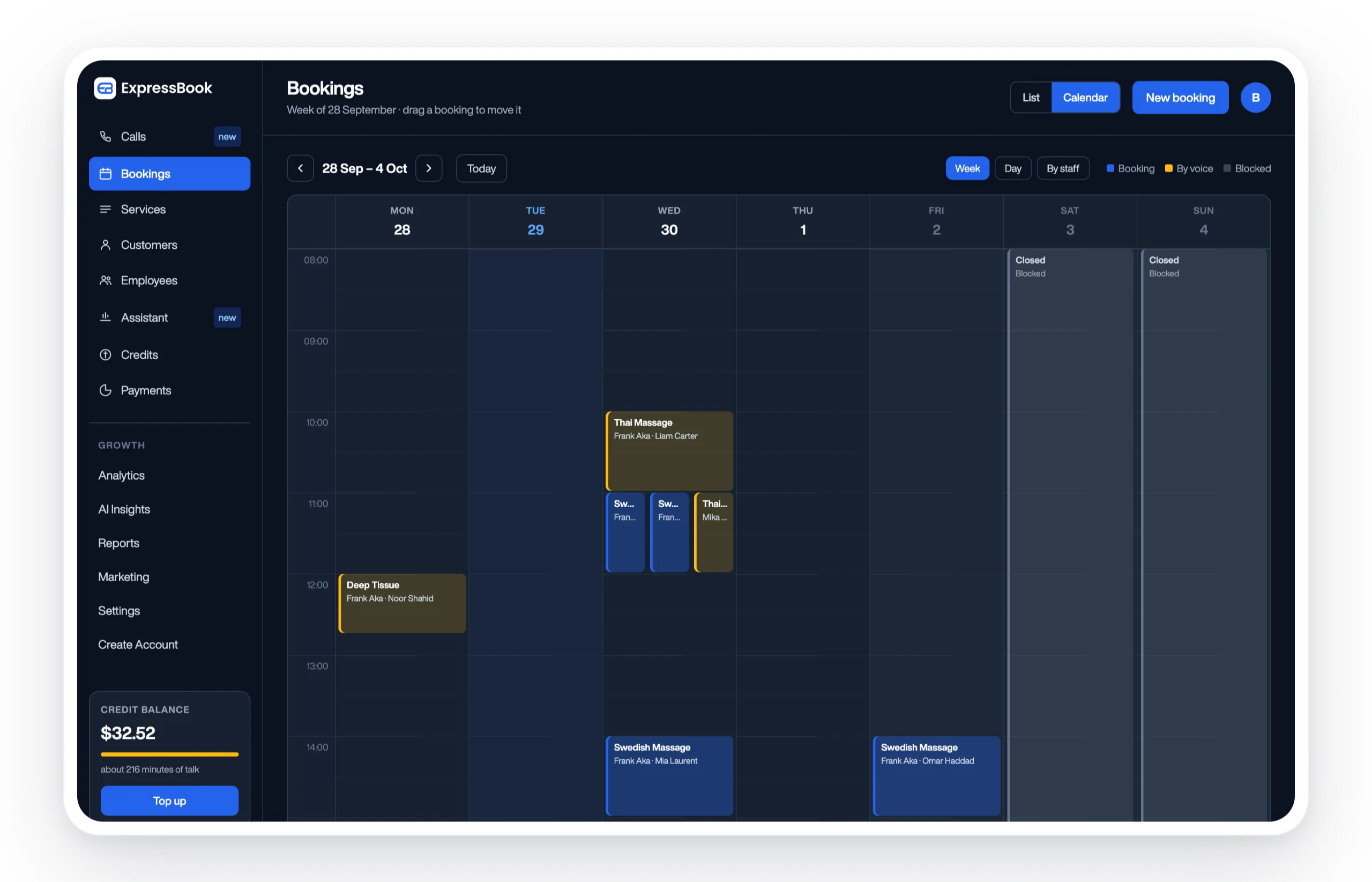
The voice agent extends that accessibility further, letting visually impaired clients book and get answers independently. There is no subscription: a small credit top-up is enough to run a full client migration, configure your intake forms, and verify that the accounting sync works exactly as expected. Set up Expressbook today, and use the first week to run the full workflow test outlined in the how-to-choose section above.
Sources and further reading
The claims and comparisons in this guide were verified against vendor documentation, product pages, and third-party directories in early 2026. Pricing figures reflect published starting rates and may change; confirm current pricing directly with each vendor before purchasing.
- Expressbook product overview and booking features
- Expressbook spa and wellness booking system
- Expressbook accounting integration details
- How to choose appointment scheduling software
- Massage Magazine: Top booking software platforms ranked
- WellnessLiving: 10 best massage therapy software solutions for 2026
- GetApp: Massage therapy software comparison
- SoftwareAdvice: Spa software directory
- 42voice: Automated appointment reminders guide
- Reuters: HIPAA and state health data privacy laws
This article provides general software comparison information and does not constitute legal, medical, or financial advice. Verify HIPAA compliance requirements and applicable state privacy laws with a qualified professional before selecting a platform for clinical use.