

To track revenue by service, give every service you sell its own income category, tag each booking and payment to that category when it happens, and review the totals every month. Done consistently, this shows you which services actually pay for your time, which ones only keep the calendar busy, and where a price change or schedule change would help most. This guide walks through the setup, the calculation, the edge cases (refunds, discounts, tips, taxes, prepaid packages) and the review routine.
TL;DR
- Tracking revenue by service means recording income per service line, not only per client or as one monthly total.
- Keep to three to six service categories, attach each sale to one of them at the moment it is booked or paid, and tag direct costs to the same lines.
- Report net revenue: subtract discounts and refunds, leave out sales tax, and treat prepaid packages as owed work until you deliver it.
- Reconcile service totals against your payment processor and your bookkeeping file every month, then review margin by service monthly or quarterly.
- When bookings, payments and accounting sync automatically, most of this work stops being manual entry.
Table of Contents
- What tracking revenue by service means
- Set up your service categories first
- What to record for every sale
- How to calculate revenue by service
- A worked example
- Reconcile with your processor and your books
- Review it on a schedule and act on it
- Our perspective
- Put it on autopilot with ExpressBook
- Common mistakes to avoid
- FAQ
- Sources
What tracking revenue by service means
Tracking revenue by service means recording income by the specific activity you sold, instead of only by client or as an aggregate total. Canopy’s knowledge base describes the purpose as analyzing profitability, allocating resources, managing costs and guiding decisions such as pricing a service differently or discontinuing it.
The stakes are real for service businesses. Shopify notes that as of 2024, services provided by private businesses accounted for almost three-quarters of U.S. GDP, and service revenue is simply income earned by performing an activity. Unlike a retailer, you have no inventory to count, so the only way to know what is working is to label the income itself.
A total of $17,500 for the month tells you nothing about what to do next. A breakdown that shows color services bring in 32% of revenue, but at a lower margin than blowouts, tells you exactly what to do next.
Set up your service categories first
Before you track anything, decide what a “service” is in your books. Two rules help.
Keep the list short. One finance guide recommends three to six service lines, because beyond that the report becomes noise instead of a basis for pricing or scheduling decisions. A salon might use cuts, color, treatments and add-ons. A fitness studio might use group classes, personal training, memberships and workshops. A clinic might use initial consultations, follow-ups, procedures and assessments.
Map each category to an income account. In QuickBooks Online, products and services are associated with income accounts. Several items can share one account, or each can have its own. If you want a clean per-service report, give each of your three to six lines its own account or its own item, and keep the naming identical in your booking system and your accounting file.
A trades-focused bookkeeping guide gives a useful template for how far to split: it suggests separate lines for service and repair, installation and replacement, and maintenance agreements, with revenue tagged to the service line and direct costs tagged to the job. The principle carries to any appointment business: separate the work that behaves differently, such as one-off visits versus recurring plans.
What to record for every sale
Whether you use a spreadsheet or software, each transaction needs the same handful of fields. Without them, the monthly roll-up cannot be trusted.
| Field | Why it matters |
|---|---|
| Date of service | Lets you report revenue in the month it was earned |
| Date paid | Separates earned revenue from cash received |
| Service name and category | The label every report depends on |
| Client or booking ID | Lets you trace a number back to an appointment |
| Staff member or resource | Supports revenue and margin per provider, room or chair |
| List price | The starting point for measuring discounts |
| Discount or promo applied | Shows how much price you give away, per service |
| Refund or adjustment | Keeps net revenue honest |
| Sales tax collected | Tracked separately because it is not your revenue |
| Tip | Usually tracked apart from service revenue |
| Payment method and processor reference | Makes reconciliation possible |
| Direct cost (labor minutes, materials) | Turns revenue into contribution margin |
The fewer of these you type by hand, the better. A booking record already knows the date, the service, the staff member and the price. Anything that has to be retyped into a spreadsheet is a future error.
How to calculate revenue by service
The core calculation is simple. Canopy describes it as summing all sales or billable activities for each service item, then working out each service’s share of total revenue. The care goes into deciding what counts as a sale.
Start from gross, then work down to net
Gross revenue per service is the number of completed appointments multiplied by the price charged. Net revenue is what remains after reductions:
- Discounts and refunds. Accountants use contra revenue accounts, such as sales returns and allowances or sales discounts, so you can see both original sales and net sales. In practice, record a refund against the service that was refunded, not against the month’s total.
- Sales tax. Taxes you collect are not income you earned. They belong in a current liability account such as Sales Taxes Payable, and net sales exclude them. If your state taxes some services and not others, per-service tracking makes your tax filing easier too.
- Tips. Tips generally belong to the staff who earned them, so keep them out of service revenue and in their own line. Check payroll treatment with your accountant.
Prepaid packages and deposits
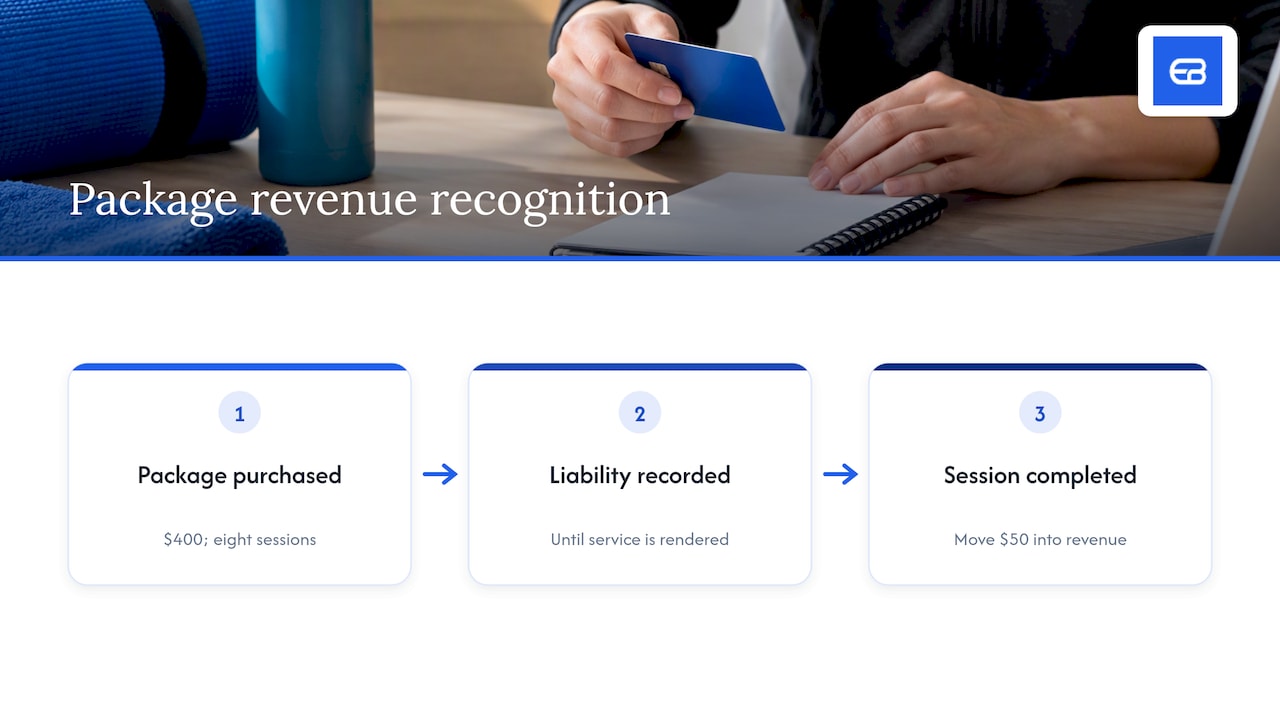
Money received before the work is done is not yet revenue. Under accrual accounting, unearned revenue is recorded as a liability until the service is rendered. If a client buys a $400 package of eight sessions, each completed session moves $50 from liability into revenue for that service. Memberships, class passes and deposits work the same way.
Accrual versus cash
The cash method records income when payment arrives. The accrual method records it when it is earned. The Small Business Administration says accrual accounting gives a clearer picture of business performance over time, though it is more complex to manage. For service-level reporting, accrual matters most when you sell packages or bill after the appointment.
An important rule: you cannot switch casually. The IRS states that you must use the same accounting method to figure taxable income and keep your books, and you generally need IRS approval to change methods. Talk to a CPA before changing how you report, and use management reports in your booking software for the day-to-day view.
A worked example
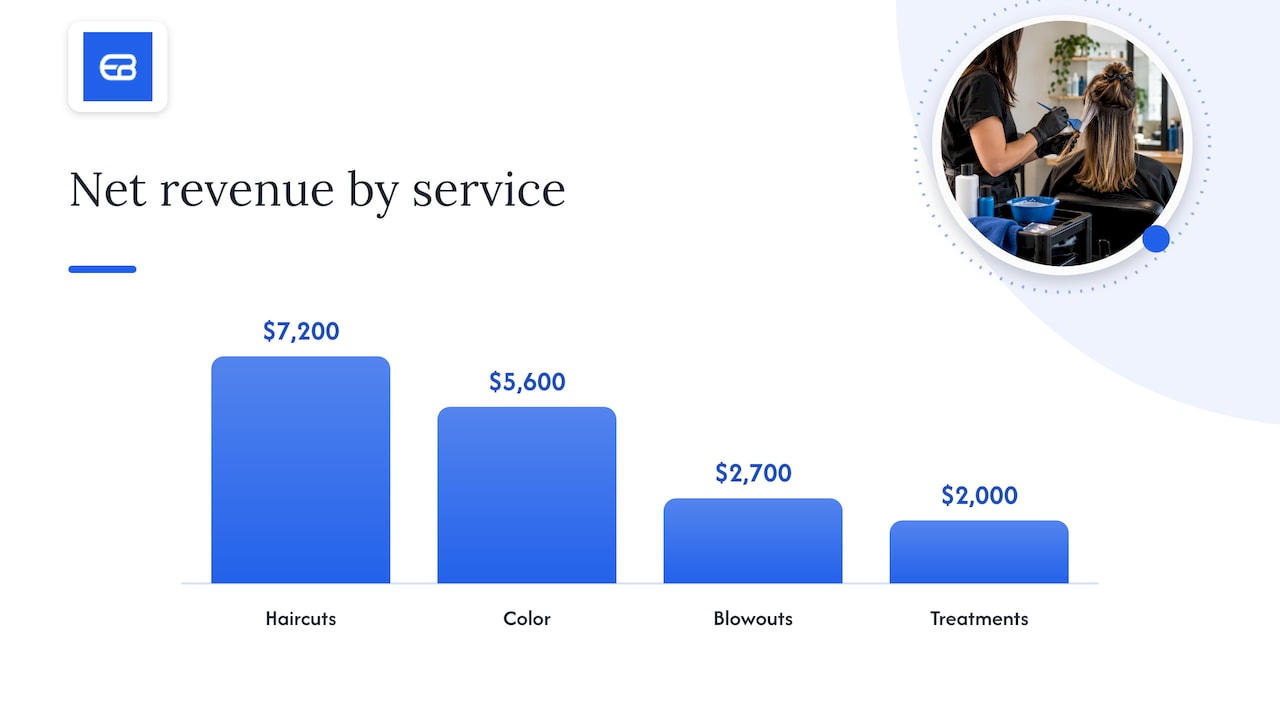
Here is an illustration for a small salon in one month. The figures are invented to show the method, not benchmarks.
| Service | Completed | Avg. price | Net revenue | Share | Direct costs | Contribution margin |
|---|---|---|---|---|---|---|
| Haircuts | 120 | $60 | $7,200 | 41.1% | $3,000 | $4,200 (58.3%) |
| Color | 40 | $140 | $5,600 | 32.0% | $3,100 | $2,500 (44.6%) |
| Blowouts | 60 | $45 | $2,700 | 15.4% | $1,000 | $1,700 (63.0%) |
| Treatments | 25 | $80 | $2,000 | 11.4% | $1,100 | $900 (45.0%) |
| Total | 245 | $17,500 | 100% | $8,200 | $9,300 |
Contribution margin here means revenue minus only the costs that exist because the service is sold, such as direct labor and materials, which is how Woven defines it. Fixed costs like rent are left out.
What the table shows: color is the second-largest line by revenue but one of the weakest by margin, while blowouts are small but efficient. The owner can now test a color price increase, or add blowouts as a bundled upsell. None of that is visible in a $17,500 total.
Reconcile with your processor and your books
Service-level numbers are only useful if they match the money. Each month, check three things:
- Bookings to payments. Every completed appointment should have a matching payment, deposit or package redemption. Unmatched appointments are either unpaid or mislabeled.
- Payments to processor payouts. Your processor deposits net amounts after fees, so compare gross sales, fees, refunds and payout totals, not just the bank deposit.
- Payouts to the books. The SBA recommends keeping up with receivables, payables, cash and bank reconciliation so operations run smoothly. Your service revenue accounts should add up to the same total as your processor’s gross sales, less tax and tips.
A 30-minute monthly routine beats a year-end scramble. The real danger of manual entry is drift: a refund recorded in one place but not another, or a package sale logged as revenue on day one.
Review it on a schedule and act on it
Pick a rhythm and keep it. A practical guide suggests reviewing gross margin by service line monthly or quarterly, then using the results to raise prices, promote stronger lines, drop services with negative margin, or shift freed labor to other work.
A monthly review can answer five questions:
- Which service grew or shrank compared with last month?
- Which service has the highest margin per hour of staff time?
- How much revenue did discounts remove, by service?
- Which services are mostly sold in packages, and how much of that is still unearned?
- Are the busiest time slots filled with your best-margin services?
If labor is your biggest direct cost, track time against the service. The same trades guide suggests technicians clock time against a job number through a payroll job-costing feature or a field app timesheet. For appointment businesses, the booked duration of each service is a good starting estimate.
Our perspective
We build ExpressBook for service businesses, and the pattern we see is consistent: the revenue data is rarely missing. It is scattered. Bookings live in one calendar, payments in a processor dashboard, and the accounting file gets updated at month end from memory and a stack of exports.
That is why we built the platform around syncing bookings, payments and client data with QuickBooks and Xero. If the service name, price, deposit and refund travel with the booking, the per-service report mostly builds itself, and the end-of-month scramble shrinks. Our rule of thumb for owners: decide your three to six service categories once, use the same names everywhere, and let software carry the data rather than your keyboard.
We would also keep the analysis simple. Revenue share by service, margin by service, and discounts by service answer most pricing and scheduling questions before you need anything more elaborate.
— serge
Put it on autopilot with ExpressBook
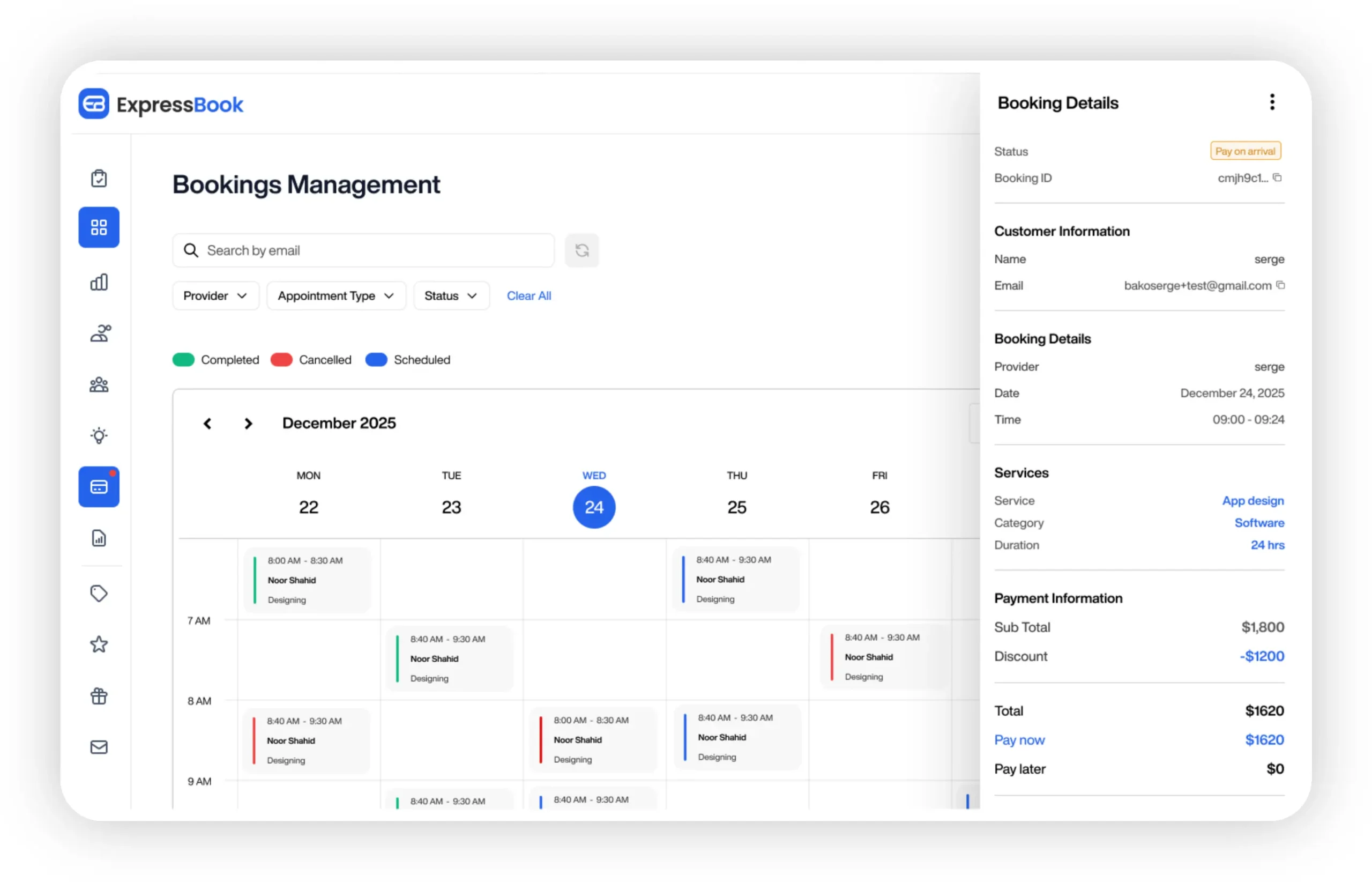
ExpressBook is cloud-based booking and scheduling software built for salons, gyms, clinics, spas, freelancers and other appointment businesses. Appointments, online payments, deposits, refunds and reminders live in one place, and bookings, payments and client data sync with QuickBooks and Xero, with reporting and AI-powered analytics on top. There is also a mobile app for both users and admins, so you can check your numbers between appointments.
You can test it with a free trial of up to 3 months, which is long enough to run a full month-end close on real data.
If you also want the phone-answering side handled, our AI voice assistant runs in the browser through a booking page, widget or QR code, with no phone line needed. It answers questions about your business and takes bookings, including for visually impaired clients. It runs on prepaid credits: you can top up with $25, $50 (plus $2 free) or $100 (plus $8 free). Not sure where to start? Try the booking system demo or read our guide to choosing appointment scheduling software.
Common mistakes to avoid
- Too many categories. Twenty service lines produce twenty tiny numbers. Group similar services and keep detail in the service name.
- Counting deposits as revenue. A deposit for a future appointment is a liability until you deliver.
- Netting tax and tips into service totals. Both distort your averages and your margins.
- Renaming services in only one system. If the booking tool says “Balayage” and the accounting file says “Color 2,” reports will not match.
- Ignoring discounts. A service that looks strong at list price may be mediocre after promotions.
- Reviewing only revenue. A service can lead on revenue and trail on margin, as the color line did in the example.
- Changing accounting methods mid-year without advice. The IRS requires consistency, so involve your CPA.
For more on how booking tools fit into a modern operation, see our guide to online booking software for small businesses and how automated reminders support client retention, since fewer no-shows lift revenue on every service line.
FAQ
Can I track revenue by service in a spreadsheet?
Yes, if your volume is small. Use one row per completed appointment with the date, service category, price, discount, refund, tax, tip and payment reference, then summarize with a pivot table by month and service. The weakness is manual entry, so most businesses outgrow a spreadsheet once they pass a few dozen appointments a week.
Should I use cash or accrual accounting for service revenue?
Accrual shows what you earned in a period, while cash shows what you collected. The SBA notes accrual gives a clearer picture of performance, and the IRS requires consistency and generally approval to switch. Ask your CPA which method fits your tax situation before changing anything.
How many service categories should I use?
Three to six is a sound target for reporting. Fewer than that hides differences, and more than that creates noise. Keep individual service names inside each category if you need finer detail.
How do I record prepaid packages and gift cards?
Record the cash received as unearned revenue, a liability. As each session is delivered, move its share into revenue for that specific service. Gift cards follow the same principle, though rules on unredeemed balances vary by state, so confirm with your accountant.
How often should I review revenue by service?
Monthly is the right habit for most appointment businesses, with a deeper margin review every quarter. Monthly reviews catch discount creep and slow services early enough to adjust pricing or scheduling.
Sources
- Revenue by Service Item, Canopy Knowledge Base
- Service Revenue: What It Is and How to Track It, Shopify
- Set up products and services, QuickBooks Online help
- Bookkeeping for a Trades Business: Job Costing, Invoicing
- Contribution margin by service line, Woven
- What is a contra revenue account?, AccountingCoach
- What is net sales?, AccountingCoach
- Manage your finances, U.S. Small Business Administration
- Publication 583, Starting a Business and Keeping Records, IRS