

You can automate most appointment refunds: full refunds for cancellations made inside your policy window, partial refunds for deposits, and refunds for appointments you cancel yourself. The setup is the same every time. You write the rules down, connect booking and payments so both update together, and keep a human in the loop for disputes, exceptions and anything that looks unusual. This guide covers each step for US service businesses, from salons and gyms to clinics and freelancers.
TL;DR
- Automate clean, rule-matching cases (cancellation inside the window, provider-side cancellations, duplicate charges). Send disputes, high-value exceptions and suspected fraud to a person.
- Write the policy first: eligibility, exclusions, who approves what, and how the money goes back. Software only enforces what you define.
- Connect booking, payments and accounting so the refund, the calendar slot and the books change in one event.
- Expect client refunds to take roughly 5 to 10 business days to appear, and plan for the original processing fee usually not coming back.
- Test in shadow mode before going live, and keep a decision log for every refund.
Table of Contents
- What appointment refund automation actually covers
- Which refunds to automate and which to review
- Set refund rules before you set up any software
- Connect booking, payments and accounting
- Notify clients automatically
- How long refunds take and what they cost
- Protect payment data and limit access
- Test before you switch it on
- Our perspective: automate the routine, keep the judgment
- Try it with your own refund rules
- FAQ
- Sources
What appointment refund automation actually covers
A refund is not one task. It is a chain: a client cancels or a no-show is logged, the policy decides what is owed, the payment processor returns money, the calendar frees the slot, the client is told, and the bookkeeping reflects a reduced sale. Manual handling breaks this chain at every link. Someone forgets to release the slot, the refund goes out twice, or the accountant finds the credit three weeks later.
Automation connects the links. In practice that means four jobs:
- Deciding whether the cancellation qualifies for a full refund, a partial refund, a credit or nothing.
- Paying the client through the original payment method.
- Notifying the client and your staff, and reopening the slot.
- Recording the refund in your accounting software with the reason and the approver.
The first job is where most of the risk sits, so it gets the most attention below.
Which refunds to automate and which to review
The safest dividing line is the one that refund-automation guidance keeps returning to: let the system approve clean cases that match a rule exactly, and send everything else to a person. One 2026 guide on refund automation recommends human review for disputed, high-value, ambiguous, fraudulent, chargeback-related or policy-exception requests.
For an appointment business, that sorts into two lists.
| Automate | Keep under human review |
|---|---|
| Client cancels before your free-cancellation deadline | Client disputes a charge or has an open chargeback |
| You or your staff cancel or reschedule the appointment | Refund requests after the appointment took place |
| Duplicate or accidental double charge | Requests that fall outside the written policy |
| Deposit returned when the slot is rebooked, if your policy says so | High-value packages, memberships or multi-session bundles |
| Partial refund calculated by a fixed percentage | Complaints about service quality or safety |
| Confirmation messages and receipts | Repeat requests from the same client that look unusual |
A salon-focused workflow guide makes a similar point: booking, payment and refund, and service recovery should follow separate routes, with approval required wherever money, safety or reputation is at stake. A cancelled blowout and a client unhappy with a color correction are different problems, and only one of them belongs in an automatic flow.
A useful rule of thumb: if you could write the decision as “if X, then refund Y” on an index card, automate it. If a manager would first ask “what happened?”, it needs a person.
Set refund rules before you set up any software
Automation makes a vague policy fail faster. Before touching settings, write down:
- Eligibility: which appointment types and payment types can be refunded.
- Time windows: for example, full refund more than 24 hours out, half refund inside 24 hours, none for no-shows. Choose windows that fit how hard your slots are to refill.
- Exclusions: gift cards, promotional pricing, custom or materials-based services.
- Evidence: what a client must supply for exceptions, such as a doctor’s note.
- Approver roles: who can override the rule, and up to what amount.
- Payout method: original payment method, store credit or both.
This list mirrors guidance that says to define eligibility, exclusions, evidence, approvers and payout method before automating, and to log the decision, amount, channel and send time.
Make the policy visible and acknowledged
The American Dental Association advises practices to display the appointment policy prominently, include it in new-patient materials and obtain acknowledgment. The same advice works for a barbershop or a personal trainer. Put the policy on your booking page, repeat it in the confirmation message, and have the client tick a box at checkout. An automatic refund or an automatic fee is far easier to defend when the client agreed to the terms in advance.
The ADA also cautions that late-cancellation fees should be applied judiciously because charging can strain relationships. That is a design choice for your rules: many businesses let the automation handle the refund side and route fee waivers for loyal clients to a manager.
Rescheduling is not cancelling
Treat a reschedule as its own path. If a client moves an appointment inside your policy window, the payment should usually stay attached to the new slot rather than being refunded and re-charged. This avoids paying processing fees twice and keeps the client’s deposit protected.
Connect booking, payments and accounting
Refund errors usually come from systems that do not talk to each other. If the calendar says an appointment is cancelled but the payment tool still shows it as paid, someone has to reconcile by hand.
The cleaner approach is an integrated booking and payment setup. Stripe’s booking-system guidance explains that businesses can connect through APIs or platform integrations, and the booking platform is notified when a payment goes through. The same guide notes that integrated scheduling and payments let a platform prompt Stripe to handle cancellations or partial refunds automatically, so nobody searches across separate systems.
The third connection is accounting. The IRS describes customer refunds as returns and allowances that reduce net receipts, and expects businesses to keep formal books and records. When a refund syncs straight to QuickBooks or Xero with its reason code, your income reports stay accurate without month-end clean-up.
How ExpressBook fits
ExpressBook is built around this chain: appointment management, online payments, payment and refund handling, automated reminders and automatic syncing with QuickBooks, Xero and Google Calendar. Real-time availability means a freed slot can be rebooked quickly, which is the best protection against the cost of a cancellation. Staff and admins can also work from the dedicated mobile app, so a manager can approve an exception from the floor rather than waiting for a desktop.
Deposits and reminders live in the same system as your refund rules. That matters, because clear reminders cut the number of cancellations that arrive late, and smart scheduling is one of the strongest ways to reduce no-shows. Fewer last-minute cancellations means fewer refund decisions to make at all.
Notify clients automatically
A refund without a message produces a second problem: the client emails to ask where their money is. Build three messages into the flow:
- Cancellation confirmation, sent immediately, stating what was cancelled and what refund applies.
- Refund issued, with the amount, the payment method and a realistic timeline.
- Rejection or review notice, for requests that fell outside the rules, explaining that a team member will look at it and when to expect an answer.
The third message is the one most businesses skip. A client who hears nothing assumes the worst. Keep it short, polite and specific about timing.
ExpressBook’s voice assistant gives clients another channel. It works directly in the browser through a booking page, widget or QR code, needs no phone line, answers in multiple languages, and can help visually impaired clients book and ask questions about your business. Call transcripts are logged, which gives you a record of what the client was told about your policy. Voice assistant usage runs on credits that you top up: $25 of credit, $50 plus $2 free, or $100 plus $8 free, all one-off payments.
How long refunds take and what they cost
Set client expectations with real numbers. Stripe’s documentation says a customer typically sees the refund as a credit about 5 to 10 business days later, depending on the bank. Refunds issued shortly after the original charge can appear as a reversal, where the charge simply drops off the statement.
Three practical points from the same documentation:
- Refunding a payment after it succeeds might incur a fee, and the original processing fees are not returned. Cancelling a payment before it completes costs nothing.
- A refund can fail if the card is closed or the bank cannot process it. The money returns to your balance, and that can take up to 30 days.
- Other processors have their own terms. Check your processor’s refund page and put the timeline in your policy.
Because the processing fee on the original charge is typically lost, a policy that offers store credit or free rescheduling first, and a cash refund second, can protect your margin. Say so plainly in your policy so clients are not surprised.
Federal rules to know
Most appointment refunds are governed by your own policy and state law, not by a general federal refund right. Two points are worth knowing:
- The FTC’s Cooling-Off Rule gives three business days to cancel only certain qualifying sales, such as some sold at a home or temporary location. It does not create a general three-day refund right for ordinary appointments.
- For covered mail, internet or telephone merchandise orders, the FTC’s rule requires refunds within seven working days for third-party credit transactions, or within one billing cycle for first-party card refunds. That rule is about merchandise, so it applies if you also sell products online, not to a haircut.
If you take health appointments, privacy rules apply to what the refund message and records reveal. Our HIPAA appointment scheduling guide covers that in detail. For anything about state consumer law or a specific dispute, ask a licensed attorney in your state.
Protect payment data and limit access
A refund tool can move money, which makes it a target. Stripe recommends PCI-compliant processors, encryption in transit, two-factor authentication, continuous monitoring, least-privilege staff access and current software.
In plain terms for a small team: let only managers issue refunds above a set amount, require two-factor sign-in for every account that can reach payments, and remove access the day someone leaves. If you want a practical starting point, this guide on how to secure customer data affordably walks through low-cost steps for small businesses.
Test before you switch it on
Do not point new rules at live money on day one. A sound test plan has four parts:
- Shadow mode. Run the rules alongside your staff for a couple of weeks and compare what the system would have done with what people actually decided. This is the approach recommended for refund automation. Every mismatch is either a rule to fix or a case that needs human review.
- Duplicate protection. Use idempotency keys, which are unique request IDs that stop the same refund being sent twice if a request is retried.
- Balance checks. A refund cannot exceed what remains unrefunded. Stripe’s API reference says a refund may be full or partial, cannot exceed the remaining amount, and fails if already fully refunded. Also check for open disputes before paying out.
- Reconciliation. Match processor events against your books weekly. Stripe’s Balance Transaction reference identifies refund and refund-failure transactions and exposes net amount, fees, currency and status, which is what you need for this check.
Keep a decision record for each refund: who or what approved it, which rule applied, the amount and the time. When a client or a card issuer questions a charge, that record is your evidence. A credit-card customer may also assert a claim against the issuer for unsatisfactory services after a genuine attempt to resolve the matter with the merchant, as a Philadelphia Fed paper on card protections explains. Responding quickly and fairly before it gets that far is cheaper than a chargeback.
Our perspective: automate the routine, keep the judgment
We built ExpressBook for owners who spend evenings reconciling bookings against payments. Our view is that refunds are a bookkeeping problem disguised as a customer-service problem. When booking, payment and accounting data move together, most refunds stop being decisions and become records.
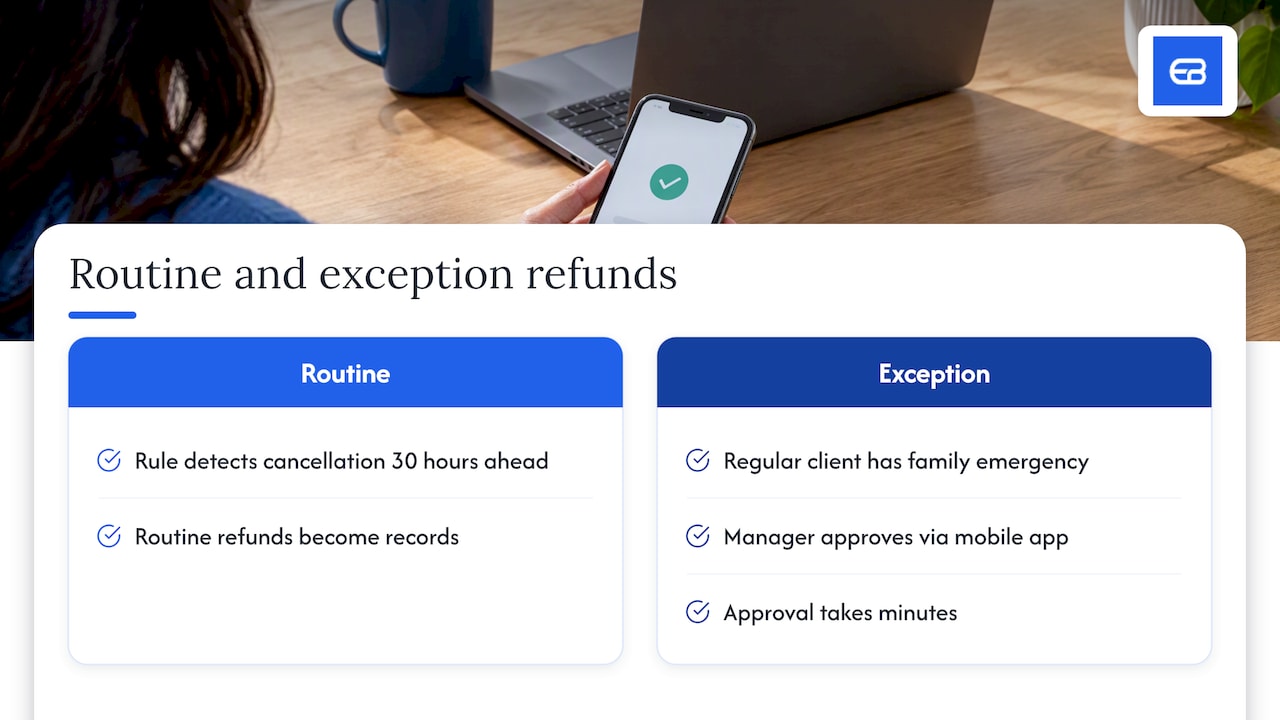
That is also why we do not think every refund should be automatic. A rule can tell you a client cancelled 30 hours ahead. It cannot tell you that the client is a regular who had a family emergency. The best setups are strict on the routine and generous at the exception, with managers approving the exceptions from the mobile app in minutes.
We also think a smaller number of refunds is the real goal. Reminders, deposits and real-time availability keep clients from cancelling late, and a reachable booking channel, including a voice assistant, keeps people booking instead of walking away. Compared with manual scheduling, the savings come less from the refund step itself than from everything upstream of it.
— serge
Try it with your own refund rules
If you want to see these rules running against your real calendar, ExpressBook offers a free trial of up to 3 months, long enough to run a full shadow-mode test across a few busy weeks. You can set up deposits, reminders, accounting sync and the voice assistant, then decide with your own numbers. If you are still comparing tools, our guide to choosing appointment scheduling software lists the criteria that matter.
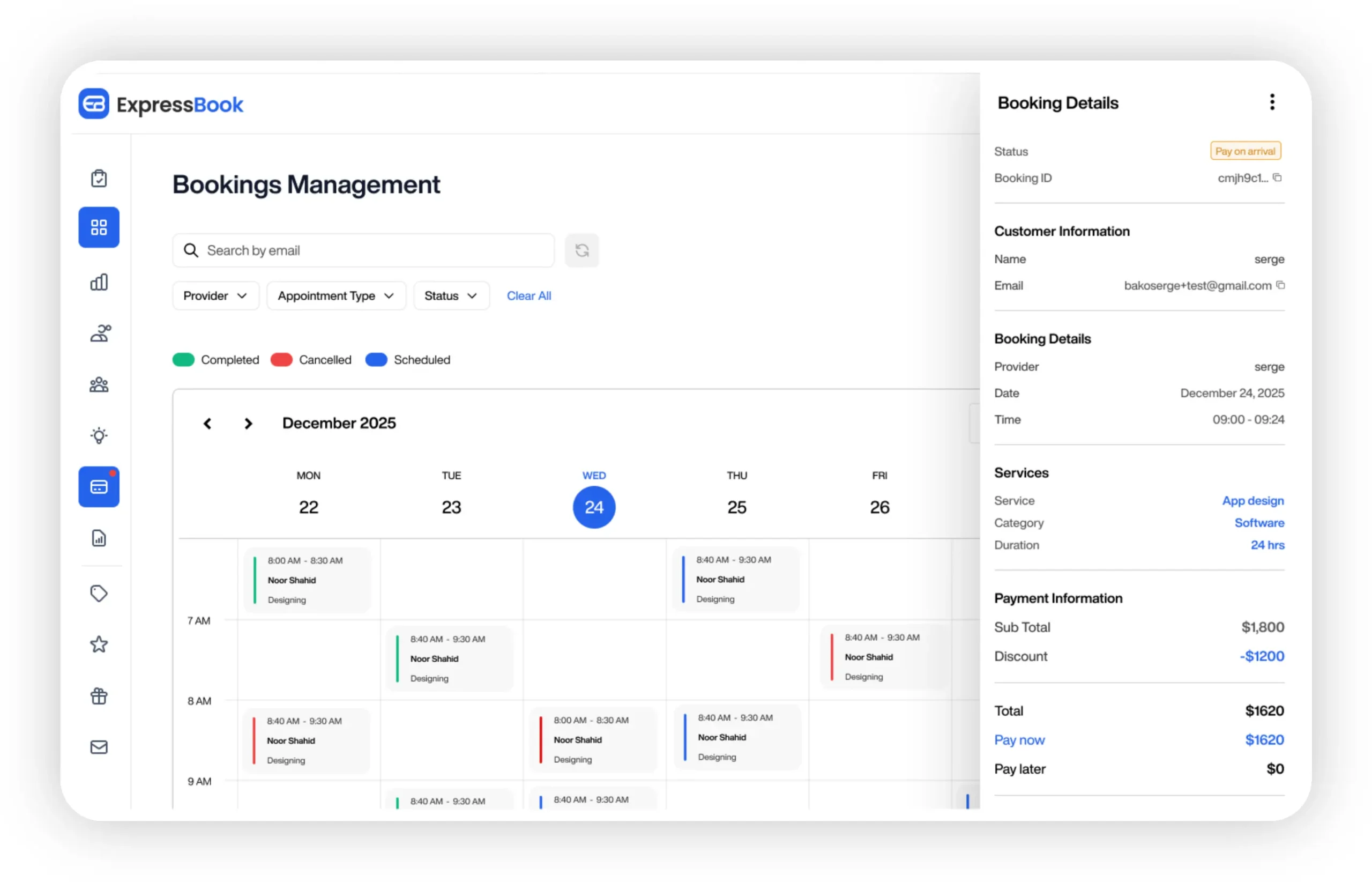
Start your free trial at ExpressBook and set your first refund rule today. Our terms and conditions explain how payments and refunds are handled on our platform.
FAQ
Can I refund only part of an appointment payment automatically?
Yes, if your booking and payment systems are connected. Define the percentage in your policy, such as 50% inside 24 hours, and let the system calculate it. Stripe’s guidance says an integrated platform can prompt partial refunds automatically. Review any partial refund that a client contests.
How long until the client sees the money?
Usually about 5 to 10 business days, depending on the client’s bank. Refunds issued soon after the charge may show as a reversal. Tell clients this in the refund confirmation so they do not write in after two days.
Do I get the processing fee back when I refund?
Often not. Stripe states that the original processing fees are not returned on refunds. Check your own processor’s terms, and consider offering credit or free rescheduling before a cash refund.
Is there a federal law that says I must refund appointment cancellations?
Not as a general rule. The FTC’s Cooling-Off Rule covers only certain qualifying sales, not ordinary appointments, so your written policy and state law do most of the work. Ask an attorney in your state if you are unsure.
Which refunds should never be automatic?
Disputed charges, chargebacks, high-value packages, quality or safety complaints and anything outside your written policy. Send these to a manager with the booking and payment history attached.
Sources
- Refund Automation: What AI Can Approve Safely
- Scale Salon Support Ticket Triage Workflows 2026
- Practical AI Automation for Refund Requests
- Cancellations, American Dental Association
- Booking system with payment: A guide for businesses, Stripe
- Business Income and the Tax Gap, IRS
- Refund and cancel payments, Stripe
- Buyer’s Remorse: The FTC’s Cooling-Off Rule, FTC
- FTC Federal Register notice on mail, internet or telephone orders
- How to secure customer data affordably for small businesses
- Create an application fee refund, Stripe API Reference
- The Balance Transaction object, Stripe API Reference
- Credit and debit card consumer protections, Philadelphia Fed