Calendly shares a link for picking a meeting time. ExpressBook talks to customers about your services, prices and staff, and books the appointment for them.
A voice front desk for service businesses: it knows your services, lengths, prices and who does what, and books the right slot.
Scheduling links for meetings, priced per seat, strongest for teams booking calls and demos.
Everything else is included on every account: booking page, calendar, staff, deposits, packages, reviews and reports.
What each one does for a service business.
| ExpressBook | Calendly | |
|---|---|---|
| Answers your customers for you | Yes: a voice assistant on your page, website widget and QR code | No voice booking assistant |
| How you pay | Prepaid credits, drawn down by the second of talk; no monthly fee | Per-seat subscription |
| Services with prices and lengths | Built around services, staff and what each one costs | Built around meeting types |
| Deposits and no-show fees | Reservation fees and full online payment, per service | Depends on event type |
| Staff calendars and shifts | Per-employee calendars, shifts and who-does-what | Team scheduling for meetings |
| Reminders | Email free; SMS and WhatsApp from the same credit balance | Email and text workflows |
| Packages and deals | Sell courses of visits and run promotions | Not a focus |
| Accounting | QuickBooks and Xero sync | No native accounting integration |
Calendly’s column reflects its features as of early 2026. Check their site for their latest features and pricing.
If what you book is meetings, calls and demos rather than services with prices and staff, Calendly is built for that. If you want your own customers answered and booked while you work, without a subscription, that is what ExpressBook is for.
Not a menu, not a form. A conversation that ends with a confirmed slot in your calendar and a deposit in your account.
Plain words, any accent, their language. “Thursday after work” is enough.
Who is working, who can do it, how long it takes, what is already booked.
Never a list of twelve. If a slot goes while they think, it offers the next one.
A reservation fee or full payment, by link, when the service needs one. No-shows stop costing you.
Email straight away, a reminder before the day. They can move or cancel by talking to it again.
No phone line to forward. People talk to it in the browser, wherever they found you.
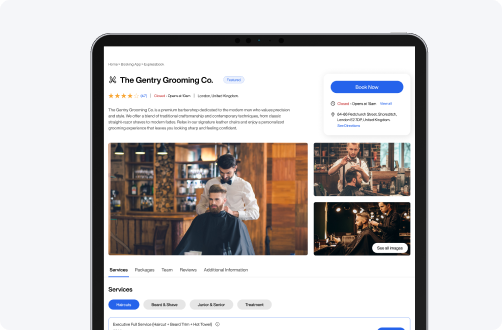
The booking page you already have, with the assistant on it. Put the link in your bio, your Google profile, your signature.
One line of script. A button in the corner of the site you already have, in your colours, that books without sending anyone away.
On the counter, the mirror, the window, the receipt. They scan, they talk, they leave booked — while you finish with the person in front of you.
Anyone can read out opening hours. These are the moments a front desk earns its keep.
Tell it which team members do which services and when they work. It only ever offers a time with someone who can actually do the job.
Put a reservation fee on a two-hour service and it is paid when they book, so a no-show does not cost you the afternoon.
“Can I move my Tuesday?” It finds the booking from their email and number, offers a new time and updates the calendar. Paid bookings go to you, never refunded by a bot.
You write the rules: “anything medical”, “complaints”, “groups over six”. It stops, takes their number, promises a call back inside your window, and puts it at the top of your Calls screen.
Emails, phone numbers and promo codes are easy to mishear. It puts a box on screen and lets the caller type them instead of spelling them out three times.
Answers in your language by default and switches when a caller asks. Confirmations go out in the language they booked in.
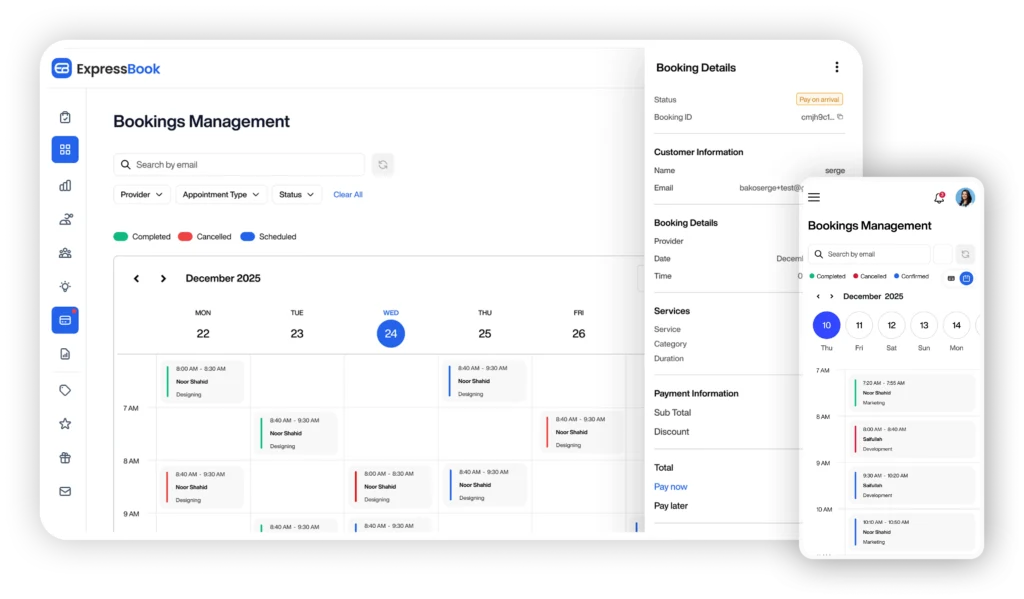
Three screens. No training, no scripts to write, no phone company to call.
Name, hours, where you are. It greets people as you.
What you offer, how long it takes, what it costs, who can do it. The assistant reads it live on every call.
Any amount, by card. The assistant is answering the moment the payment clears.
Nothing is metered except talk time and texts. Everything below is switched on from day one, at no extra charge.
You buy a balance. The assistant draws it down by the second it spends talking — never rounded up to the minute. A quiet month costs almost nothing.
Email confirmations and reminders are free. SMS and WhatsApp messages draw from the same balance. Everything else is included.
Something else? The assistant on our own page will answer it, or hand you to a person.
No. People talk to it in the browser: on your booking page, through the widget on your website, or by scanning your QR code. There is no phone number to forward and nothing to set up with a phone company.
You top up a prepaid balance by card. The assistant draws it down by the second while it talks; SMS and WhatsApp messages use the same balance. There is no monthly fee and nothing to cancel.
A minute before, the assistant wraps up the call it is on; then it stops answering until you top up. Your page, bookings and calendar keep working. Auto top-up can buy more when you run low.
It stops, asks them to type their number, promises a call back within the window you set, and puts the job at the top of your Calls screen with what they said.
It only offers times that are genuinely free for someone who can do the service, and a slot is held the moment the caller says yes. Every call is logged with its transcript, so you can see exactly what was said.