

Which cloud-based employee scheduling platforms are best for SMBs?
The best cloud-based employee scheduling software for small and medium businesses in 2026 are Expressbook, Deputy, Homebase, Planday, Connecteam, and Sling. Each platform replaces spreadsheets and manual texts with centralized scheduling systems that automate shift creation, push notifications, and payroll syncing. The right choice depends on your business type, team size, and the integrations you need most.
| Platform | Best For | Key Features | Starting Price | Free Trial | Mobile App |
|---|---|---|---|---|---|
| Expressbook | Service businesses (salons, gyms, healthcare) | AI analytics, voice agent, QuickBooks/Xero sync, branded booking pages | Prepaid credits, no monthly fee | No subscription | iOS, Android, admin app |
| Deputy | Retail, hospitality, multi-location | Auto-scheduling, compliance tools, POS integrations | ~$4.50/user/mo | Yes | iOS, Android |
| Homebase | Small teams, hourly workers | Time clock, payroll, hiring tools | Free plan available | Yes | iOS, Android |
| Planday | Shift-heavy industries (restaurants, healthcare) | Shift planning, labor cost control, HR tools | ~$2.99/user/mo | 30 days | iOS, Android |
| Connecteam | Deskless workforces, field teams | Task management, GPS clock-in, chat | Free for small teams | Yes | iOS, Android |
| Sling | Budget-conscious SMBs | Shift scheduling, time tracking, messaging | Free plan available | Yes | iOS, Android |
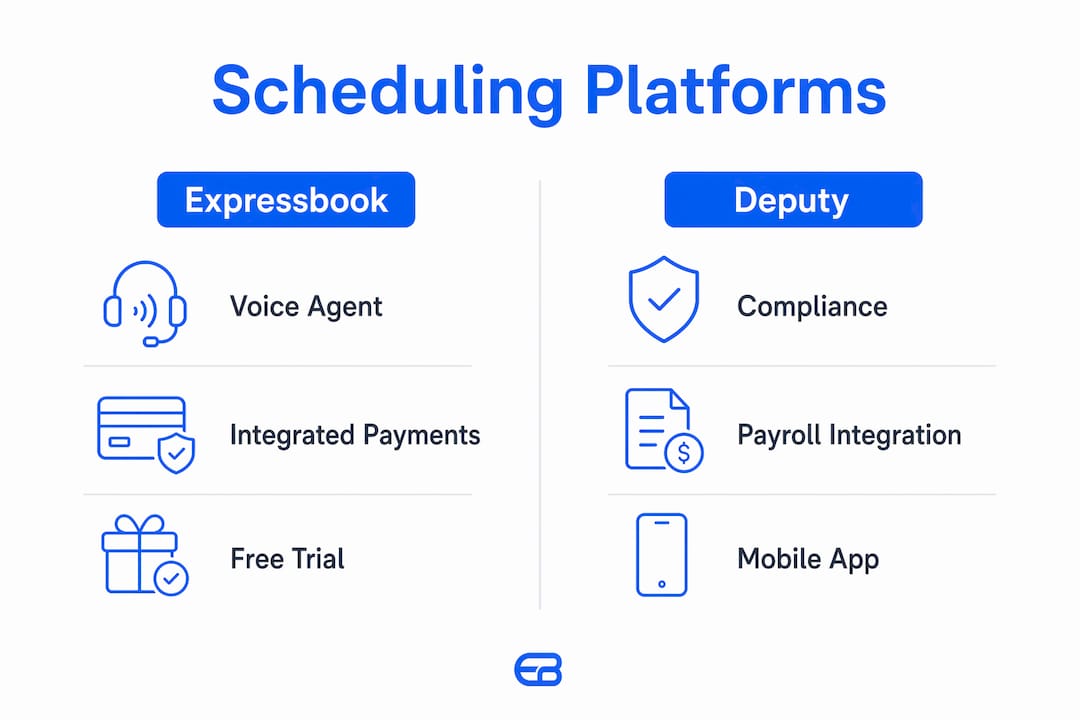
Expressbook stands apart in this group with its voice agent feature for visually impaired users and pricing with no subscription at all, which no other platform on this list offers. Its direct sync with QuickBooks and Xero also makes it a natural fit for service businesses already using those accounting platforms.

Table of Contents
- Detailed reviews of the top employee scheduling platforms
- How to choose the best cloud-based scheduling software for your SMB
- What benefits and features should you expect from scheduling software?
- Expressbook gives service businesses a scheduling advantage
- Key Takeaways
Detailed reviews of the top employee scheduling platforms
Expressbook
Expressbook is purpose-built for service businesses: salons, gyms, spas, healthcare providers, and any appointment-driven operation that needs scheduling, payments, and accounting to work together without manual data entry. The platform’s AI-powered analytics surface labor trends and booking patterns, giving managers a real picture of demand before they publish a schedule.
The dedicated mobile app covers both clients and admins, so your team can view shifts, manage bookings, and receive automated reminders from any device. The voice agent is a genuine differentiator: it lets visually impaired clients book appointments and get answers to business questions without any screen interaction, a feature no other platform on this list offers.
Standout capabilities:
- Real-time sync with QuickBooks and Xero, eliminating end-of-month reconciliation
- Branded booking pages with online payment and refund handling
- Google Calendar integration and automated client reminders
- AI-powered labor forecasting and reporting dashboard
- Voice agent for accessibility and client self-service
Pricing: No subscription. Prepaid credits drawn down by the second of talk time, with every feature included.
Integrations: QuickBooks, Xero, Google Calendar, payment processors.
Support: In-app support, onboarding assistance, and documentation.
Verdict: For service businesses that want scheduling, payments, and accounting in one place, Expressbook delivers a level of integration depth and accessibility that general workforce tools rarely match.
Deputy
Deputy is a strong choice for retail, hospitality, and multi-location businesses that need compliance-aware scheduling. Its auto-scheduling engine assigns shifts based on availability, qualifications, and labor law requirements, which is particularly valuable for businesses operating across multiple states with varying break and overtime rules.
Standout capabilities:
- Demand-based auto-scheduling
- Compliance alerts for overtime and break violations
- POS and payroll integrations (Xero, ADP, Gusto, Square)
- Shift swapping with manager approval workflows
Pricing: Approximately $4.50 per user per month for scheduling; higher tiers add HR and compliance features. Free trial available.
Pros:
- Strong compliance tooling for regulated industries
- Wide integration library
Cons:
- Per-user pricing scales up quickly for larger teams
- Interface can feel complex for first-time users
Deputy carries strong ratings on Capterra and G2, with users consistently praising its compliance features and payroll integrations.

Homebase
Homebase targets small teams with hourly workers, particularly in food service, retail, and local services. Its free plan is genuinely functional: one location, unlimited employees, basic scheduling, and a time clock. That makes it one of the few truly free options for a business just getting off spreadsheets.
Standout capabilities:
- Built-in time clock with GPS verification
- Hiring and onboarding tools
- Payroll processing (add-on)
- Team messaging and shift reminders
Pricing: Free plan for one location. Paid plans start at approximately $24.95 per location per month, not per user, which benefits larger teams.
Pros:
- Genuinely useful free tier
- Per-location pricing is cost-effective for bigger crews
Cons:
- Advanced features locked behind higher tiers
- Less suited for multi-location or appointment-based businesses
Homebase holds a solid reputation on Trustpilot for ease of use among small business owners.
Planday
Planday focuses on shift-heavy industries where labor cost control is the priority. Its scheduling interface shows real-time wage costs as you build the schedule, so managers can adjust before publishing rather than discovering budget overruns after the fact. That live cost visibility is one of the most practical features in this category.
Standout capabilities:
- Live labor cost display during schedule creation
- Shift trading and absence management
- HR document storage
- Payroll export integrations
Pricing: Starts at approximately $2.99 per user per month for the base plan. A 30-day free trial is available.
Pros:
- Real-time cost control during scheduling
- Clean, intuitive interface
Cons:
- Fewer integrations than Deputy
- Limited features for appointment-based businesses
Connecteam
Connecteam is built for deskless and field-based workforces: construction crews, delivery teams, cleaning services, and similar operations where employees rarely sit at a desk. Its GPS clock-in, task management, and in-app chat make it more of a complete operations platform than a pure scheduling tool.
Standout capabilities:
- GPS-verified clock-in and clock-out
- Task checklists and digital forms
- In-app team chat and announcements
- Training and onboarding modules
Pricing: Free for teams of up to 10 users. Paid plans start at approximately $29 per month for the first 30 users.
Pros:
- Exceptional value for small field teams
- Broad feature set beyond scheduling
Cons:
- Can feel like more than a small service business needs
- Reporting tools less developed than enterprise alternatives
Connecteam maintains a strong presence on Trustpilot, with users highlighting the mobile experience and ease of onboarding.
Sling
Sling keeps things simple. Its free plan covers shift scheduling, time-off requests, and team messaging for unlimited employees, making it the most accessible entry point in this comparison for budget-conscious managers. The paid tiers add time tracking, labor cost reports, and POS integrations.
Standout capabilities:
- Unlimited employee scheduling on the free plan
- Shift templates and recurring schedules
- Labor cost and overtime alerts
- Newsfeed and team communication tools
Pricing: Free plan available. Paid plans start at approximately $1.70 per user per month.
Pros:
- Most generous free tier for scheduling-only needs
- Simple, low learning curve
Cons:
- Payroll integrations require paid tiers
- Less suited for appointment-based or service-industry workflows
How to choose the best cloud-based scheduling software for your SMB
Picking the right platform comes down to matching the software’s strengths to your specific operational reality, not chasing the longest feature list. Here are the factors that matter most.
Mobile app quality and employee self-service
Your team will not adopt a scheduling tool they find hard to use on their phones. Self-service scheduling features like shift swapping, availability submission, and schedule viewing from a mobile app reduce manager bottlenecks and drive adoption. Look for apps with clean interfaces on both iOS and Android, not just a mobile-responsive website.
Pro Tip: Prioritize platforms with a dedicated admin app as well as an employee-facing app. Managing a schedule change from your phone at 7 AM is very different from logging into a browser.
Open shift management and automated scheduling
Open shifts and mobile claim features reduce the back-and-forth that consumes manager time. When an employee calls out, the ability to post that shift and let qualified staff claim it in minutes is worth more than most premium features. Automated scheduling that factors in availability, certifications, and labor rules adds another layer of efficiency.
Integration with payroll, accounting, and POS
Linking scheduling with payroll and accounting prevents the manual errors that compound at month-end. If you run QuickBooks or Xero, a platform with native sync eliminates duplicate data entry entirely. For retail and food service, POS integration gives you real-time labor cost as a percentage of sales, which is the number that actually drives staffing decisions.
Pricing model and total cost
Consider these factors when evaluating cost:
- Per-user vs. per-location pricing: Per-location pricing (like Homebase) benefits larger teams; per-user pricing (like Deputy) scales with headcount.
- Free plan limitations: Most free tiers cap locations, features, or integrations. Confirm what you actually need before assuming the free plan covers it.
- Trial length: A trial period longer than two weeks allows more time to test real workflows; Expressbook sidesteps the question with no subscription, only prepaid credits.
- Hidden costs: Payroll processing, advanced reporting, and API access are often add-ons.
Schedule predictability and advance notice
Publishing schedules well in advance reduces costly turnover by giving employees the predictability they need to plan their lives. Software that facilitates easy advance scheduling through templates, recurring shifts, and automated reminders pays for itself in reduced hiring costs. Replacing an hourly employee can be expensive when you account for recruiting, training, and lost productivity.
Ease of use and onboarding support
A platform that takes three weeks to configure will not get used. Evaluate the onboarding experience during your trial: how long does it take to build your first schedule? Is there live support, or only documentation? For SMBs without a dedicated IT team, the answer matters.
Scalability and customization
Your scheduling needs in 2026 may look different in 2028. Choose a platform that can grow with you, whether that means adding locations, integrating new payroll providers, or supporting a larger workforce. Platforms with open APIs and tiered enterprise plans give you room to expand without switching tools.
What benefits and features should you expect from scheduling software?
Cloud-based workforce management tools deliver value well beyond replacing a spreadsheet. The operational and financial benefits compound quickly once the software is embedded in your daily workflow.
Core benefits for SMBs
Time savings and reduced conflicts. Auto-scheduling engines that factor in availability, certifications, and labor rules can build a compliant schedule in minutes rather than hours. Conflicts caused by double-booking or overlooked time-off requests drop sharply.
Real-time labor cost visibility. Seeing wage costs update as you assign shifts, before the schedule goes live, is one of the most underused advantages of modern scheduling tools. It turns scheduling from a logistics task into a financial planning exercise.
Improved employee engagement and retention. Mobile-first scheduling tools improve employee retention in high-turnover sectors like retail and hospitality. When employees can view their schedules, swap shifts, and submit availability from their phones without chasing a manager, their sense of control over their work lives increases.
Compliance assistance. Automated alerts for overtime thresholds, required break periods, and predictive scheduling laws reduce the risk of costly violations, particularly for businesses operating in states with strict labor regulations.
Essential features to look for
- Drag-and-drop schedule builder with shift templates and recurring patterns
- Mobile app for both employees and managers, on iOS and Android
- Open shift posting with employee claim and manager approval workflows
- GPS clock-in and clock-out for field or multi-site teams
- Payroll and accounting integrations (QuickBooks, Xero, ADP, Gusto)
- Automated notifications for schedule publication, shift changes, and reminders
- Reporting and analytics for labor costs, hours worked, and attendance trends
- Time-off and availability management with approval workflows
Accessibility and advanced AI features
Most platforms in this category offer some form of AI-assisted scheduling, but the depth varies. Basic tools suggest shifts based on historical patterns. More advanced platforms, like Expressbook, use AI-powered analytics to forecast demand and surface booking trends, giving managers a data-driven basis for staffing decisions rather than gut instinct.
Expressbook also includes a voice agent that allows visually impaired users to book appointments and get answers to business questions without any screen interaction. For service businesses with a diverse client base, that accessibility layer is not a minor detail. It expands who can engage with your business independently.
For managers who want to coordinate across time zones or plan meetings around shift schedules, tools like TimeTamer can complement your scheduling platform by simplifying cross-timezone coordination without adding complexity to your core workflow.
Pro Tip: When evaluating AI scheduling features, ask vendors specifically whether the AI accounts for labor compliance rules in your state, not just historical availability. The difference between pattern-matching and compliance-aware automation is significant for businesses in California, New York, or Oregon.
Implementation time and onboarding
Most cloud-based scheduling platforms can be set up within a day for a small team. The real variable is data migration: importing employee profiles, historical schedules, and payroll codes. Platforms with guided onboarding and live support compress that timeline. Budget at least one full scheduling cycle, typically two weeks, to evaluate whether the tool actually fits your workflow before committing to an annual plan.
For a deeper look at how online scheduling improves operations beyond just shift management, the operational gains extend to client experience, staff accountability, and revenue visibility.
Security and data privacy
Cloud-based platforms store sensitive employee data: hours, wages, personal contact information, and sometimes banking details for payroll. Confirm that any platform you evaluate uses encrypted data transmission, role-based access controls, and complies with applicable data privacy regulations. Ask vendors directly about their data residency practices and breach notification policies before signing a contract.
Expressbook gives service businesses a scheduling advantage
Most workforce scheduling tools are built for shift-based industries: retail, restaurants, logistics. Expressbook is built for service businesses that need scheduling, client management, payments, and accounting to work as one system, not four separate tools bolted together.
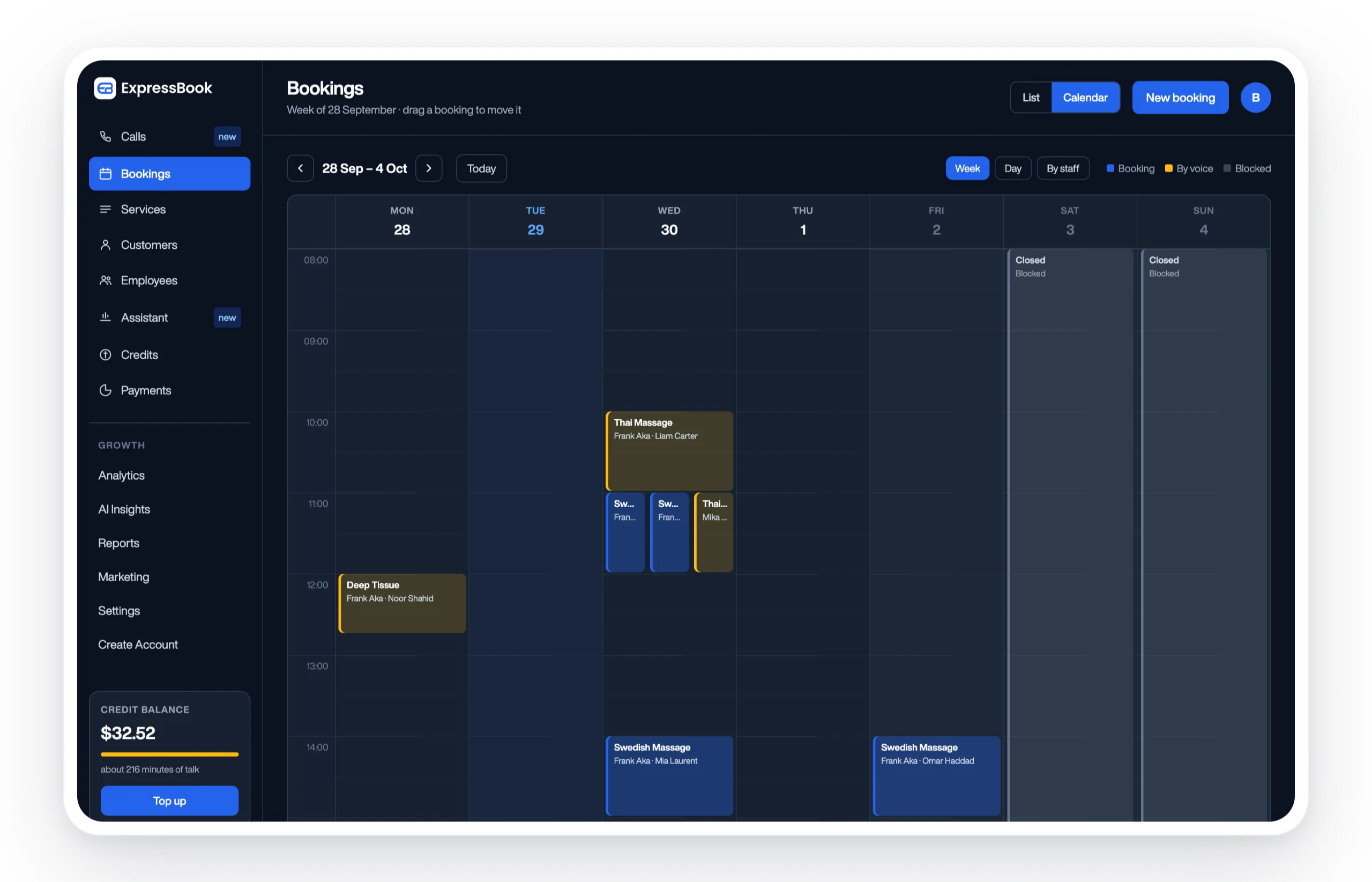
Where other platforms stop at shift assignment, Expressbook connects every booking to a payment record and syncs it automatically with QuickBooks or Xero. That means no manual reconciliation at month-end, no duplicate data entry, and no gap between what your schedule says and what your books show. The AI-powered analytics dashboard gives managers a clear view of demand patterns, so staffing decisions are grounded in data rather than habit.
The dedicated mobile app covers both clients and admins. The voice agent extends that access to visually impaired users, a feature that sets Expressbook apart from every other platform in this comparison. And with no subscription, a small credit top-up is enough to test it in real conditions before committing more.
If you manage a salon, gym, healthcare practice, or any appointment-driven business, set up Expressbook and see how much time you recover in the first month.
Key Takeaways
Cloud-based employee scheduling software delivers the most value when it combines mobile-first access, payroll integration, and automated scheduling in a single platform built for your industry.
| Point | Details |
|---|---|
| Mobile access drives adoption | Employees who can view and swap shifts from their phones are more likely to use the tool consistently. |
| Payroll integration reduces errors | Linking scheduling with QuickBooks or Xero eliminates manual data entry and month-end reconciliation. |
| Schedule predictability cuts turnover | Publishing schedules at least two weeks in advance improves employee retention and reduces costly turnover, with replacement expenses reaching up to $20,000 per hire. |
| Trial length matters | Expressbook has no subscription: prepaid credits are drawn down only while the assistant talks to customers. |
| Expressbook for service businesses | Expressbook combines scheduling, payments, AI analytics, and a voice agent in one platform built for appointment-driven SMBs. |