Automating appointment scheduling, reminders, and payments without inflated costs or add-on tools frustrates small business teams. Most scheduling software limits free trials, charges extra for reminders and branding, or complicates accounting sync with outside integrations. This comparison details price, reminders, payment options, and integrations across five scheduling alternatives so small business teams can pick the platform that matches how they work.
Table of Contents
ExpressBook
At a Glance
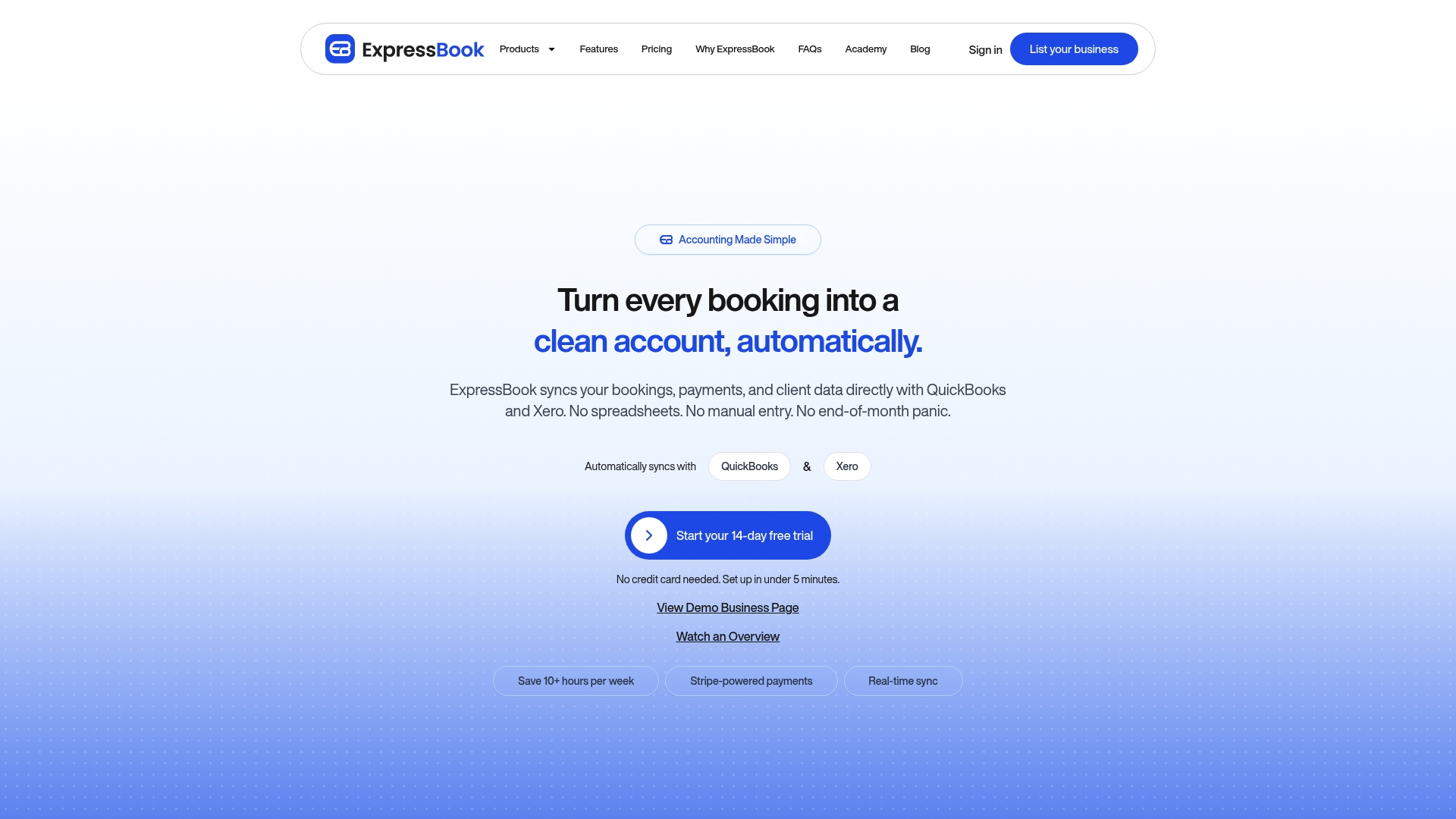
The vendor advertises it can save users over 10 hours a week by cutting manual admin and reconciliation. That claim targets businesses that spend hours each week on bookings, payments, and bookkeeping. ExpressBook also includes mobile app access and a voice agent for booking and accessibility.
Core Features
ExpressBook centralizes real-time availability management, automated calendar blocking, and employee schedule management while syncing calendars. It handles online payments and pay-on-arrival options, custom cancellation policies, confirmations, receipts, and refund handling. The platform bundles customer engagement tools, loyalty features, reports and analytics, and AI-powered insights for pricing and growth.
Key Differentiator
ExpressBook combines industry-specific templates for salons, gyms, clinics, and pet groomers with AI pricing and growth suggestions, plus accounting sync and calendar links that scale from solo practitioners to large enterprises. The combination of vertical templates and predictive pricing guidance reduces setup time for a specific business type. Integrations with accounting and calendar tools keep bookings and payments reconciled with bookkeepers and managers.
Pros
The platform groups booking, payments, staff scheduling, and client notes in one place, which reduces context switching for staff. Automated reminders by email and SMS lower no-shows while branded business pages keep the client experience consistent. Integrations with accounting and calendar tools simplify bookkeeping and day-to-day operations. Mobile app access and a built-in voice agent improve accessibility for customers and administrators. The vendor advertises free trial periods and clear starter pricing, which helps shops test workflows before committing.
Cons
- Can be complex for non-tech-savvy users and requires a learning curve for full customization.
Notable Integrations
- QuickBooks: sync bookings, payments, and client records with accounting workflows.
- Google Calendar: two-way calendar syncing for staff and resource schedules.
- Apple Calendar: simple consumer-facing calendar compatibility for appointments.
- Xero: the vendor advertises accounting sync with Xero for reconciliation.
Who It’s For
Service providers such as salons, spas, clinics, pet groomers, and wellness centers that need an all-in-one appointment and client management system. Practices that want accounting sync and calendar integration will find bookkeeping workflows easier. The platform scales for solo practitioners through multi-location operations and enterprise teams.
Unique Value Proposition
Automatic accounting sync with major bookkeeping tools plus industry-specific setup is the clearest productivity lever. That mix lets a small business consolidate appointment intake and payment flows while keeping books aligned. For managers, it reduces the hours spent reconciling transactions and chasing client data across systems.
Real World Use Case
A busy spa uses ExpressBook to publish staff schedules, accept deposits, and send automated reminders by SMS and email. Front-desk staff spend less time on phone bookings, and the accounting team receives cleaner payment records. That workflow frees managers to focus on client experience and staff planning.
Pricing
The vendor advertises up to a 3-month free trial for new customers to test the product. After trial, plans start at $9/month for individual practitioners and $45/month for small business plans. Large enterprises receive custom pricing through sales.
Website: https://expressbook.com
Acuity Scheduling
At a Glance
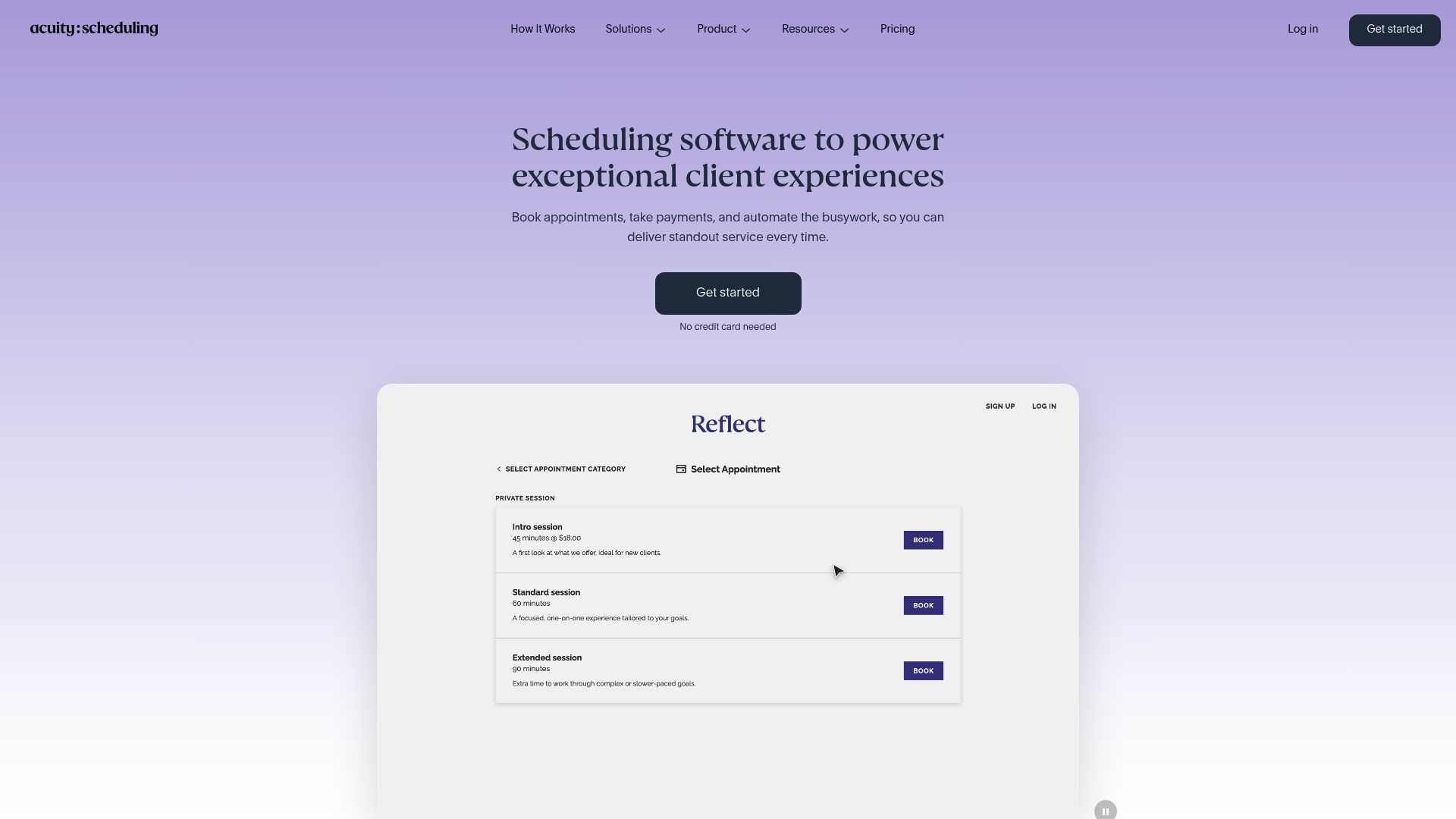
Starting at $16/month for the basic plan with a seven-day free trial, Acuity Scheduling offers branded booking pages and automated reminders that reduce no-shows. The vendor advertises HIPAA compliance for health-related services, which can matter for clinics and therapists. Acuity is part of Squarespace, so booking flows and site branding align closely with that ecosystem.
Core Features
Acuity supports online booking, client self scheduling, class management, and resource assignments while syncing calendars and availability. It handles payments through Stripe, Square, and PayPal, and it sends automated email and SMS reminders plus follow-ups. Developers get API access and CSS customization, and the mobile app lets owners manage bookings on the go.
Key Differentiator
Acuity’s strongest angle is its combination of scheduling customization and automation tools that target no-shows and payment collection. The platform lets you require deposits, build custom intake forms, and automate reminder sequences for different appointment types. That flexibility helps businesses match booking logic to real world staff and room constraints.
Pros
Acuity excels at flexible appointment types and layered automation. Businesses can require deposits, sell memberships, and issue gift certificates while automating reminders to reduce missed appointments. The scheduling site builder makes it straightforward to match brand colors and messaging to external websites and booking pages. Integrations with video conferencing and payment processors reduce manual steps for virtual classes and paid sessions. Support resources include tutorials and webinars that help teams adopt advanced features.
Cons
- Higher tier plans and enterprise pricing can be expensive for growing teams.
- The mobile app can be glitchy and may require frequent re logins.
- Advanced customization and API usage have a steep learning curve.
- Native waitlist features are limited, which can frustrate very busy schedules.
When It May Not Fit
Acuity may not suit businesses watching tight budgets, since premium features appear on higher priced tiers. Teams that rely solely on a mobile workflow may find the app unstable. Organizations that need robust native waitlist logic or extremely simple set up might prefer a lighter alternative. Larger enterprises should compare enterprise SLA and onboarding terms before committing.
Notable Integrations
Acuity connects to common scheduling and commerce tools including Zoom, Google Calendar, Mailchimp, and Zapier. It also links directly to Stripe, PayPal, and Square for payments and supports Google Meet for video appointments. These connectors cover most virtual class and payment workflows used by service providers.
Who It’s For
Small and mid sized service businesses, solo practitioners, and multi location teams that need branded booking, payment collection, and automation will find Acuity useful. It fits fitness instructors, salons, consultants, and clinics that require intake forms and different appointment rules per staff member. Organizations seeking API access and custom styling will benefit from its developer options.
Real World Use Case
A yoga studio sells memberships and drop in classes through Acuity, syncs schedules with Zoom for virtual sessions, and uses automated reminders to cut no-shows. The studio also issues gift certificates and manages instructor availability across two locations. That setup reduces manual booking work and keeps class rosters accurate.
Pricing
Plans start at $16/month for the basic tier and include a seven day free trial. Higher plans add more calendars, advanced automation, and extra integrations. Detailed tier breakdowns and enterprise options are available on the vendor site.
Website: https://acuityscheduling.com
Appointlet
At a Glance
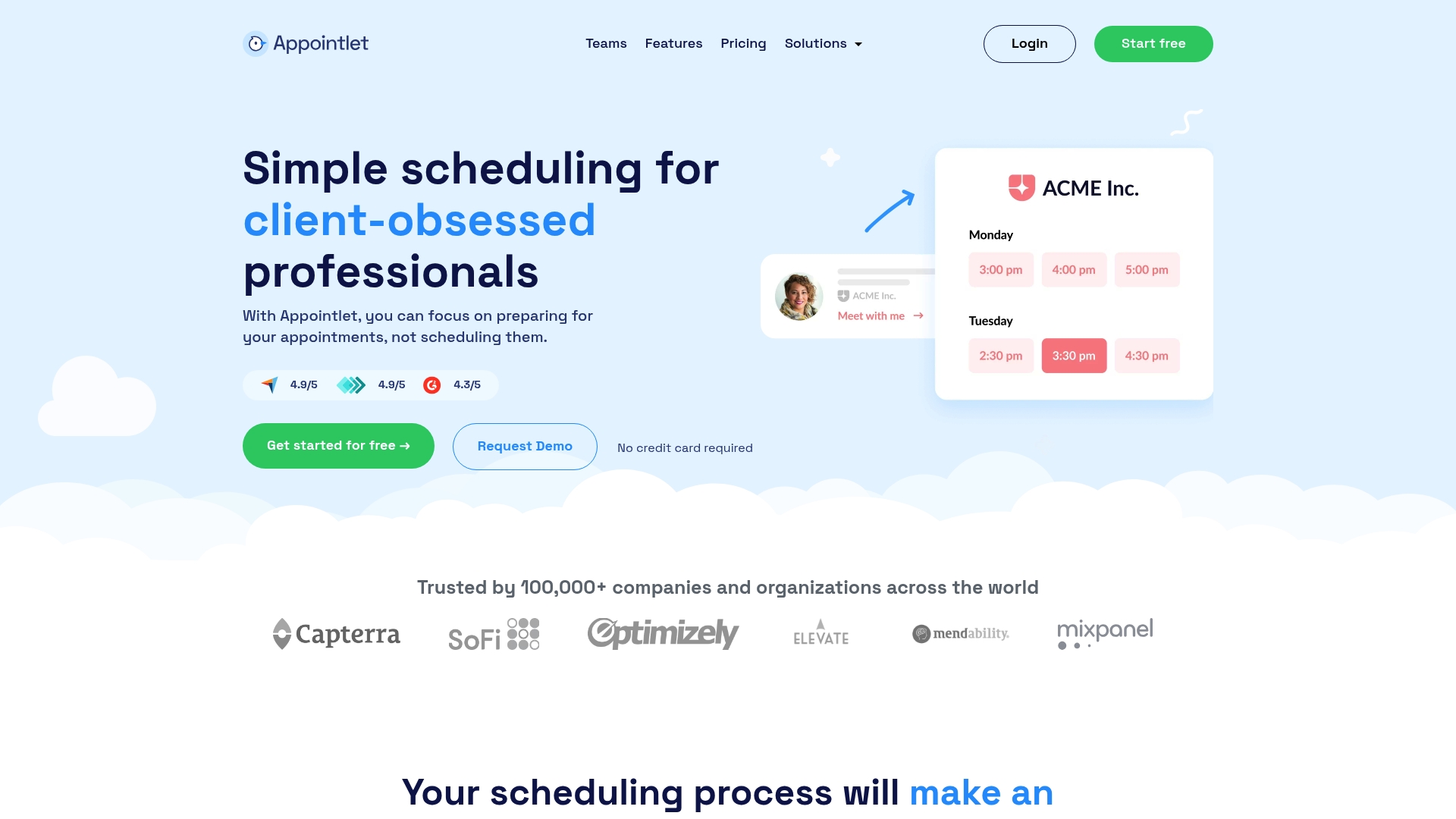
Appointlet reports serving over 100,000 companies globally. The platform pairs a no cost tier that supports unlimited meetings, members, and calendars with simple multi calendar syncing. Small teams that need basic booking, payment collection, and video meeting links will find the setup fast and low friction.
Core Features
Appointlet syncs with Google Calendar and Office 365 and can embed booking forms on your site or share direct links. It creates meeting links for Zoom, Google Meet, and Microsoft Teams while accepting payments through Stripe and Paypal. The product also offers customizable booking pages, team availability control, and automated notifications on paid plans.
Key Differentiator
The most visible advantage is the free plan that supports unlimited meetings, members, and calendars. That model makes it practical for businesses that manage multiple staff calendars without adding seats or per meeting costs. Easy multi calendar connectivity reduces the administrative juggling that causes double bookings when staff use different calendar systems.
Pros
Appointlet makes calendar syncing straightforward and supports both Google and Office ecosystems with minimal setup. The free tier removes common entry barriers for small operations by allowing unlimited meetings and team members. Custom branding for booking pages and built in payment options via Stripe and Paypal let businesses accept deposits before appointments. Customer support and onboarding resources are available to guide configuration and embedding.
Cons
-
Reminder emails and SMS require paid plans, so the free tier lacks automated follow ups.
-
Some users report occasional booking errors and interface quirks that disrupt the booking flow.
-
Advanced automations such as automatic rescheduling or complex workflows are limited on the free plan.
-
Account deletion can be cumbersome for businesses that need quick offboarding.
When It May Not Fit
If you rely on automated reminders without a subscription, this product will not meet that need. Teams that need advanced workflow automations or complex booking rules may feel constrained. Organizations that require enterprise grade booking reliability and advanced audit controls should evaluate other platforms.
Notable Integrations
Appointlet connects natively to core calendar and meeting tools and to common payment and automation services.
- Google Calendar
- Office 365
- Zoom
- Google Meet
- Microsoft Teams
- Stripe
- Paypal
- Zapier CRM, marketing, and SMS services
Who It’s For
Small and medium sized businesses, solo professionals, and small teams that want affordable online booking will get the most value. It fits firms that already use Google or Office 365 calendars and need to add booking pages quickly. Practices that accept upfront payments and run a mix of virtual and in person appointments will benefit from the payment integrations.
Real World Use Case
A health clinic uses Appointlet to publish booking links for telehealth and in person visits. Staff calendars in Google Calendar stay synchronized, and Zoom links attach automatically to confirmed slots. The clinic collects copayments ahead of appointments using Stripe to reduce no shows and speed check in.
Website: https://appointlet.com
FieldVibe
At a Glance
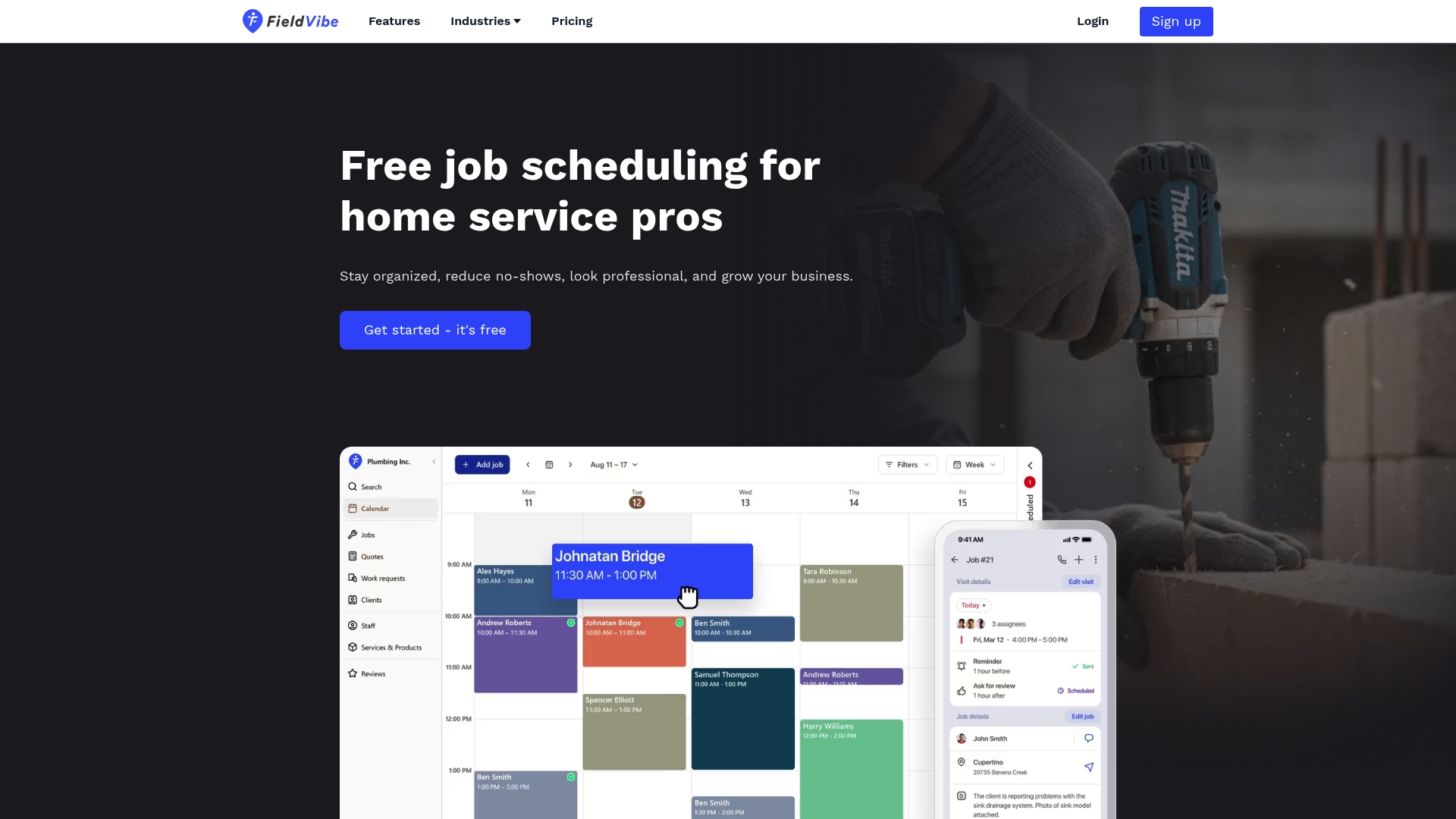
Free for solo entrepreneurs with an included free business website and instant setup. The app focuses on home service trades such as HVAC, plumbing, electrical, lawn care, and pest control. Mobile and desktop access plus Google Calendar sync make field scheduling practical for single technicians.
Core Features
Fast job scheduling supports recurring visits, detailed job and visit status tracking, and client history management. It also includes automated text reminders, staff permissions, quote creation, review collection, offline access, and Google Calendar integration.
Key Differentiator
The standout is the vendor claim of being free for solo business owners while offering instant setup and an included website. That design narrows the product toward technicians who need minimal onboarding and clear, trade specific workflows. The focus suits single operators who want a quick launch and basic digital marketing tools.
Pros
The free solo tier and modest team pricing reduce the barrier to trying the product. Users gain quick control of daily jobs with recurring scheduling, client profiles, and automatic text reminders that cut no shows. Offline access, quote templates, and a built in website help small businesses appear professional and win more calls.
Cons
-
Limited integrations beyond Google Calendar restrict automatic workflows with CRM or accounting tools.
-
Advanced automation and deeper reporting are gated behind paid plans, reducing value for power users.
-
The product focus on small teams means it lacks features needed by larger operations or enterprise customers.
When It May Not Fit
Not a match for businesses that need many third party integrations or complex automation across back office systems. Large contractors with more than a handful of technicians will find permissions and reporting limited. If your team relies on advanced analytics or an open API the platform may not fit.
Notable Integrations
FieldVibe connects directly with common calendar workflows and offers a single official sync.
- Google Calendar
Who It’s For
Solo home service professionals and small trade businesses will find the features match daily needs. Ideal users include plumbers, electricians, HVAC technicians, cleaners, and lawn care providers who want quick setup. Teams of more than ten people should evaluate enterprise focused alternatives first.
Real World Use Case
A plumber schedules emergency calls, sets recurring inspections, and sends quotes from the mobile app. Automated text reminders cut no shows and the client history keeps past repairs visible during dispatch. The plumber can work offline and sync with Google Calendar when back online.
Pricing
FieldVibe has a free tier for solo entrepreneurs. Paid plans start with Solo Pro at USD 20 per month and Crews at USD 50 per month.
Website: https://fieldvibe.com
Zenbooker
At a Glance
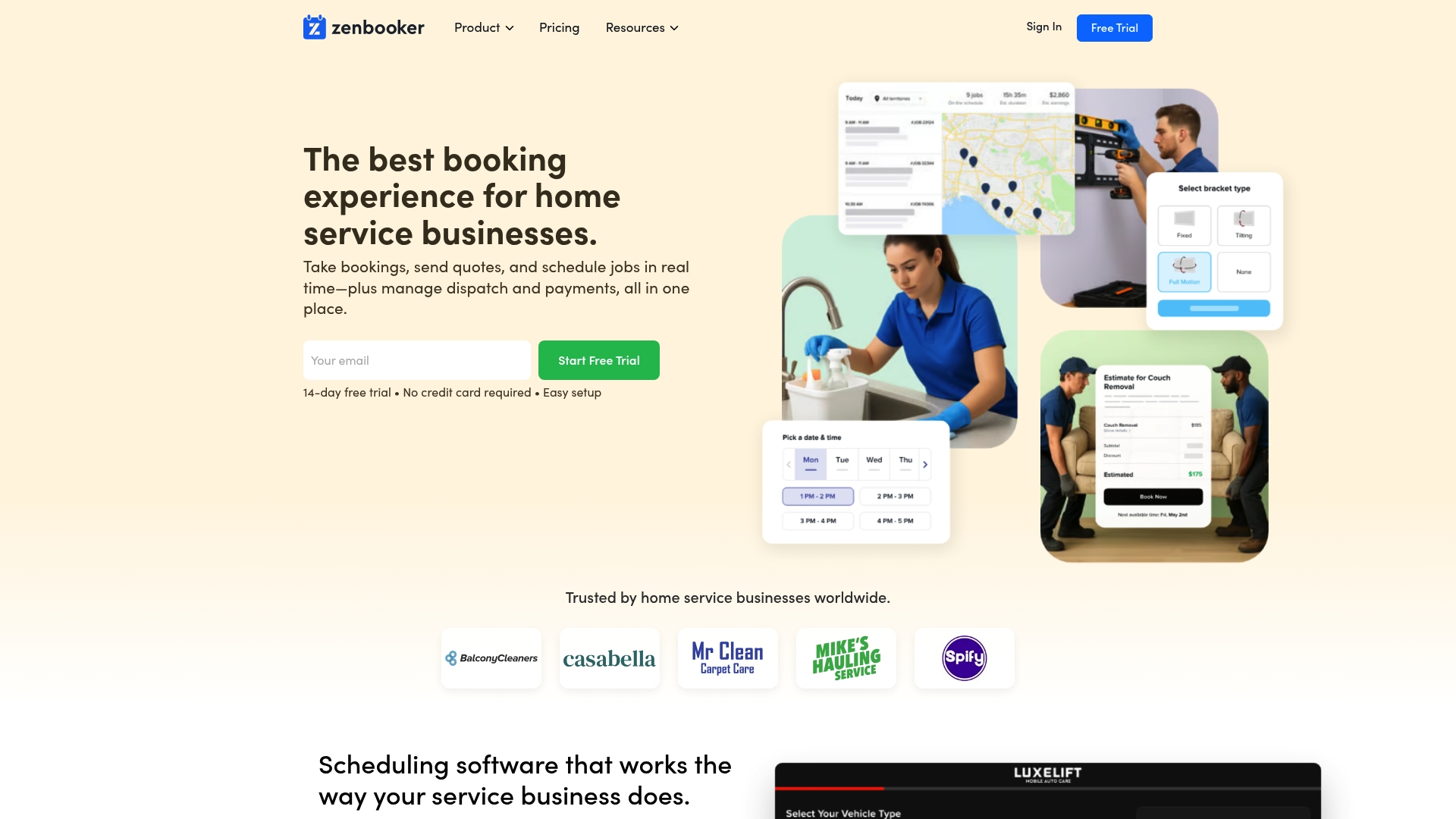
All plans include unlimited staff accounts at no extra cost, a detail that matters for field teams. Zenbooker targets home service companies such as cleaning, HVAC, and appliance repair. The vendor advertises a free trial for 14 days and tiered plans aimed at single locations through franchise networks.
Core Features
Zenbooker supports online booking, service requests, and bookable estimates that customers can accept in a single flow. It also provides a branded booking website you can embed, plus invoicing and payment links delivered by email or SMS. Territory management, CRM records, and automation for appointment reminders and follow ups tie scheduling to customer communication.
Key Differentiator
The product focuses on home service providers with features and templates built around inperson visits, service estimates, and territory routing. That vertical focus makes its customization and multi location support more specific than general booking tools aimed at salons, gyms, or clinics. The emphasis on branded booking sites and bookable estimates targets businesses that sell on price and repeat service.
Pros
Zenbooker bundles scheduling, quoting, payments, and a CRM into one product, which reduces switching between separate tools. Unlimited staff accounts in every plan remove per seat billing and simplify growth for field teams. Multiple location and territory support suits franchises and regional operators, while branded invoices and SMS payment links help reduce unpaid bills.
Cons
- Public user reviews and comparative feedback are limited, so independent user experience is not well documented.
- The product lists no notable third party integrations on its public feature list, which can complicate connecting to existing accounting or marketing tools.
- Documentation of advanced admin controls and API access is not clearly presented on the vendor site.
When It May Not Fit
Who It’s For
Small to large home service providers that run inperson service visits, need quoting plus invoicing, and operate across multiple neighborhoods or locations. That includes cleaning services, pest control, mobile auto detailers, and handyman companies that want branded online booking plus automatic reminders. Companies that bill by seat may find the unlimited staff model attractive.
Real World Use Case
A residential cleaning company uses Zenbooker to publish a branded booking page, accept bookable estimates, and send automated reminders by SMS. Staff schedules appear by territory so crews start and finish in nearby jobs. That setup reduces time spent on phone scheduling and lets managers track unpaid invoices with emailed payment links.
Pricing
The vendor advertises a free trial for 14 days. Paid plans start at $29/month for small businesses, rise to $79/month for multiple location teams, and reach $149/month for large franchise setups. All tiers claim unlimited bookings and staff accounts included.
Website: https://zenbooker.com
Comparison of alternatives
ExpressBook excels with its industry-specific workflow and integration capabilities, offering customization for diverse service sectors. Competitors like Appointlet and FieldVibe exhibit strengths in cost efficiency and user-focused design, providing accessible alternatives for specific business profiles.
Cost Efficiency Considerations
Appointlet distinguishes itself with its no-cost tier supporting unlimited meetings, team members, and calendars. This feature uniquely appeals to cost-conscious businesses, offering entry-level functionality without the financial commitment required by other platforms. Business owners seeking minimal initial operating costs may find Appointlet an advantageous option over paid solutions like ExpressBook.
Industry Focus and Template Customization
FieldVibe targets field service professionals, offering tools such as quote creation and offline access, tailored for trades like HVAC and plumbing. Unlike generalized scheduling tools, FieldVibe’s ability to streamline on-site job management and customer history tracking give it a competitive edge for service-based businesses requiring mobile platform proficiency.
Best fit
- Businesses managing complex multi-service teams can benefit from ExpressBook for its AI-driven insights into growth and tailored templates.
- Solo professionals seeking affordable scheduling will find Appointlet’s free plan with unlimited usage appealing.
- Field service businesses needing specific tools like offline access and quote creation should consider FieldVibe.
- Organizations requiring multi-location support and unlimited staff capabilities may explore Zenbooker.
- Teams prioritizing integrated payment functionality would gain flexibility from Acuity Scheduling.
Our pick
ExpressBook remains the scheduling solution for service providers seeking scalability and advanced analytics. Its integrated voice assistant, mobile compatibility, and industry-focused templates make it distinctively suitable for professional operations. Yet, businesses focused solely on cost-effectiveness or offering trade-based field services might prefer alternatives like Appointlet or FieldVibe due to their specifically tailored capabilities.
Choosing the right scheduling software depends on features, pricing, and ease of integration. Here’s a comparison of five notable platforms:
| Product | Key Features | Best For | Pricing | Limitation |
|---|---|---|---|---|
| Expressbook | Centralized booking, AI insights, mobile app, voice agent | Salons, clinics, wellness centers | $9/month, $45/month SMB | Learning curve for full customization |
| Acuity Scheduling | Automated reminders, branded pages, HIPAA compliance, API access | Small to mid-sized service businesses | $16/month | Limited waitlist features in native application |
| Appointlet | Unlimited meetings, team availability, Stripe/Paypal integrations | SMEs needing quick calendar sync | Free, paid plans available | Free tier lacks automated email/SMS reminders |
| FieldVibe | Job scheduling, offline access, client history, text reminders | Solo trades professionals | Free, $20/month SoloPro | Limited 3rd-party integration options |
| Zenbooker | Quoting, payment links, multi-location features | Home service providers | $29/month to $149/month | Limited documentation on API and integrations |
Challenges in Choosing Scheduling Software for Small Business
While selecting scheduling software, many service providers face issues like manual reconciliations, booking conflicts, and administrative overload. The article highlights how these pain points slow down operations for salons, clinics, and wellness centers. Users seek solutions that cut manual work, integrate with accounting systems, and reduce no-shows.
Expressbook addresses these challenges with real-time availability management and automatic sync of bookings, payments, and client data to QuickBooks and Xero. It offers a voice agent for accessibility and a dedicated mobile app, supporting businesses from solo practitioners to enterprises. You can save over 10 hours weekly by consolidating scheduling, payments, and client management in one platform.
Boost your efficiency with a platform designed for your service type. Learn more in our Booking & Scheduling Software Archives or get details about managing wellness and spa appointments in the Spa and Wellness Archives.
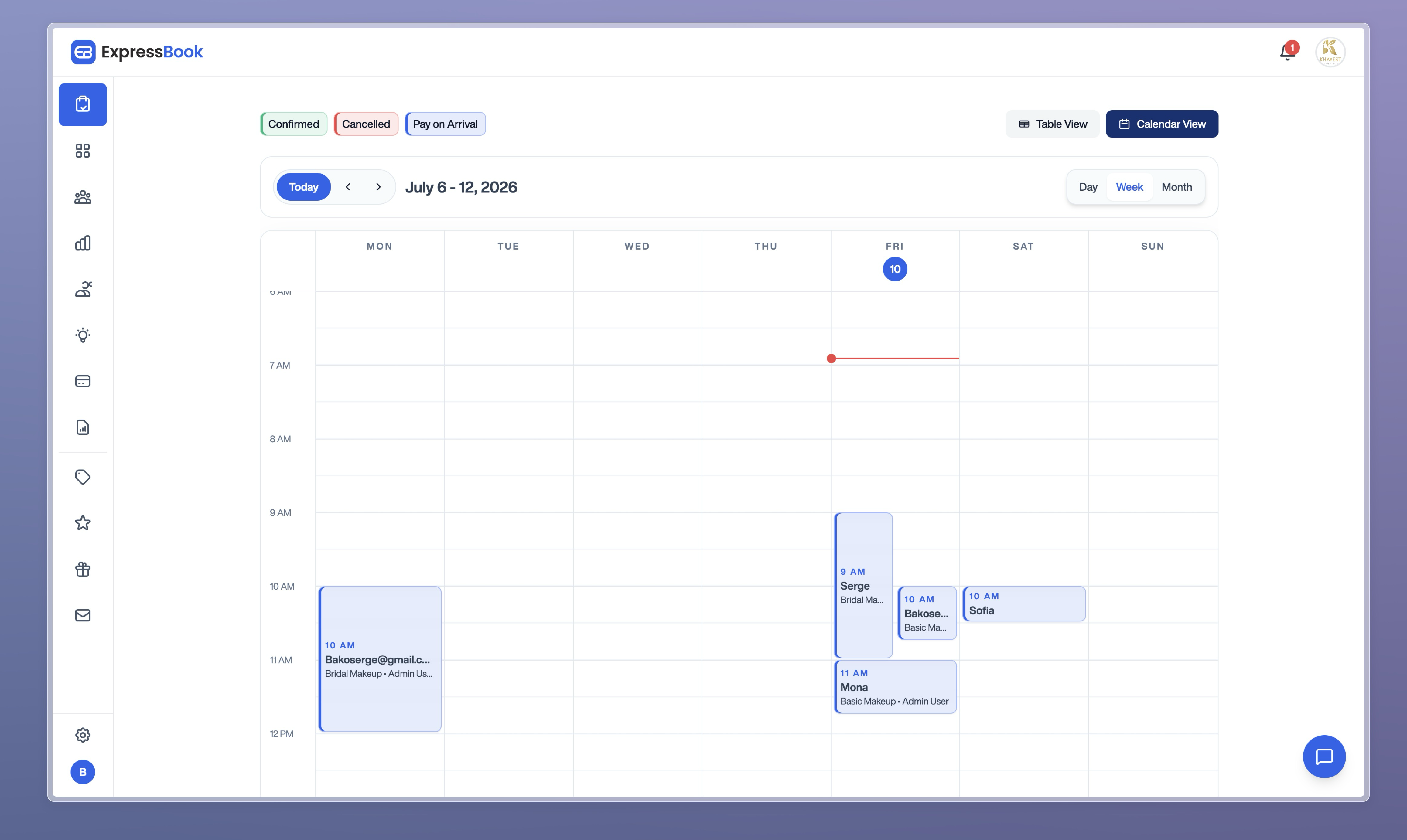
See how Expressbook can power up your bookings without extra effort. Visit https://expressbook.com and start your free trial today to connect your scheduling and accounting workflows with AI-powered insights.
FAQ
How does ExpressBook support no-show reduction for small businesses?
ExpressBook employs automated reminders via email and SMS to lower no-shows. This feature enhances client engagement and keeps appointment schedules intact, providing a structured reminder system that benefits users. Small business owners can expect improved attendance rates with these effective reminders.
What is the difference between Acuity Scheduling and ExpressBook?
Acuity Scheduling offers extensive customization and advanced automation tools that specifically help manage no-shows and payment collection. ExpressBook excels in providing industry-specific templates for various service sectors, streamlining appointment systems from solo practitioners to large enterprises. Each platform addresses distinct business needs in the scheduling landscape.
Can I use ExpressBook if I want a voice agent for accessibility?
Yes, ExpressBook includes a voice agent that enables visually impaired clients to book appointments easily. This feature enhances the user experience for those with accessibility needs and ensures inclusivity. Businesses prioritizing accessibility should consider ExpressBook as an effective solution.
Does ExpressBook offer a free trial for new users?
ExpressBook provides up to three months of free trial for new customers, allowing them to test the software before subscribing. This offers businesses the opportunity to explore features and workflows without financial commitment. New users can effectively assess their fit with the platform during the trial period.
How does ExpressBook handle integration with accounting tools?
ExpressBook integrates with popular accounting software like QuickBooks and Xero, effectively syncing bookings and payments. This feature simplifies bookkeeping for service providers, making financial management easier. Users can expect streamlined operations and improved accuracy in reconciling transactions.