

For U.S. service businesses that need payments, staff scheduling, and accounting sync in one place, Expressbook is the recommended pick. If Expressbook doesn’t fit your situation, three other categories are worth evaluating:
- Standalone automation platforms — strong rules engines, easy setup, but advanced workflows often sit behind paid tiers
- Calendar-native booking pages — best for solo professionals who live in Google Calendar or Outlook and need simple, low-cost booking
- Merchant/ops ecosystems — built around POS and payments first, with appointment scheduling as a secondary feature
Expressbook has no subscription: you buy prepaid credits and pay only for the time its assistant spends talking to your clients. The platform includes a dedicated mobile app for both clients and admins, plus a voice agent that lets visually impaired clients book appointments and get answers to business questions — a meaningful accessibility advantage most scheduling tools skip entirely.
Table of Contents
- Which online scheduling software wins on features and price?
- What does each scheduling option actually deliver?
- How do you choose the right scheduling platform?
- How to get your booking page live this afternoon
- Why Expressbook fits U.S. service businesses
- Key Takeaways
- The features that actually reduce friction day to day
- Test everything on a small credit top-up
- Useful sources and further reading
Which online scheduling software wins on features and price?
The table below compares Expressbook against the three main competitor categories on the dimensions that matter most for service businesses.

| Dimension | Expressbook ⭐ | Standalone automation platforms | Calendar-native booking pages | Merchant/ops ecosystems |
|---|---|---|---|---|
| Best for | Service SMBs needing payments + accounting sync | Freelancers and teams automating meeting workflows | Solo pros already in Google/Outlook | Retail/hospitality with POS needs |
| Starting price / free plan | Prepaid credits, no monthly fee | Free tier available; advanced rules on paid plans | Free with Workspace; paid tiers unlock payments | Free entry tier; paid per location or per transaction |
| Payments & deposits | Built-in payments, deposit rules, refund handling | Limited or via third-party add-ons | Stripe on paid tiers only | Strong POS + payment processing |
| Calendar sync (Google/Outlook) | Google Calendar integration + real-time availability | Google and Outlook sync | Native Google Calendar; Outlook via Microsoft | Varies; often Google only |
| Staff & resource scheduling | Full staff and resource rules | Basic staff routing | Limited team rules | Moderate; location-based |
| Integrations (QuickBooks / Xero / Zapier) | QuickBooks and Xero sync built in | Zapier-dependent; no native accounting sync | No native accounting sync | Partial; varies by plan |
| Mobile app | Dedicated app for users and admins | Admin app on paid plans | Mobile browser; limited native app | Yes, merchant-focused |
| Custom branding / booking page | Branded booking pages included | Available on mid/upper tiers | Limited customization | Basic branding |
| Multi-location / enterprise | Supported | Limited | Not designed for it | Strong multi-location support |
| Support & security (PCI, backups) | PCI-compliant payments; transparent pricing | Varies by vendor | Google infrastructure; PCI via Stripe | PCI-compliant; enterprise support |
Pricing shapes by category: Expressbook has no subscription: prepaid credits drawn down by the second of talk time. Standalone automation platforms typically offer a free individual tier with per-user pricing on team plans. Calendar-native tools gate premium features like multiple booking pages and Stripe payments behind paid Workspace tiers (Business Standard and above). Merchant/ops ecosystems often charge per location or take a percentage of transactions, which adds up quickly for multi-site businesses.
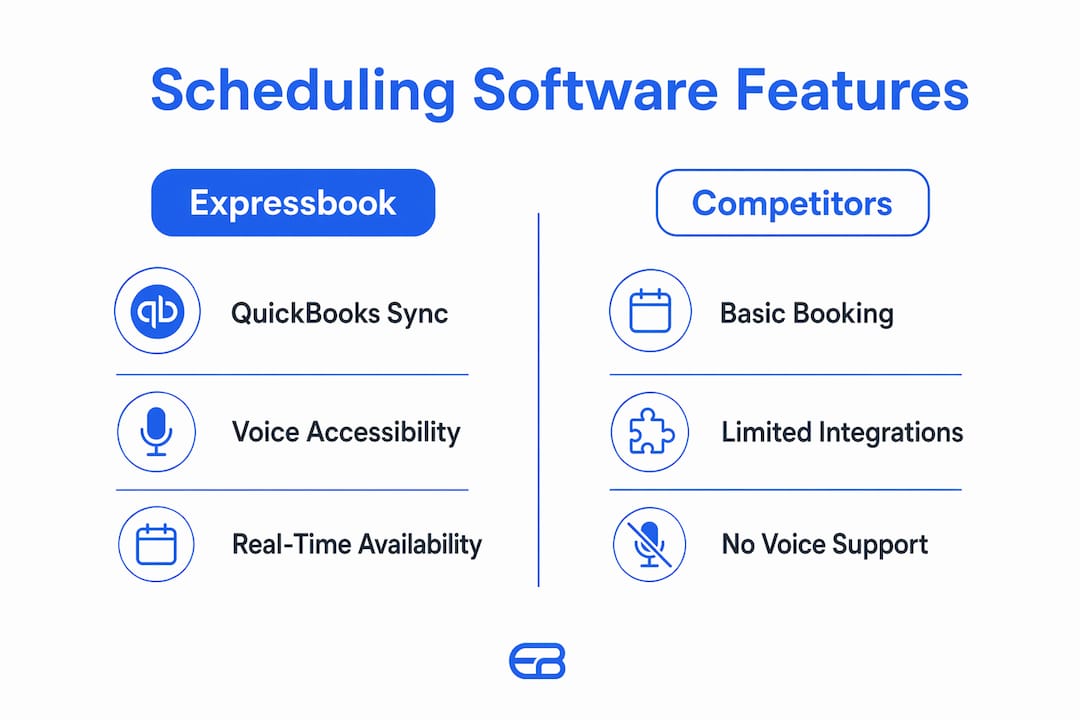
Expressbook pros: Native QuickBooks/Xero sync, voice-agent accessibility, full payments and refund handling, real-time availability, AI analytics, mobile admin app.
Expressbook cons: Requires topping up credits as you use the assistant; may be more than a solo freelancer needs.
What does each scheduling option actually deliver?
Expressbook
Expressbook is built specifically for service businesses — salons, gyms, private clinics, studios, and independent contractors — that need appointment scheduling to connect directly with their accounting stack. The platform syncs bookings, payments, and client data with QuickBooks and Xero automatically, which eliminates the manual entry that causes end-of-month reconciliation headaches. Real-time availability management prevents double-bookings across staff and resources, and AI-powered analytics surface patterns in booking behavior that help owners make smarter staffing decisions.

The dedicated mobile app covers both the client-facing booking experience and the admin side, so you can manage your schedule from anywhere. The voice agent is a standout feature: it lets visually impaired clients book appointments and ask business questions without needing to navigate a visual interface. Automated reminders and built-in deposit and refund handling reduce no-shows without requiring a separate payment processor.
Pros: QuickBooks/Xero sync, voice-agent accessibility, real-time availability, AI analytics, mobile admin app, branded booking pages, no monthly fee.
Cons: Credits need topping up as you use them; feature depth may exceed what a single-service freelancer needs.
Best for: U.S. service businesses with staff, multiple service types, and accounting software already in use.
Standalone automation platforms
These platforms excel at meeting scheduling and workflow automation. They typically offer clean, shareable booking links, round-robin routing, and integrations with video conferencing tools. Setup is fast, and the free tiers are genuinely usable for individual professionals. The limitation shows up when you need payments, deposits, or accounting sync — those features usually require a paid plan, and native QuickBooks or Xero connections are rarely included. You end up routing data through Zapier, which adds complexity and a second subscription.
Pros: Fast setup, polished booking links, strong calendar sync, good free tiers.
Cons: Accounting integrations require workarounds; deposit and refund handling is limited on lower plans.
Best for: Freelancers and consultants who primarily schedule meetings and don’t need payment or bookkeeping automation.
Calendar-native booking pages
Google Calendar appointment schedules create booking pages that update your calendar automatically when a client books. For a solo professional already paying for Google Workspace, this is the lowest-friction option. Buffer time, scheduling windows, custom questions, and calendar conflict checking are all available. Stripe payments and multiple booking pages unlock at the Business Standard tier and above.
The trade-offs are real, though. Team scheduling rules are minimal, and co-host calendars aren’t automatically checked for conflicts — you have to select them explicitly. Note that Google phased out the older “appointment slots” feature after August 7, 2024, so any setup guide referencing slots is outdated.
Pros: Tight calendar integration, low cost for Workspace subscribers, simple setup.
Cons: Weak team scheduling, no accounting sync, payments gated behind paid tiers.
Best for: Solo professionals who live in Google Workspace and have simple, single-service booking needs.
Merchant/ops ecosystems
These platforms lead with payments and point-of-sale functionality. Multi-location support is typically strong, and the payment infrastructure is mature and PCI-compliant. Microsoft Bookings, for example, integrates with Outlook and Teams, supports team and shared bookings, and sends email and SMS notifications. The limitation is that appointment scheduling is often a secondary feature rather than the core product. The interface can feel merchant-first rather than appointment-first, and accounting sync with QuickBooks or Xero usually requires additional configuration.
Pros: Strong payments and POS, multi-location support, enterprise-grade infrastructure.
Cons: Heavier than most service businesses need; appointment scheduling is not the primary design focus.
Best for: Retail, hospitality, or multi-location businesses where POS integration matters more than appointment-first workflows.
How do you choose the right scheduling platform?
The single most important decision rule: match the product category to your existing stack. Your accounting software, payment processor, staff complexity, and number of locations should drive the choice — not the feature list on a pricing page.
Accounting and integrations
If you use QuickBooks or Xero, native sync is worth prioritizing over a Zapier workaround. A Zapier connection adds a third subscription, introduces sync delays, and breaks when either platform updates its API. Expressbook’s built-in accounting sync eliminates that fragility. If you don’t use accounting software yet, this dimension matters less — but you likely will as your business grows.
Payments and no-show handling
Ask any vendor: what are the fees for refunds and chargebacks? Can you attach deposit rules to specific appointment types? A platform that supports payments but not deposits gives you only half the no-show protection you need. Expressbook handles payments, deposits, and refunds natively. Calendar-native tools connect Stripe on paid tiers, but deposit rules and refund workflows are less granular.
Staff and resource scheduling
For businesses with multiple staff members or shared resources (treatment rooms, equipment, courts), you need a platform that enforces availability rules at the resource level, not just the calendar level. Ask vendors: how does your system check availability across multiple staff calendars simultaneously? Can you assign services to specific staff members or rooms? Platforms that rely on calendar-native conflict checking alone can miss co-host calendar conflicts unless you configure them explicitly.
Customer experience and branding
A branded booking page builds client trust and keeps your business identity consistent from the first touchpoint. Generic booking links with a third-party platform’s logo undercut that. Custom branding is available on Expressbook’s plans and on mid-tier plans for most standalone platforms. Calendar-native tools offer limited customization.
Security and support
Look for PCI compliance on any platform handling card payments. Ask whether the vendor publishes a public status page and a PCI attestation. Check support hours — a scheduling outage on a Monday morning needs a faster response than a ticket queue allows. Red flags to watch for: opaque pricing with no published plan details, no mobile admin app, no bookkeeping integrations, and no mention of accessibility support.
Implementation timeline: A single-location booking page can go live the same afternoon with any of these platforms. Complex setups — multiple staff, resource rules, accounting sync configuration, and branded pages — typically take one to three days with DIY setup, or a short paid onboarding session for enterprise configurations.
How to get your booking page live this afternoon
This checklist covers a single-location setup from zero to first paid booking in one session.
- Create your service types and durations. Define each service you offer, its length, and its price. Include buffer time between appointments if you need it.
- Connect your primary calendar and enable conflict checking. Link Google Calendar or Outlook and confirm that all relevant staff calendars are selected for availability checks — not just the primary calendar.
- Configure payments and deposit rules. Connect your payment processor (Stripe is the most common) and set deposit amounts or full prepayment requirements by service type. Confirm that refund workflows are enabled.
- Add staff members and set availability rules. Assign services to specific staff, set working hours, and apply any resource constraints (rooms, equipment).
- Publish your booking page and share the link. Embed the booking widget on your website or share the direct link via email, social media, or your Google Business Profile.
- Run two or three test bookings end-to-end. Book a test appointment, process a test payment, and issue a test partial refund. Confirm that the booking appears correctly in your accounting software.
Pro Tip: Always run your test booking from a private or incognito browser window so you see exactly what a new client sees. Process a test partial refund specifically — full refunds are simpler, and partial refunds are where tax and fee calculations most often surface unexpected behavior.
Post-launch checks: Confirm that confirmation and reminder emails arrive with the correct time zone. Log into the mobile admin app and verify that the new booking appears. If you use Expressbook’s voice agent, call the booking line and test a booking from start to finish to confirm the accessibility flow works correctly.
Why Expressbook fits U.S. service businesses
The strongest argument for Expressbook isn’t any single feature — it’s the combination of features that service businesses actually need working together without manual intervention.
Accounting sync that actually closes the loop. Most scheduling platforms stop at the booking. Expressbook syncs bookings, payments, and client data with QuickBooks and Xero automatically, so every transaction that flows through your booking page lands in your books without a manual export. For a salon processing 40 appointments a week or a clinic running 15 billable sessions a day, that’s a material reduction in administrative time.
Real-time availability and no double-bookings. Expressbook’s availability engine checks staff and resource calendars in real time, so clients only see slots that are genuinely open. This matters most for businesses with shared resources — treatment rooms, studios, or equipment that multiple staff members use. The online scheduling experience stays accurate even when a staff member’s schedule changes mid-day.
Mobile admin app and voice-agent accessibility. The dedicated mobile app lets admins manage bookings, check schedules, and handle client requests from anywhere. The voice agent extends booking access to visually impaired clients, who can book appointments and ask business questions by phone without navigating a visual interface. Few scheduling platforms at any price point offer this level of accessibility out of the box.
Automated reminders and payment handling to reduce no-shows. Expressbook sends automated reminders and enforces deposit rules at the time of booking, which addresses the two most common causes of no-shows: clients who forget and clients who have no financial commitment to the appointment.
Expressbook is designed to save service businesses significant time each week by eliminating manual bookkeeping entries, preventing double-bookings, and automating client reminders — so owners spend less time on administration and more time delivering their service.
Use-case examples: a hair salon using Expressbook connects its booking page to QuickBooks and eliminates the end-of-week manual reconciliation that previously took two hours. A private gym uses staff and resource scheduling rules to prevent two trainers from booking the same studio simultaneously. A private clinic uses the voice agent to extend booking access to patients who prefer phone-based interaction, without adding a receptionist hour.
Key Takeaways
Expressbook is a strong choice for U.S. service businesses that need payments, staff scheduling, and QuickBooks or Xero sync working together without manual data entry.
| Point | Details |
|---|---|
| Match platform to your stack | Choose based on accounting software, payment needs, and staff complexity — not feature lists alone. |
| Native accounting sync matters | Built-in QuickBooks/Xero sync eliminates Zapier workarounds and reduces end-of-month reconciliation time. |
| Free tiers have real limits | Payments, multiple booking pages, and advanced staff rules are typically gated behind paid tiers across all categories. |
| Test the full booking-to-refund flow | Run a test booking with payment and a partial refund before going live to catch tax and fee surprises. |
| Expressbook recommended pick | Expressbook offers prepaid credits with no monthly fee, native accounting sync, a mobile admin app, and voice-agent accessibility. |
The features that actually reduce friction day to day
Most scheduling software comparisons focus on the booking page — how it looks, how easy it is to share, whether it works on mobile. Those things matter, but they’re not where service businesses lose time. The real friction is downstream: manual data entry into accounting software, no-shows that weren’t backed by a deposit, double-bookings that slip through because a staff calendar wasn’t checked, and clients who can’t book because the interface doesn’t work for them.
The platforms that solve those problems aren’t always the ones with the most polished booking links. A standalone automation platform with a beautiful UI but no QuickBooks connection still leaves a salon owner exporting CSVs every Friday. A calendar-native tool that doesn’t check co-host calendars still produces double-bookings for a clinic with shared treatment rooms.
The practical recommendation: prioritize integrations and accessibility over aesthetics. Test the end-to-end flow — booking, payment, refund, and accounting sync — before you commit. A UI demo tells you what the software looks like. A test booking with a partial refund tells you whether it actually works for your business.
Test everything on a small credit top-up
With no subscription, you can run a full booking season, process real payments, reconcile with QuickBooks or Xero, and know with confidence whether the platform fits your business, paying only for the time the assistant spends talking. That is the most straightforward way to evaluate scheduling software for a service business.
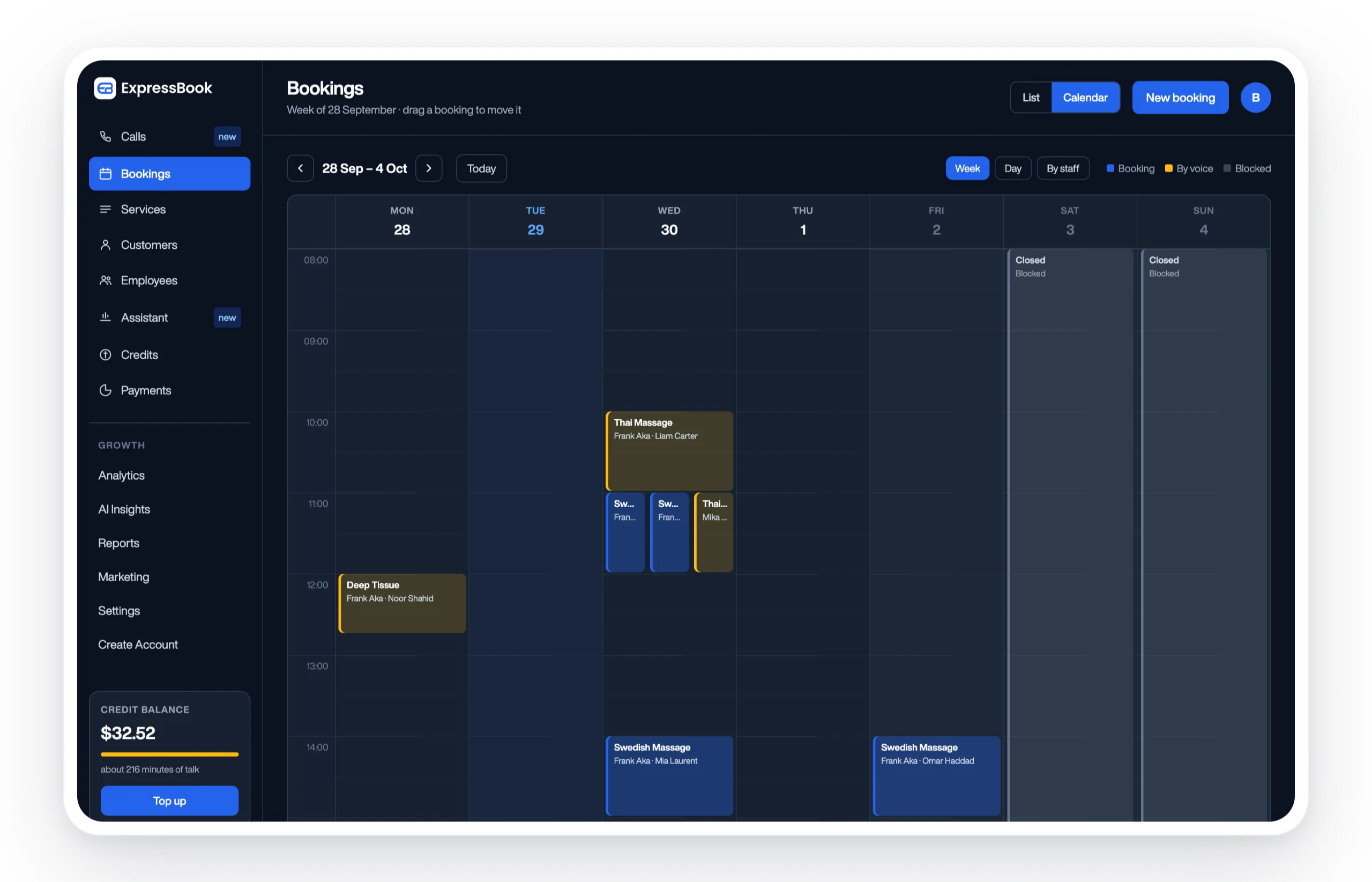
QuickBooks and Xero sync from day one. Connect your accounting software during setup and every booking, payment, and client record syncs automatically. No exports, no manual entries, no end-of-month catch-up.
Real-time availability and staff scheduling. Set availability rules for each staff member and resource, and let clients book only what’s genuinely open. The mobile admin app keeps you in control whether you’re on the floor or off-site.
Payments, deposits, and refunds handled natively. Attach deposit requirements to any service type, process payments at booking, and handle refunds without leaving the platform. The voice agent means every client — including those who prefer phone-based booking — can access your schedule.
Set up Expressbook at expressbook.com, connect your calendar and payment processor on day one, invite your staff, and run your first test booking with payment enabled. The appointment scheduling guide walks you through each configuration step if you want a deeper reference.
Useful sources and further reading
The following resources were used as the basis for claims in this article and are worth bookmarking if you want to go deeper on specific platforms or features.
- Google Workspace Appointment Scheduling — Google’s overview of appointment scheduling in Google Calendar, including feature tiers, Stripe integration, and booking page setup. Covers what’s available on free vs. paid Workspace plans.
- Create an Appointment Schedule — Google Calendar Help — Step-by-step setup guide for Google Calendar appointment schedules, including buffer time, scheduling windows, and calendar conflict settings.
- Changes to Google Calendar Appointment Slots — Google Calendar Help — Official notice explaining the transition from appointment slots to appointment schedules, effective after August 7, 2024. Useful for anyone following older setup guides.
- Microsoft Bookings Overview — Microsoft Learn — Microsoft’s documentation on Bookings, covering Outlook and Teams integration, team scheduling, and notification options.
- Expressbook — expressbook.com — Expressbook’s main product page covering features, QuickBooks/Xero sync, and platform overview., QuickBooks/Xero sync, and platform overview.
- How to Choose the Best Appointment Scheduling Software — A deeper buying guide from Expressbook covering evaluation criteria, integration questions, and decision frameworks for service businesses.