

For most U.S. small and medium service businesses, Expressbook is the clearest choice in online appointment booking software. It handles scheduling, automated reminders, online payments, and accounting syncs with QuickBooks and Xero in one platform, without requiring a separate bookkeeping workflow at month-end.
Three reasons it stands out immediately:
- Time savings: Expressbook advertises saving users over 10 hours per week by eliminating manual booking entries and back-and-forth scheduling.
- Accounting sync: Native integrations with QuickBooks and Xero mean bookings, payments, and client data flow directly into your books automatically.
- Unified operations: Payments, reminders, staff scheduling, and client records all live in one place, so nothing falls through the cracks between your front desk and your accounting software.
Expressbook has no subscription: a small credit top-up is enough to test real booking flows, payment processing, and accounting reconciliation. Sign up directly at expressbook.com to start.
Table of Contents
- What does online appointment booking software need to include?
- What automation actually saves small service businesses
- Which integrations should you verify before signing a contract?
- How does scheduling software pricing actually work?
- How to set up an online booking system: steps and timeline
- How do you choose the right appointment scheduling software?
- Why Expressbook fits most U.S. service businesses
- Configuration examples for common service businesses
- Key Takeaways
- The feature most buyers overlook until it’s too late
- Trying Expressbook: what you get and how to start
- Useful sources and further reading
What does online appointment booking software need to include?
Not every scheduling tool is built the same. Before evaluating vendors, it helps to know which features are table stakes and which are genuine differentiators worth paying for.
Core features every platform should offer:
- Embeddable booking page or widget for your website
- Two-way calendar sync with Google Calendar and Outlook
- Automated SMS and email reminders for clients and staff
- Online payment processing (Stripe or equivalent) with refund support
- Staff and resource scheduling with availability rules and buffer times
- Client records with appointment history (CRM-lite functionality)
- Branded booking pages with your logo and colors
- Cancellation and rescheduling flows with configurable policies
- Reporting and basic analytics on bookings, revenue, and no-shows
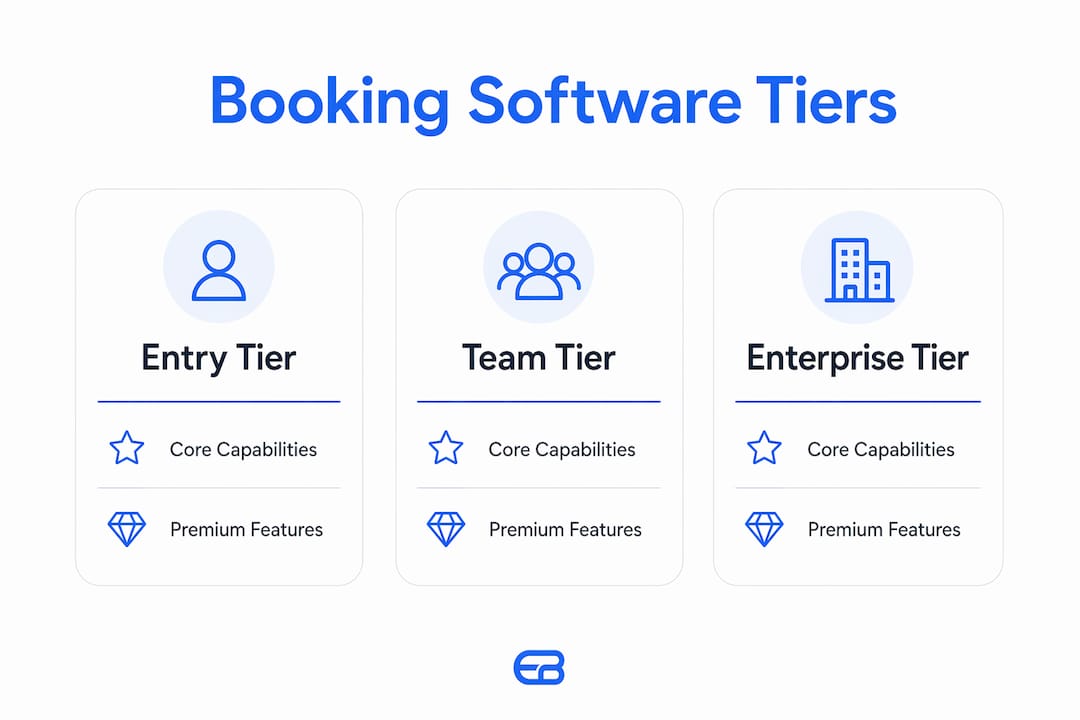
Premium differentiators worth paying for at the team or enterprise tier include AI-powered analytics, multi-location management, HIPAA-compliant data handling for healthcare providers, advanced resource allocation, and automated reminders tied to retention workflows.
| Feature | Entry tier | Team tier | Enterprise tier |
|---|---|---|---|
| Online booking page | ✓ | ✓ | ✓ |
| Calendar sync (Google/Outlook) | ✓ | ✓ | ✓ |
| Automated SMS/email reminders | Limited | ✓ | ✓ |
| Online payments + refunds | ✓ | ✓ | ✓ |
| Staff scheduling | Single user | Multi-staff | Multi-location |
| QuickBooks/Xero sync | — | ✓ | ✓ |
| AI analytics | — | — | ✓ |
| HIPAA compliance options | — | Add-on | ✓ |
| Mobile admin app | ✓ | ✓ | ✓ |

If your business handles payments and has more than one staff member, the team tier is almost always the right starting point. Entry tiers are fine for solo operators testing the concept, but the accounting sync and multi-staff scheduling features are where the real operational value lives.
What automation actually saves small service businesses
The business case for appointment scheduling software comes down to four concrete outcomes: fewer no-shows, less time on admin, faster payments, and better client retention.
No-show reduction is the most immediate win. Automated SMS and email reminders sent 48 hours and 2 hours before an appointment give clients enough notice to cancel or reschedule rather than simply not showing up. For a salon or dental practice running back-to-back appointments, a single recovered slot per day adds up quickly across a month.
Admin time is the less visible cost. When a front desk coordinator manually enters bookings, confirms appointments by phone, and then re-enters payment data into QuickBooks, that work compounds. Expressbook’s QuickBooks and Xero sync removes the re-entry step entirely, so your bookkeeper sees accurate revenue data without waiting for a manual export at month-end.

Payment speed matters too. Collecting payment at booking, rather than at the point of service, improves cash flow and reduces the friction of chasing unpaid invoices. Refunds processed through the platform also stay in the same data trail, which simplifies reconciliation.
For industry-specific impact: a medspa running 6-hour treatment days can redirect the time a coordinator spent on phone confirmations toward upsell conversations and intake form reviews. A dental practice with longer appointment blocks benefits from automated pre-appointment intake forms that arrive before the patient does, cutting chair-side admin time. The shift is consistent across service categories: automation moves staff time from reactive coordination toward revenue-generating work.
Metrics to track after launch: no-show rate (target under 10%), admin hours per week spent on scheduling, and average time from booking to payment receipt.
Which integrations should you verify before signing a contract?
Integrations are where scheduling software either pays for itself or creates new problems. The list below covers what to test during any test run, not just what the vendor’s marketing page claims.
- Two-way calendar sync. Confirm that a booking made in the scheduling platform blocks time in Google Calendar or Outlook, and that a manually blocked time in your calendar prevents double-bookings in the scheduling tool. One-way sync is a common limitation that causes conflicts.
- Payment processor fees and refund flows. Understand the per-transaction fee structure. Test a full refund test run the process works end-to-end and that the refund appears correctly in your accounting sync.
- QuickBooks or Xero sync. Verify that new bookings, payments, and refunds all create the correct entries automatically. Ask the vendor specifically whether the sync is real-time or batch-processed, and how errors surface.
- Video conferencing links. If you offer virtual consultations, confirm that Zoom or Google Meet links generate automatically in booking confirmations rather than requiring manual insertion.
- CRM or marketing integrations. If you use Mailchimp, HubSpot, or a similar tool for client communications, check whether the scheduling platform pushes new client records automatically.
- Data backups. Vendor uptime SLAs cover availability, not data recovery. For cloud accounting data specifically, third-party backup strategies are worth reviewing separately, particularly if your QuickBooks or Xero data is the authoritative record for your business.
Common integration pitfalls to watch for: partial calendar syncs that only push new bookings but not cancellations; duplicate client records created when a client books through multiple channels; accounting entries that appear with incorrect service categories; and transaction fees that are deducted before the sync, creating discrepancies between your booking revenue and your accounting totals.
Pro Tip: During your test run, run at least one complete booking-to-refund cycle and verify that every step, from the booking confirmation email to the refund entry in QuickBooks or Xero, appears correctly. This single test surfaces more integration issues than any demo.
How does scheduling software pricing actually work?
Pricing models across the scheduling software category follow a few recognizable shapes, and understanding them upfront prevents surprises after you’ve committed.
Common pricing structures:
- Freemium/feature-limited: A free tier with a capped number of bookings, staff members, or integrations. Useful for solo operators, but accounting syncs and multi-staff features are almost always behind a paywall.
- Per-staff/per-seat: A monthly fee per team member who needs access. Costs scale predictably with headcount, which works well for growing teams.
- Per-location: A flat fee per physical location, common for multi-site businesses like franchise salons or dental groups.
- Percentage transaction fees: Some platforms charge a percentage of each booking payment processed through their system, on top of the payment processor’s own fee. This model can become expensive at higher revenue volumes.
- Add-on fees: SMS reminders, HIPAA compliance modules, and advanced reporting are frequently sold as add-ons rather than included in base plans.
What to test in your first weeks:
- Calendar sync reliability across a full week of real bookings
- Payment flow from booking to receipt, including a test refund
- Reminder deliverability (check that SMS messages actually arrive)
- Reporting exports in a format your accountant can use
- Mobile admin experience for managing bookings away from a desk
Expressbook has no subscription at all, unlike the free trials most platforms provide before billing monthly. You can run a real month-end reconciliation with QuickBooks or Xero and catch any sync issues before they become a billing problem, paying only for talk time.
How to set up an online booking system: steps and timeline
Setup complexity scales with team size and the number of services you offer. Here is a practical sequence that applies across most platforms.
- Create your services. Define each service with a name, duration, price, and any deposit or prepayment requirement. Include buffer times between appointments if your workflow requires cleanup or prep.
- Add staff and set availability. Enter each team member, assign them to relevant services, and configure their working hours and days off. Set booking lead times (minimum notice before a booking) and advance booking windows (how far out clients can schedule).
- Connect your calendar. Link Google Calendar or Outlook and verify two-way sync with a test booking.
- Connect your payment processor. Link Stripe or your preferred processor, set your refund and cancellation policy, and run a test transaction.
- Connect QuickBooks or Xero. Authorize the integration and confirm that a test booking creates the correct entry in your accounting software.
- Configure reminders. Set automated SMS and email reminders at your preferred intervals (commonly 48 hours and 2 hours before the appointment).
- Build intake forms. Add any pre-appointment questions: health history for medspas, insurance information for dental practices, or service preferences for salons.
- Embed the booking widget. Place the booking widget or link on your website, Google Business Profile, and any social media profiles where clients find you.
- Test the full booking flow. Make a test booking as a client, confirm the reminder arrives, process a payment, and verify the accounting entry.
- Train your staff. Walk your team through the admin app, show them how to view and manage bookings, and confirm they can handle rescheduling and cancellations.
Realistic time-to-launch estimates:
- Solo operator, single service: 2–4 hours from signup to first live booking
- Small team (2–10 staff), multiple services: 1–2 business days including testing
- Multi-location rollout: 1–2 weeks, accounting for location-specific availability rules and staff onboarding
Post-launch: Monitor no-show rates, reminder delivery rates, and accounting sync accuracy daily for the first 30 days. Most issues surface in the first two weeks.
How do you choose the right appointment scheduling software?
The vendor evaluation process is where most buyers make avoidable mistakes. The questions below are worth asking directly, not just reading from a feature comparison page.
Questions to ask vendors before signing:
- What is your uptime SLA, and how do you communicate outages?
- What support channels do you offer (chat, email, phone), and what are your response time commitments?
- How does a client-initiated refund work end-to-end, including the accounting entry?
- What are your contract terms? Is there a minimum commitment, and can you export all client data if you leave?
- Do you provide onboarding support, and is migration from another platform included?
Evaluation criteria mapped to business priorities:
- Pricing model fit: Does the per-seat or per-location model match how your business scales?
- Required integrations: Does the platform sync natively with QuickBooks, Xero, and your calendar, or does it require a third-party connector?
- Ease of setup: Can a non-technical owner configure the platform without developer help?
- Mobile admin: Does the platform have a dedicated admin app, or is mobile access a browser-only experience?
- Security and compliance: Is the platform PCI-compliant for payment processing? Does it offer HIPAA-compliant options for healthcare providers?
- Scalability: Can the platform handle additional locations, staff, and booking volume without a platform migration?
Red flags to avoid:
- Hidden SMS fees not disclosed in the base plan pricing
- One-way calendar sync only (bookings push out, but cancellations don’t update)
- No ability to export your full client list and appointment history
- Opaque refund policy with no clear timeline for client refunds
- No dedicated mobile admin app, only a mobile-responsive web interface
Pro Tip: Ask the vendor to walk you through a live refund scenario during your demo. How a platform handles refunds and chargebacks tells you more about its operational maturity than any feature list.
For a structured vendor selection framework, Expressbook publishes a decision guide that maps common SMB priorities to specific platform capabilities.
Why Expressbook fits most U.S. service businesses
Expressbook is built specifically for service businesses that need scheduling, payments, and accounting to work together without manual intervention. The platform’s QuickBooks and Xero sync is native, not a third-party connector, which means bookings, payments, and refunds create accounting entries automatically.
| Capability | Expressbook |
|---|---|
| Online booking page | ✓ Branded, embeddable |
| Two-way calendar sync | ✓ Google Calendar |
| Automated SMS/email reminders | ✓ Configurable intervals |
| Online payments + refunds | ✓ Stripe integration |
| QuickBooks sync | ✓ Native |
| Xero sync | ✓ Native |
| Mobile app (admin + client) | ✓ Dedicated apps |
| Voice agent accessibility | ✓ Included |
| AI-powered analytics | ✓ |
| HIPAA compliance options | Available |
| Pricing | Prepaid credits, no monthly fee |
The mobile app covers both the admin and client experience. Admins can view and manage bookings, adjust staff availability, and process refunds from their phone. Clients can book, reschedule, and receive reminders through the same app.
The voice agent is a capability most scheduling platforms don’t offer. It allows visually impaired clients to book appointments and ask business-related questions by voice, which expands your accessible client base without requiring any additional configuration on your end.
For industry-specific configuration, Expressbook maintains dedicated vertical pages for health practices, dental scheduling, and beauty and aesthetic businesses, each with recommended settings and workflow examples.
Pro Tip: For small service teams looking to reduce no-shows quickly, configure Expressbook’s reminders to send at 48 hours and 2 hours before each appointment, and enable the QuickBooks or Xero sync before your first live booking. Starting the sync from day one means your accounting data is clean from the beginning, rather than requiring a retroactive import.
Configuration examples for common service businesses
Different service categories have different scheduling requirements. Here are practical starting points for four common use cases.
-
Salon (multiple resources): Configure each stylist as a separate staff member with their own availability. Enable resource booking for chairs or stations if your space is the constraint, not just the stylist’s time. Set a 48-hour cancellation policy with a deposit requirement to reduce last-minute gaps. Expressbook’s beauty and aesthetic vertical page includes recommended booking window settings for high-volume salon environments.
-
Dental practice (longer appointments, intake forms): Dental appointments range from 30-minute cleanings to 2-hour treatment sessions, so configure each service type with accurate durations and buffer times for room turnover. Add intake form fields for insurance provider and policy number. For practices handling protected health information, review HIPAA compliance options before going live. Expressbook’s dental scheduling page covers clinical workflow configurations in detail.
-
Medspa (prepayment and consent): Require full prepayment at booking for high-demand treatments, and add a consent form field to the intake flow. Configure a longer cancellation window (72 hours is common) given the higher revenue per appointment. The medspa vertical page on Expressbook includes configuration examples for treatment-specific booking rules.
-
Fitness and gym (classes vs. 1:1 sessions): Set up class-based scheduling with a maximum participant count separate from individual personal training sessions. For classes, enable a waitlist so cancellations automatically fill from the queue. For 1:1 sessions, configure the trainer’s availability independently from class schedules to prevent conflicts.
On cancellations, rescheduling, and refunds: The clearest booking flows state the cancellation policy at the time of booking, not just in a confirmation email. Configure your platform to display the policy on the booking page itself, require clients to acknowledge it before confirming, and automate the refund or credit process so your staff doesn’t handle it manually. A client who reschedules themselves through the platform costs you nothing in admin time; a client who calls to cancel costs you a staff interaction and a potential dispute if the refund policy isn’t clear.
Key Takeaways
Expressbook is the strongest choice for U.S. small and medium service businesses that need scheduling, payments, and accounting to work together automatically from day one.
| Point | Details |
|---|---|
| Native accounting sync | Expressbook syncs bookings and payments directly with QuickBooks and Xero, eliminating manual entries. |
| A small credit top-up is enough to test real booking flows, payment processing, and accounting reconciliation before committing. | |
| Mobile and voice access | Dedicated admin and client apps, plus a voice agent for visually impaired users, cover the full client base. |
| Integration verification | Always test a full booking-to-refund cycle on a small credit top-up to surface sync issues before they affect your books. |
| Expressbook for SMBs | Set up Expressbook at expressbook.com and configure QuickBooks or Xero sync on day one for clean accounting from the start. |
The feature most buyers overlook until it’s too late
Most buyers evaluate scheduling software on the booking page and the reminder system. Those are visible, easy to demo, and easy to compare. What gets skipped in the evaluation is the accounting sync, and that omission creates real problems at month-end.
A platform that handles bookings well but requires manual export to QuickBooks or Xero is not saving your business time. It is shifting the manual work from the front desk to the bookkeeper. For a business processing dozens of appointments per week, that gap compounds fast. The month-end reconciliation becomes a project rather than a routine check.
The voice agent accessibility feature is similarly underestimated. Most service businesses don’t think about accessibility until a client raises it. Building it in from the start, as Expressbook does, means you’re not retrofitting a solution later or losing bookings from clients who can’t navigate a standard booking interface.
There’s also a tendency to treat the first weeks as a demo rather than a real test. Run a full billing cycle, catch sync errors, and evaluate whether your staff actually uses the mobile admin app or defaults back to the phone. Use that time deliberately.
The businesses that get the most from scheduling software are the ones that configure it completely before going live, not the ones that add features incrementally after launch. Set up the accounting sync, the reminders, the intake forms, and the cancellation policy on day one. The setup investment is a few hours; the operational return runs every week after that.
Trying Expressbook: what you get and how to start
A small credit top-up is the most direct way to evaluate whether Expressbook fits your operation. In your first weeks, you can run real bookings, process actual payments, test the QuickBooks or Xero sync through a full billing cycle, and confirm that automated reminders are reaching your clients reliably.
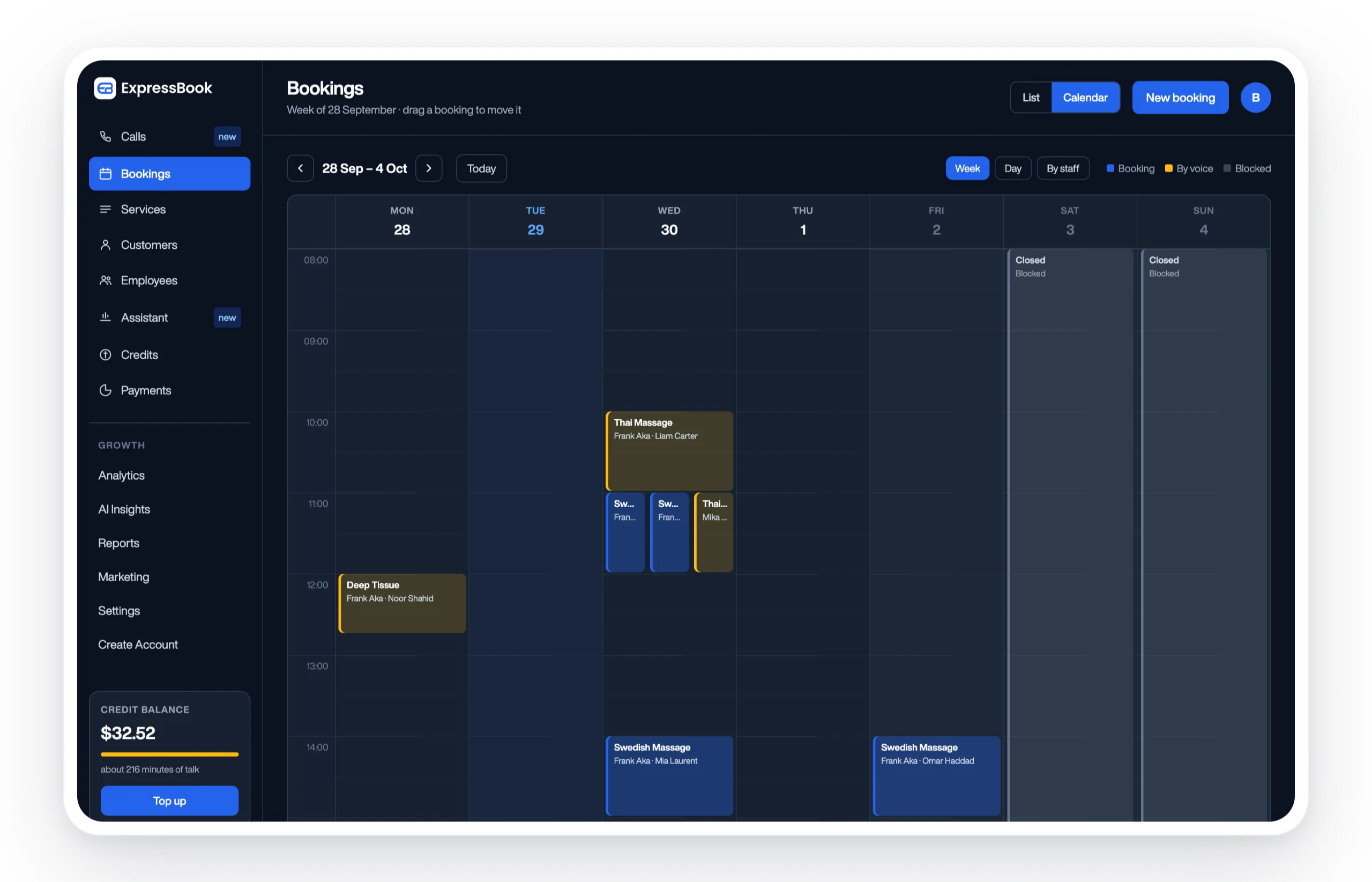
Signup is self-serve at expressbook.com. You can configure your services, staff, and integrations without developer help. For multi-location rollouts or practices with complex scheduling rules, Expressbook’s onboarding support is available to help configure the platform correctly from the start.
The mobile app is available for both admins and clients, and the voice agent is included for visually impaired users who need to book or ask questions by voice. Support is available via chat and email as you test the platform. For businesses comparing options before deciding, the scheduling software alternatives guide walks through how Expressbook compares on pricing, integrations, and setup time. Set up Expressbook at expressbook.com and have your first booking live within a day.
Useful sources and further reading
- Signup and product overview
- How to choose the best appointment scheduling software
- Expressbook for health practices
- Expressbook dental appointment scheduling
- Expressbook beauty and aesthetic vertical
- Expressbook medspa configuration guide
- How automated reminders improve client retention
- Scheduling software alternatives for small business
- Akika Labs: why data backups protect your clients
- Akika Labs AI and QuickBooks integration resources