

The fastest way to reduce payment failures is to act on eight proven levers, prioritized by impact and implementation speed. Below is your immediate action checklist. Each item links to the section where it is explained in full.
- Enable card account updaters (Visa Account Updater / Mastercard Account Updater) — High impact — prevents stale-credential declines before they happen. See Prevention.
- Implement smart retry logic — High impact — cap at 3–5 attempts, space over 2–14 days, align to paydays. See Recovery Tactics.
- Add payment pre-validation (Plaid-style bank verification or NACHA account validation) — High impact — catches bad account details before a charge is attempted. See Prevention.
- Offer alternate payment methods (Apple Pay, Google Pay, ACH bank-pay) — High impact — gives declined customers an immediate fallback. See Prevention.
- Send clear, specific decline messages — Medium impact — actionable copy with one-click update links recovers customers who would otherwise churn silently. See Communication.
- Set up multi-acquirer routing or failover — Medium impact — reduces gateway timeouts and network-side outages. See Routing.
- Tune fraud rules to reduce false positives — Medium impact — overblocking legitimate customers is a hidden revenue leak. See Fraud Tuning.
- Launch a dunning sequence (email + SMS + in-app) — Medium impact — automated recovery communications drive most of the revenue recovered after a failure. See Recovery Tactics.
- Monitor authorization rate and decline reason mix daily — Low effort, high signal — you cannot fix what you cannot see. See Metrics.
- Run A/B tests on retry schedules and messaging — Medium effort — continuous experimentation compounds recovery gains over time. See Testing.
Key Takeaways
Prevention consistently outperforms recovery: enabling card account updaters, network tokens, and payment pre-validation at capture time reduces payment failures more efficiently than any retry or dunning sequence can recover them.
| Point | Details |
|---|---|
| Prevention first | Card updaters (VAU/MCAU) and network tokens eliminate stale-credential declines before a charge is attempted. |
| Front-load recovery | 90% of recovered transactions occur within the first 10 days; cap retries at 3–5 attempts spaced over 2–14 days. |
| Optimize retry strategy | Network-informed retry logic can improve recovery rates by roughly 10–20 percentage points over basic single-merchant retries. |
| Measure authorization rate daily | A drop of 2+ points in 24 hours signals a routing, fraud-rule, or issuer issue that needs immediate investigation. |
| Expressbook closes the loop | Tokenized payment capture at booking, automated reminders, and QuickBooks/Xero sync reduce failures at the source for service businesses. |
Table of Contents
- Why payments fail: root causes and how to read decline codes
- Prevention: stop payment failures before you bill
- Recovering failed payments: smart retries, dunning, and alternate flows
- Routing, multiple acquirers, and gateway strategies to improve authorization rates
- Tune fraud controls so you stop fraud without killing legitimate payments
- What to say and where: decline messaging and customer experience best practices
- What to measure: KPIs and dashboards to spot and fix payment issues
- How to test, iterate, and operationalize payment-failure reduction
- Typical timelines and cost considerations for implementing fixes
- How booking and scheduling integrations reduce payment failures
- Handling and recovery from chargebacks related to payment failures
- What actually matters most when you reduce payment failures
- Expressbook reduces payment friction for service businesses
- Sources
Why payments fail: root causes and how to read decline codes
Most payment failures are soft declines, meaning the issuer or network rejected the transaction for a temporary reason and the charge can be retried. Hard declines, by contrast, signal a permanent problem and should never be retried automatically. Understanding which type you are dealing with is the single most important classification decision in any failed payment recovery workflow.
Root causes fall into four categories:
- Stale credentials — expired cards, replaced card numbers (after fraud or reissue), and outdated ACH routing or account numbers.
- Issuer decisions — insufficient funds, daily spend limits, fraud blocks, or a generic “do not honor” from the issuing bank.
- Technical failures — gateway timeouts, session expirations, OTP failures, and network routing errors between acquirer and issuer.
- Cross-border issues — currency mismatches, geographic restrictions, and 3D Secure friction on international transactions.
Decline code glossary
| Decline Code | Meaning | Soft or Hard | Recommended Action |
|---|---|---|---|
insufficient_funds |
Account balance too low | Soft | Retry after 3–5 days; align to payday |
expired_card |
Card past expiration date | Soft | Trigger card updater; prompt customer to update |
do_not_honor |
Generic issuer decline | Soft | Retry once after 24 hours; escalate to dunning |
processing_error |
Gateway or network error | Soft | Retry immediately (once); then standard schedule |
pickup_card |
Card reported lost or stolen | Hard | Do NOT retry; contact customer via alternate channel |
fraudulent |
Issuer flagged as fraud | Hard | Do NOT retry; remove payment method; contact customer |
card_not_supported |
Card type not accepted | Hard | Prompt customer to use alternate method |
invalid_account |
ACH account number invalid | Hard | Validate account details; request new method |
Pro Tip: Build a two-branch decision tree in your billing system: if the decline code maps to a hard decline, suppress all automatic retries and route the customer directly to a manual update flow. Retrying hard declines wastes attempts, risks issuer flags, and can accelerate account closure.
Technical failures deserve a separate note. A gateway timeout is not the same as an issuer decline. If your processor returns a network error rather than a card-level code, retry once within minutes before treating it as a soft decline on the standard schedule. Mixing these two categories in your retry logic is a common source of unnecessary revenue loss.
Prevention: stop payment failures before you bill
Prevention delivers better return on investment than recovery. Card account updaters and network tokens reduce declines caused by stale or replaced card credentials before a charge is ever attempted, which means fewer retries, fewer dunning emails, and less customer friction.
The four highest-ROI preventive controls:
-
Visa Account Updater (VAU) and Mastercard Account Updater (MCAU) — These network services automatically push updated card numbers and expiration dates to merchants when a customer’s card is reissued. Enrollment is handled through your payment processor. For subscription businesses with large stored-card databases, enabling VAU and MCAU is typically the single highest-impact configuration change available.
-
Network tokenization — Rather than storing a raw card number (PAN), network tokens are issued by the card networks and remain valid even when the underlying card is reissued. Stripe, Braintree, and Adyen all support network tokenization. Tokens also carry higher authorization rates because issuers treat them as lower-risk.
-
Payment pre-validation — Verifying beneficiary account details before a payment is sent reduces rejections and reconciliation costs by catching errors at capture rather than at settlement. For ACH and bank-pay flows, real-time account verification via Plaid or NACHA’s same-day ACH validation removes the most common source of ACH failures: mistyped routing and account numbers. Real-time bank verification reduces ACH failures by eliminating manual entry entirely.
-
Checkout UX improvements — Reduce form fields, surface Apple Pay and Google Pay as the default payment options (wallet payments use device-stored, network-tokenized credentials and carry higher auth rates), and display clear billing descriptors so customers recognize the charge.
Implementation checklist for engineering teams:
- Enroll in VAU and MCAU through your payment processor’s dashboard or API.
- Enable network tokenization in your processor’s token vault settings.
- Integrate Plaid Link or a NACHA-compliant bank verification service for ACH flows.
- Add Apple Pay and Google Pay to your checkout using the Payment Request API or your processor’s SDK.
- Set up webhooks for
card.updatedandpayment_method.updatedevents so your billing system stays in sync automatically. - Test each flow in a sandbox environment before deploying to production.
Pro Tip: Automating AP workflows and embedding validation at invoice capture can reduce data-entry errors by 50–80% in practice. The same principle applies to subscription billing: validate at capture, not at charge time.
Recovering failed payments: smart retries, dunning, and alternate flows
Combine intelligent retry scheduling with fast, actionable communication to maximize recovery in the first 10 days. Data shows 90% of recovered transactions occur within the first 10 days after failure, which means a flat retry schedule spread over 30 days leaves most of your recoverable revenue on the table.
Smart retry rules
- Classify the decline code first. Never retry hard declines.
- Cap automated retries at 3–5 attempts and space them over 2–14 days, aligning attempts to likely paydays (the 1st and 15th of the month for most US customers).
- Use network-informed retry logic if your processor offers it. Optimized retry strategies can improve recovery rates by roughly 10–20 percentage points over basic single-merchant retry logic.
- After the second failed retry, escalate to dunning rather than continuing to charge silently.
Sample retry schedule for soft declines
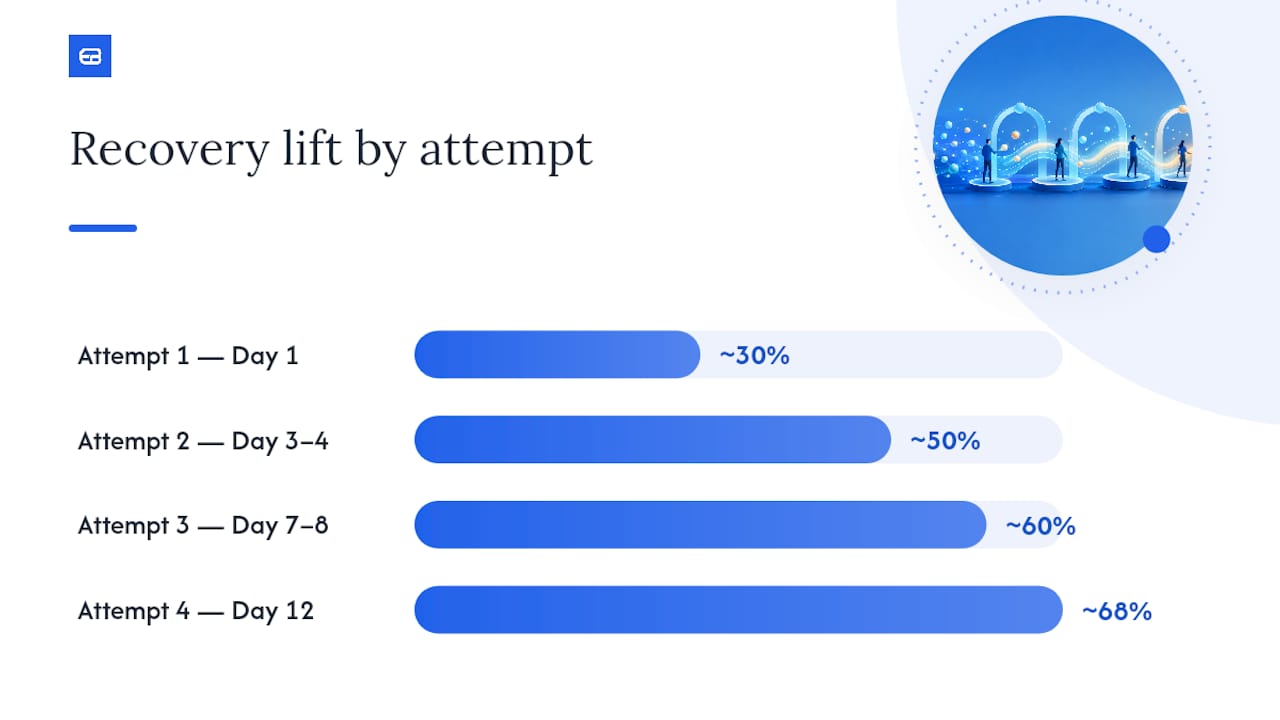
| Attempt | Timing After Failure | Expected Cumulative Recovery Lift |
|---|---|---|
| Attempt 1 | Day 1 (same day) | ~30% of recoverable transactions |
| Attempt 2 | Day 3–4 | ~50% cumulative |
| Attempt 3 | Day 7–8 (near payday) | ~60% cumulative |
| Attempt 4 | Day 12 | ~68% cumulative |
| Stop | Day 15+ | Diminishing returns; escalate to manual |
Dunning sequence: timing and templates
A dunning sequence runs in parallel with retries, not after them. Send the first message on the same day as the first failed charge.
Email — Day 1 (subject: “Your payment didn’t go through”)
SMS — Day 3
In-app banner — Days 1–10
Email — Day 7 (subject: “Action needed: your account will pause in 3 days”)
Keep every message to a single call to action. Tokenized one-click update links (where the customer lands on a pre-filled payment update page) consistently outperform links to a generic account settings page.
Routing, multiple acquirers, and gateway strategies to improve authorization rates
Smart routing and multi-bank failover reduce bank-side timeouts and route outages and can recover several percentage points of transaction success in high-volume contexts. For most US subscription businesses processing under $1M per month, a single well-configured acquirer with gateway failover is sufficient. Above that threshold, a second acquirer or a payment orchestration layer pays for itself quickly.
When to add a second acquirer or orchestration layer:
- Your primary acquirer’s authorization rate drops below 90% on domestic Visa/Mastercard transactions.
- You process a meaningful volume of international transactions where issuer relationships differ by region.
- You have experienced a single-acquirer outage that caused a revenue gap.
- Your processor does not offer real-time route health monitoring.
Smart routing benefits:
- Routes each transaction to the acquirer or gateway with the highest real-time success probability for that card BIN, issuer, and transaction value.
- Automatic failover reroutes transactions when a primary route is degraded, without customer-visible errors.
- Geographic tuning improves approval rates for cross-border transactions by matching the acquiring bank’s issuer relationships.
- Reduces gateway timeout errors, which are often misclassified as soft declines.
Operational checklist:
- Monitor acquirer-level authorization rates by BIN range and issuer daily.
- Set automated alerts for any acquirer’s auth rate dropping more than 2 percentage points in a 24-hour window.
- Test failover quarterly by simulating a primary-route outage in a staging environment.
- Review route health reports monthly and adjust routing rules based on issuer-level performance data.
Tune fraud controls so you stop fraud without killing legitimate payments
Risk-based fraud controls and adaptive rules improve approval rates without raising fraud exposure. The most common hidden revenue leak in subscription billing is not fraud itself but overblocking: fraud rules calibrated too aggressively reject legitimate customers, and those customers rarely come back.
Key controls to tune:
- 3DS2 (3D Secure 2) — Use risk-based authentication rather than blanket 3DS challenges. 3DS2 allows issuers to approve low-risk transactions frictionlessly while stepping up only high-risk ones. Blanket 3DS on all transactions adds friction and increases cart abandonment.
- Velocity rules — Flag unusual transaction frequency by card, device, or IP, but set thresholds based on your actual customer behavior data, not generic defaults. A gym member who books five classes per week should not trigger a velocity alert.
- Device signals and behavioral data — Use device fingerprinting and behavioral analytics to distinguish returning customers from new high-risk sessions.
- BIN and issuer-level tuning — Some BIN ranges carry higher decline rates for reasons unrelated to fraud. Segment your fraud rules by BIN to avoid penalizing customers whose cards are issued by banks with conservative authorization policies.
Metrics to watch:
- False-positive rate (legitimate transactions blocked / total transactions)
- Chargeback rate (chargebacks / total transactions, target below 0.9% per card network thresholds)
- Fraud loss rate (confirmed fraud losses / total revenue)
- Approval rate by BIN and issuer
Pro Tip: Before deploying new fraud rules to production, run them in shadow mode for 7–14 days. Shadow mode applies the rule logic and logs what would have been blocked without actually blocking anything. Review the shadow log for false positives before activating.
What to say and where: decline messaging and customer experience best practices
Be specific in decline messages and give customers an immediate, actionable next step. Generic messages like “Your payment failed” convert poorly because they leave customers guessing about what went wrong and what to do. Specific, actionable messages and direct update links keep trust high and improve recovery performance.
Sample messages by scenario:
- Insufficient funds: “Your payment of $[Amount] didn’t go through — your card had insufficient funds. Try a different card or pay by bank transfer. [Update payment →]”
- Expired card: “Your card on file expired. Add a new card to continue your subscription. [Update card →]”
- Generic issuer decline: “Your bank declined this payment. Please contact your bank or try a different payment method. [Try another card →]”
- ACH failure: “Your bank transfer was returned. Please verify your account details or use a card instead. [Update payment →]”
Where to display these messages:
- At checkout, inline below the payment field (not in a modal that can be dismissed).
- In a persistent in-app banner visible on every page after login until the issue is resolved.
- In the first dunning email and SMS (see Recovery Tactics above).
- As a post-login modal on the customer’s next session if the issue is still unresolved after 48 hours.
The automated flow handles volume; the personal touch handles retention.
Accessibility matters here too. Decline messages and payment update flows must work with screen readers and assistive technology. Expressbook’s built-in voice agent supports visually impaired customers through the update flow, so no customer is left without a recovery path due to an accessibility gap.

Pro Tip: Test your decline messages with real customers in a usability session at least once per year. The copy that your team thinks is clear is often not what customers understand. A single word change (“update your card” vs. “fix your payment”) can meaningfully shift click-through rates.
What to measure: KPIs and dashboards to spot and fix payment issues
Track authorization rate, recovery rate, decline reason mix, retry success rate, false-positive rate, and time-to-recovery. These six metrics give you a complete picture of where revenue is leaking and which fix to prioritize.
Core KPI definitions and alert thresholds:
- Authorization rate — Approved transactions / total attempted transactions. Target: above 92% for domestic card transactions. Alert if it drops more than 2 points in 24 hours.
- Recovery rate — Failed transactions recovered within 30 days / total failed transactions. Target: above 60% for soft declines with smart retry logic.
- Decline reason mix — Distribution of decline codes across all failures. A spike in
insufficient_fundssuggests a payday timing issue; a spike indo_not_honormay indicate a fraud rule change at a major issuer. - Retry success rate — Successful retries / total retry attempts. Declining retry success rates signal that your retry schedule needs recalibration.
- False-positive rate — Legitimate transactions blocked by fraud rules / total transactions. Target: below 0.5% for established customer cohorts.
- Time-to-recovery — Average days from first failure to successful charge. Target: under 7 days for soft declines with active dunning.
Dashboard layout recommendation:
| Metric | Slice By | Alert Threshold |
|---|---|---|
| Authorization rate | Payment method, issuer, region | Drop of 2+ points in 24 hours |
| Recovery rate | Decline code, retry attempt number | Below 50% at 10-day mark |
| Decline reason mix | Card type, BIN range | Any single code spiking 20%+ above baseline |
| Retry success rate | Attempt number, day of week | Below 15% on attempt 3+ |
| False-positive rate | Customer cohort, transaction value | Above 0.5% for returning customers |
| Time-to-recovery | Channel (email, SMS, in-app) | Above 10 days average |
Set daily automated alerts for authorization rate and decline reason mix. Review recovery rate and time-to-recovery weekly. False-positive rate and retry success rate are best reviewed in a monthly payments operations meeting.
How to test, iterate, and operationalize payment-failure reduction
Run small experiments and use shadow traffic to validate changes before full rollouts. A change that looks good in theory — a new retry schedule, a tighter fraud rule, a different dunning subject line — can harm revenue if deployed without testing.
Testing checklist:
- A/B test retry schedules — Split your failed-payment population 50/50 between your current schedule and a new cadence. Measure recovery rate at 10 days and 30 days. Run for at least two billing cycles before concluding.
- Shadow-mode fraud rules — Deploy new fraud rules in shadow mode for 7–14 days before activating. Review the shadow log for false-positive patterns.
- Routing experiments — Route 5–10% of transactions to a secondary acquirer and compare authorization rates by BIN range. Scale up if the secondary route outperforms.
- Decline message variants — A/B test subject lines, CTA copy, and message timing. Measure click-through rate on the update link and recovery rate within 7 days.
- Rollback criteria — Define a clear rollback trigger before any experiment goes live (e.g., “if authorization rate drops more than 1.5 points, revert within 4 hours”).
Team role map:
- Billing owner — Owns recovery rate and time-to-recovery KPIs; manages dunning sequence and customer communication.
- Payments engineer — Owns retry logic, routing configuration, webhook reliability, and card updater enrollment.
- Fraud analyst — Owns false-positive rate and chargeback rate; manages fraud rule tuning and shadow-mode reviews.
- Customer success owner — Monitors high-value customer recovery; escalates accounts at risk of churn to direct outreach.
Measure customer experience impact alongside revenue metrics.
Typical timelines and cost considerations for implementing fixes
Low-effort quick wins — configuration changes, reminder sequences, and message copy updates — can be live within days. Orchestration layers and multi-acquirer integrations take weeks to months and require engineering resources.
Timeline by project type:
- 1–2 weeks (quick wins): Enable VAU/MCAU through your processor’s dashboard; activate network tokenization; update decline message copy; launch a basic email dunning sequence; add Apple Pay and Google Pay to checkout.
- 4–8 weeks (medium projects): Integrate Plaid or NACHA bank verification for ACH flows; build smart retry logic with decline-code classification; add SMS to the dunning sequence; configure route health monitoring and alerts.
- 3–6 months (major projects): Implement a payment orchestration layer with multi-acquirer routing; deploy 3DS2 with risk-based authentication; build a full A/B testing framework for retry and messaging experiments; integrate a third-party recovery service.
Primary cost drivers:
- Engineering hours (the dominant cost for most projects).
- Processor fees for network tokenization and card updater services (typically a small per-transaction or per-update fee).
- Third-party recovery service fees (often a percentage of recovered revenue).
- Monitoring and alerting tooling (many processors include basic dashboards; advanced analytics may require a separate tool).
Prioritize projects by expected recovered revenue per engineering-day. Enabling VAU/MCAU and updating decline message copy typically deliver the highest ratio of recovered revenue to implementation effort, which is why they appear at the top of the checklist in the opening section.
How booking and scheduling integrations reduce payment failures
Integrating scheduling, tokenized payments, and automated reminders reduces manual-entry errors and involuntary churn for service businesses. When a booking system and a payment system share a single data layer, the most common sources of failure — stale card credentials, mistyped account numbers, and missed pre-charge notifications — are addressed at the workflow level rather than patched after the fact.
A well-designed flow looks like this: a customer books an appointment through a branded booking page, the platform captures a tokenized payment method at booking time (not at charge time), a card account updater runs before the scheduled charge, and an automated reminder goes out 24–48 hours before the charge with a one-click payment update link if the card on file has changed. By the time the charge runs, the credentials are current and the customer has been notified.
Expressbook is built around this flow. The platform captures tokenized payment methods at booking, syncs automatically with QuickBooks and Xero to eliminate reconciliation errors, and sends automated reminders that double as pre-charge notifications. The mobile app gives both customers and admins a fast path to update payment details on any device. The voice agent extends that accessibility to visually impaired customers, so no one is left without a recovery path.
For implementation documentation and feature details, the Expressbook scheduling and payments overview covers the full integration architecture. Businesses evaluating how tighter booking flows affect payment reliability can also review the booking process optimization guide.
Handling and recovery from chargebacks related to payment failures
Chargebacks tied to payment failures are a distinct problem from chargebacks tied to fraud or dissatisfaction. When a customer is charged after a failed payment was supposed to cancel a subscription, or when a retry succeeds after the customer already updated their payment method elsewhere and considers the charge unauthorized, the result is a “friendly fraud” chargeback that is both preventable and disputable.
Prevention:
- Send a clear pre-charge notification at least 24 hours before any retry attempt. Customers who know a charge is coming are far less likely to dispute it.
- Cancel retry attempts immediately when a customer contacts support to cancel their subscription. A charge that goes through after a cancellation request is almost always lost as a chargeback.
- Display billing descriptors that match your business name exactly. Unrecognized descriptors are the most common reason customers dispute legitimate charges.
Recovery and dispute response:
- Respond to every chargeback within the card network’s deadline (typically 20–45 days depending on the network and reason code).
- For chargebacks tied to a retry that succeeded after a customer update, provide evidence: the original failed charge date, the retry date, the customer’s account activity showing continued use, and the pre-charge notification email.
- Track chargeback reason codes separately from decline codes. A spike in reason code 4853 (Visa) or 4853/4855 (Mastercard) — “cardholder dispute” — often signals a dunning or communication problem, not a fraud problem.
Exceeding these thresholds triggers monitoring programs that carry fees and, at the extreme, can result in loss of card acceptance.
What actually matters most when you reduce payment failures
Most teams approach failed payments as a billing problem. The smarter frame is to treat it as a revenue operations problem with three distinct layers: prevention, recovery, and continuous improvement.
Prevention is where the leverage is. A card updater enrollment that takes two hours to configure can eliminate a category of failures entirely. A dunning sequence that took a week to build will run indefinitely and recover revenue every month without additional effort. The teams that consistently maintain high authorization rates are not the ones with the most sophisticated recovery logic; they are the ones that invested early in keeping payment credentials current and validating account details at capture.
Recovery matters, but it has a ceiling. Even the best retry schedule and dunning sequence cannot recover a hard decline or a customer who has genuinely decided to leave. The data is clear: front-load your recovery effort in the first 10 days, then stop. Continuing to retry and message beyond that window costs more in customer goodwill than it recovers in revenue.
The part most teams skip is continuous improvement. Authorization rates drift. Issuer policies change. Fraud rules that were well-calibrated six months ago may be overblocking today. The businesses that treat payment-failure reduction as a repeatable revenue operation — with defined owners, weekly metrics reviews, and a testing cadence — outperform those that treat it as a one-time project.
Expressbook reduces payment friction for service businesses
Service businesses lose revenue to payment failures not because they lack recovery tools but because their booking and billing systems are disconnected. Expressbook closes that gap directly: tokenized payment capture at booking time, automated pre-charge reminders, and real-time sync with QuickBooks and Xero mean that by the time a charge runs, the credentials are current and the customer has been notified.
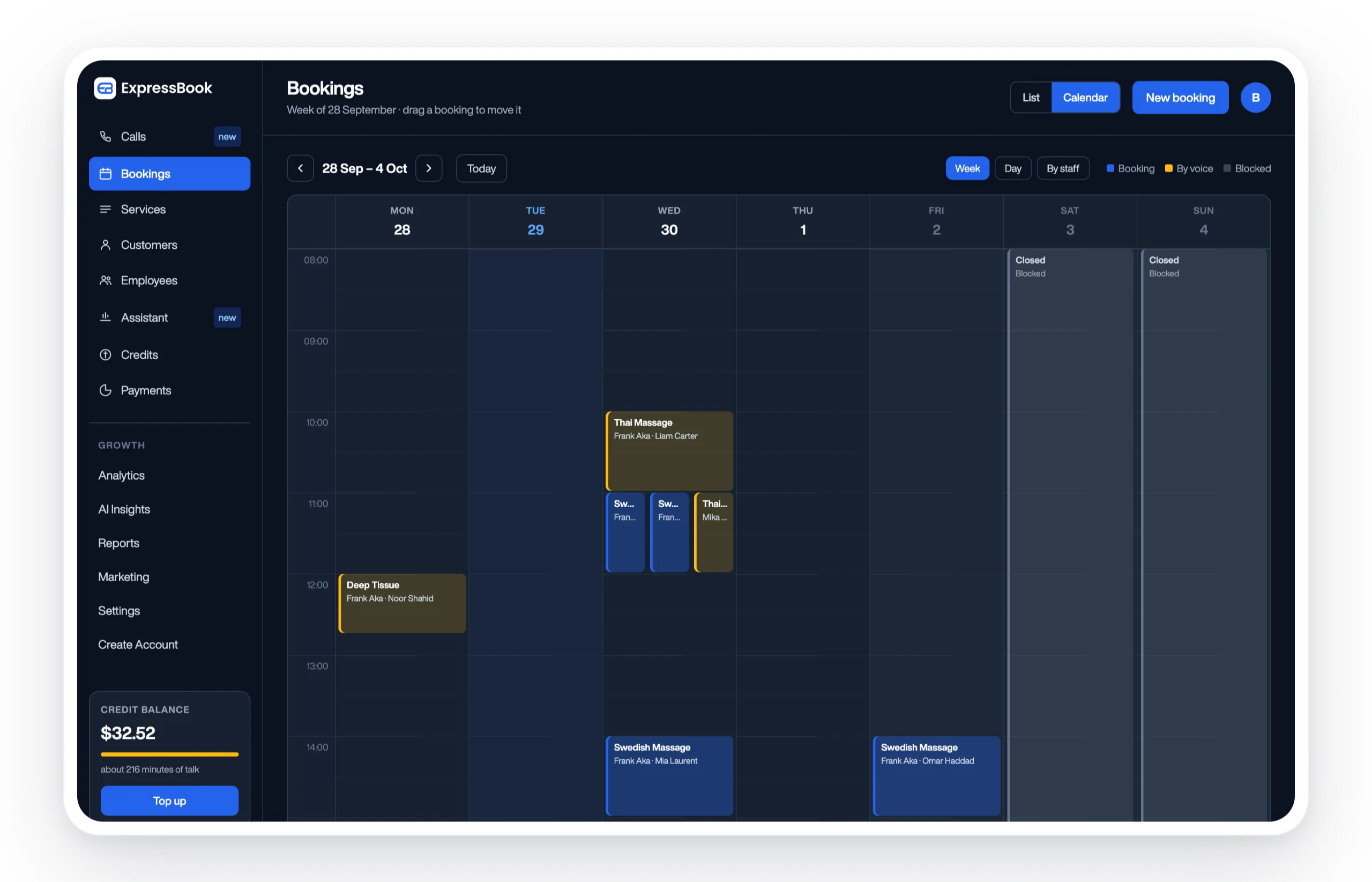
Two concrete integrations make the difference for Expressbook users. First, automated reminders sent 24–48 hours before a charge serve as both a service notification and a payment update prompt, cutting the surprise-charge disputes that generate chargebacks. Second, the mobile app and voice agent give every customer — including visually impaired users — a fast, accessible path to update payment details before a charge fails. For multi-location businesses, the multi-location scheduling overview covers how payment handling scales across sites.
Expressbook has no subscription, so a small credit top-up is enough to test the full platform, including payment capture, reminders, and accounting sync. Try Expressbook and see how tighter scheduling-to-payment workflows reduce failures before they happen.
Sources
Retries and recovery:
- Optimising authorisation rates: How to reduce network declines (Stripe)
- Failed Payment Recovery: What the Data Shows (Recurly)
- Payment Pre-validation (SWIFT)
- How to reduce failed payments and improve authorization rates (Xendit)
- How to Reduce Payment Gateway Transaction Failures (PayU)
Routing and acquirers:
Pre-validation and tokenization:
AP automation and data accuracy:
Broader merchant playbook: