

Publish a short cancellation policy now: state your notice window (24 or 48 hours), your fee for late cancellations or no-shows, your rescheduling option, your exceptions, and where customers can read the full terms. Require a checkbox at booking so every customer confirms they saw it before you take payment details.
You do not need a lawyer to start. You need five elements live on your booking page and confirmation emails by this afternoon:
- A one-sentence definition of what counts as a late cancellation versus a no-show
- Your specific notice window (24 hours, 48 hours, or a custom tier)
- The fee or forfeited deposit tied to missing that window
- At least one exception clause (illness, emergency, provider-side changes)
- A link to your full policy from every confirmation and reminder message
Add a mandatory checkbox at checkout that reads “I have read and agree to the cancellation policy,” then send a timestamped confirmation email restating the terms. That single step turns a policy from a suggestion into something you can actually enforce.
Key Takeaways
A cancellation policy protects revenue only when it states specific notice windows and fees, captures documented consent, and gets enforced the same way for every customer.
| Point | Details |
|---|---|
| Publish five core elements now | Definitions, notice window, fee, exceptions, and a link to full terms belong on every booking page today. |
| Match the fee to service value | A punitive fee on a low-cost service drives customers away; scale the fee to what’s actually at stake. |
| Capture consent, not just intent | A required checkbox plus a timestamped confirmation email gives you evidence if a charge is disputed. |
| Reminders beat penalties | Automated reminders with reschedule links reduce cancellations more effectively than a strict fee alone. |
| Automate enforcement with Expressbook | Stored payments, synced bookkeeping, and prepaid credits with no subscription let you test a consistent policy without manual tracking. |
Table of Contents
- Why a Service Cancellation Policy Matters for Revenue and Scheduling
- What Every Cancellation Policy Needs to Include
- Which Notice Window and Fee Structure Fits Your Business?
- Copy-Ready Cancellation Policy Templates You Can Adapt Today
- How to Make the Policy Enforceable and Avoid Disputes
- Where to Display Your Policy So Customers Actually See It
- Common Mistakes That Undermine a Cancellation Policy
- How Scheduling Automation Helps You Enforce the Policy
- Automate Your Cancellation Policy Without Chasing Every No-Show
- Frequently Asked Questions
- Sources
Why a Service Cancellation Policy Matters for Revenue and Scheduling
A missed appointment costs more than the missed appointment. It costs the slot another customer could have booked, the staff hour already scheduled against it, and the momentum of a full calendar. A clear cancellation policy with defined notice periods, fee rules, and visible placement reduces misunderstandings and disputed charges, which is the real cost most owners underestimate. It is not just the no-show fee you fail to collect. It is the argument at the front desk two weeks later.
Written fairly, the policy becomes a trust signal rather than a threat. Customers who see clear terms up front rarely object to a fee applied consistently; the objections come from policies that feel invented on the spot.
- Protects revenue tied to time-based inventory (a chair, a room, a staff hour) that cannot be resold once the slot passes
- Signals professionalism to new clients evaluating whether your business runs tightly
- Should scale with how “refillable” the slot is: a drop-in fitness class absorbs a cancellation more easily than a two-hour tattoo session or a specialist medical consult
The stricter the fee, the more the service’s actual value needs to justify it. A $25 no-show fee on a $40 haircut reads as fair. The same fee on a $15 class pass reads as punitive.
What Every Cancellation Policy Needs to Include
A workable policy is not a wall of legal text. It is a short checklist you can turn into two or three paragraphs, then paste into your booking software, your website footer, and your confirmation emails.
- Definitions first. Spell out, in plain language, what counts as a cancellation, a reschedule, and a no-show. A reschedule made three days out should never trigger the same consequence as a no-show ten minutes before the appointment.
- Notice windows and tiers. State the exact cutoff, and consider tiering it. Many service businesses use a 24-hour minimum and escalate the fee for cancellations inside two hours or same-day no-shows.
- Fee mechanics. Name the amount or percentage, how it’s charged (card on file, deducted from deposit, invoiced separately), and when it’s collected.
- Exceptions and the emergency clause. Illness, family emergencies, and weather deserve a documented carve-out. Link to the full policy text rather than trying to cram every scenario into the confirmation email.
- Cancellation channels and proof. Tell customers exactly how to cancel, whether that’s a link in the reminder text, a phone call, or a portal, and confirm every cancellation with a timestamped message so neither side is arguing from memory later.
Pro Tip: Keep the confirmation-email version to two sentences and link out to the full policy on your website. Cramming every clause into a reminder text just gets skimmed and ignored.
Service businesses that skip the “proof of cancellation” step lose more disputes than they win. A customer who called and left a voicemail believes they canceled in time; without a logged record, you have no way to prove otherwise.
Which Notice Window and Fee Structure Fits Your Business?
Most service businesses land on a 24 or 48 hour cancellation policy, and the choice usually comes down to how far in advance you can realistically refill the slot. Service businesses commonly use 24 to 48 hour windows, often pairing that notice period with a deposit or a card held on file.
- 24-hour window: Standard for salons, fitness studios, and single-session appointments. Acuity Scheduling notes this as the common baseline for salon and fitness bookings specifically.
- 48-hour window: Better suited to specialists, contractors, or anything requiring travel, equipment prep, or a specific staff member’s time.
- Deposits and prepayment: Appropriate for high-value single sessions (tattoos, bridal services, consulting blocks) where a no-show represents real lost income, not just a gap in the schedule.
- Sliding scale or flat fee: A flat $25-$50 fee works for most appointment-based services; a percentage of the service price fits higher-ticket bookings better, since a flat fee on a $500 service barely registers.
Air travel is the one place a 24-hour cancellation rule is federally mandated. The Department of Transportation requires airlines to fully refund cancellations made within 24 hours of booking, provided the ticket was purchased at least seven days before departure. That rule applies to regulated air carriers only. Nothing obligates a salon, gym, or clinic to mirror it, though plenty of service businesses borrow the same 24-hour language because customers already recognize it.
Refillable group classes tolerate more leniency than one-on-one, high-value bookings. A yoga studio with a waitlist can afford a lighter fee than a med spa holding a 90-minute slot for a single client.
Copy-Ready Cancellation Policy Templates You Can Adapt Today
Here is language you can paste directly into your booking flow, adjusting the numbers to match your own notice window and fee.
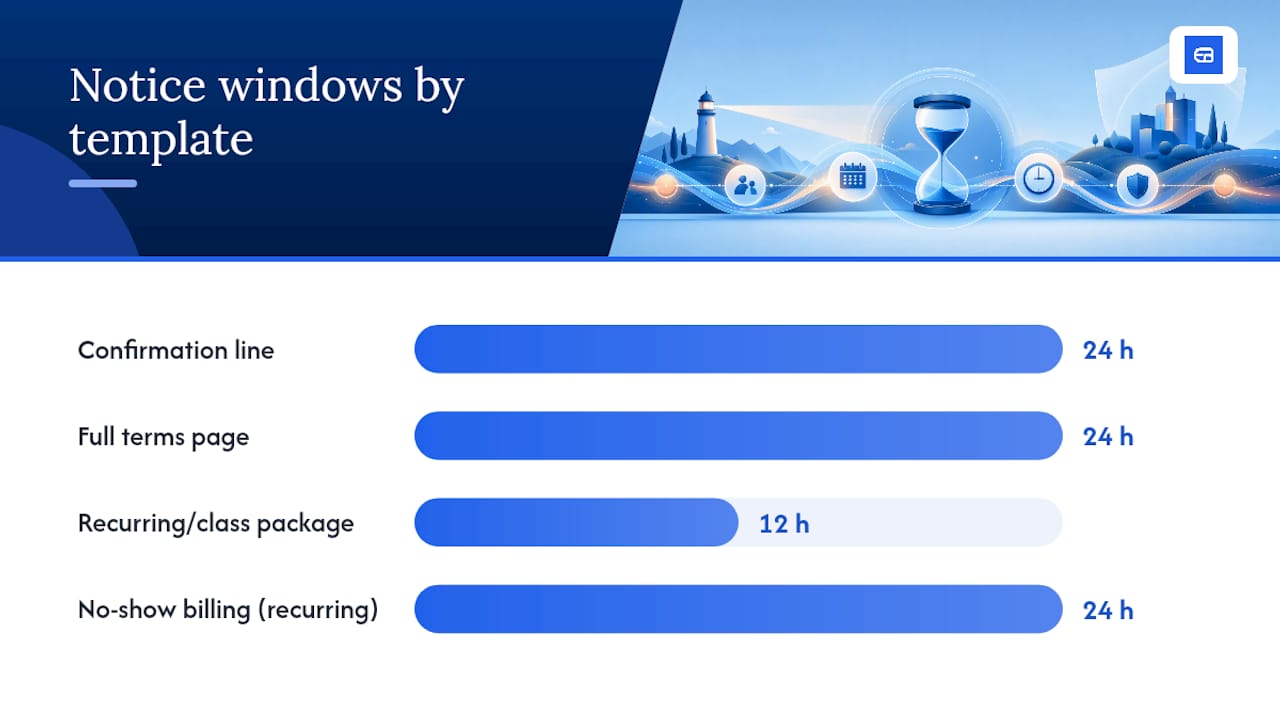
Booking confirmation line (one sentence):
“Cancellations or reschedules require 24 hours’ notice; changes made after this window may incur a $30 fee.”
Full website/terms template (appointment-based services):
“We require at least 24 hours’ notice to cancel or reschedule your appointment; full details are available in our Refund & cancellation policy.” Deposits are non-refundable for cancellations made inside the notice window but are fully transferable to a rescheduled appointment. Exceptions are made for documented medical emergencies on a case-by-case basis. To cancel, use the link in your confirmation or reminder email, or call us directly."
Recurring services and class packages:
“Class cancellations require 12 hours’ notice. Late cancellations forfeit the class credit. No-shows for recurring appointments (weekly training, standing therapy slots) are billed at the full session rate unless canceled at least 24 hours in advance.”
Refund and exception wording:
“Refunds for prepaid packages are prorated based on sessions used and are not issued for no-shows. We waive the cancellation fee once per client per year for documented emergencies.”
| Template type | Best for | Core element to customize |
|---|---|---|
| Confirmation line | All bookings | Notice window and fee amount |
| Full terms page | Appointment services | Exceptions and refund logic |
| Recurring/class package | Studios, tutors, trainers | Credit forfeiture rules |
| Contract addendum | High-value or contract work | Deposit and rescheduling terms |
Adjust the fee percentage and notice window to your own numbers, but keep the sentence structure. Vague language (“we may charge a fee”) invites disputes; specific language (“50% of the service price”) does not.
How to Make the Policy Enforceable and Avoid Disputes
A policy nobody agreed to is a policy you can’t enforce. Making it stick comes down to four operational habits.
- Capture explicit consent. Require a checkbox at booking, not a buried link. Follow it with a confirmation email that restates the policy in plain terms and timestamps when the customer agreed to it.
- Keep an audit trail. Every confirmation, reminder, and cancellation request should be logged with a timestamp. When a customer disputes a charge, you want a record, not a memory.
- Standardize payment handling. Charge fees through the same processor used for the original booking, and issue receipts automatically. Vague or manual fee collection is where most chargebacks originate.
- Train staff to apply it the same way every time. The fastest way to lose a policy’s credibility is letting one manager waive fees while another enforces them strictly. Write the exception rules down so staff aren’t improvising.
Capturing consent through a required checkbox plus a timestamped confirmation email is a low-friction way to create the evidence you need if a customer challenges a charge later. It costs nothing to add and saves the argument entirely.
Where to Display Your Policy So Customers Actually See It
A policy buried in a terms-and-conditions page nobody reads is functionally invisible. Put it where the customer is already looking.
- On the booking page itself, near the confirm button, not on a separate legal page three clicks away
- In the confirmation email, as the one-sentence version, with a link to the full terms
- In every reminder message, paired with a direct reschedule link
- On the printed or emailed receipt, so the terms are documented alongside the transaction
- In your booking footer or terms and conditions page for anyone who wants the full text
Reminders that include a one-click reschedule option cut cancellations more than a strict policy alone, since offering rescheduling as an alternative preserves revenue and the relationship better than a fee ever will. Give staff a short script for handling disputes: acknowledge the situation, point to the timestamped confirmation, and offer to reschedule before defaulting straight to the fee.
Pro Tip: Put the reschedule link directly in the reminder text, not behind a login. Every extra step between “I need to change this” and “done” increases the odds of a no-show instead.
Common Mistakes That Undermine a Cancellation Policy
- Hiding the policy in legal jargon. If customers can’t find or understand it, they can’t be expected to honor it. Write it in plain sentences, not clauses borrowed from a lease agreement.
- Enforcing it inconsistently. One waived fee for a friend of an employee erodes the whole policy’s credibility. Document exceptions and apply them the same way every time.
- Setting fees too punitive for the service value. A no-show fee that costs more than the service itself drives customers away permanently. Match the fee to what’s actually at stake.
- Fix: put the policy in three visible places, write exceptions down in advance, and pilot new fee amounts for a month before rolling them out permanently.
How Scheduling Automation Helps You Enforce the Policy
A policy is only as strong as your ability to apply it without a staff member manually chasing every late cancellation. Automated reminders with built-in reschedule links catch a meaningful share of would-be no-shows before they happen, and automated reminders paired with stored payment methods reduce administrative friction while making enforcement consistent across every booking, not just the ones a manager happens to remember.
A booking system that stores payment details, sends timestamped confirmations, and syncs every transaction to your books removes the two biggest points of friction in cancellation enforcement: proving consent and collecting the fee.
Expressbook supports this directly. Automated reminders and reschedule links cut down last-minute cancellations, stored payment methods let you charge a no-show fee without an awkward phone call, and every transaction syncs automatically with QuickBooks and Xero so the fee shows up in your books without manual entry. The platform’s No-Show Fee Policy Guide walks through wording specifically built for practice managers enforcing these terms day to day. AI-powered analytics flag which clients or time slots generate the most cancellations, a mobile app lets staff manage exceptions on the floor, and a voice agent lets visually impaired customers book and ask policy questions without needing a screen at all.
- Confirmation emails timestamp consent automatically
- Reschedule links reduce the friction that turns a cancellation into a no-show
- Stored payments make fee collection consistent instead of confrontational
Fair enforcement keeps paying customers
Punitive fees feel like protection until you notice how many first-time clients never rebook. A policy enforced consistently, with real exceptions honored, retains more customers than one enforced harshly. Track your no-show rate for a month before changing terms and a month after. If the number doesn’t move, the fee isn’t the fix. Treat the policy as a communication tool first, a revenue guardrail second.

Automate Your Cancellation Policy Without Chasing Every No-Show
Writing the policy is half the job. Applying it consistently, on every booking, without a staff member manually tracking who agreed to what, is the part most service businesses never solve with a static PDF. Expressbook is built to close that gap: reminders go out automatically with reschedule links attached, payment methods stay on file so a late-cancellation fee doesn’t require an awkward phone call, and every confirmation, charge, and refund syncs straight into QuickBooks or Xero without a manual entry at month’s end.
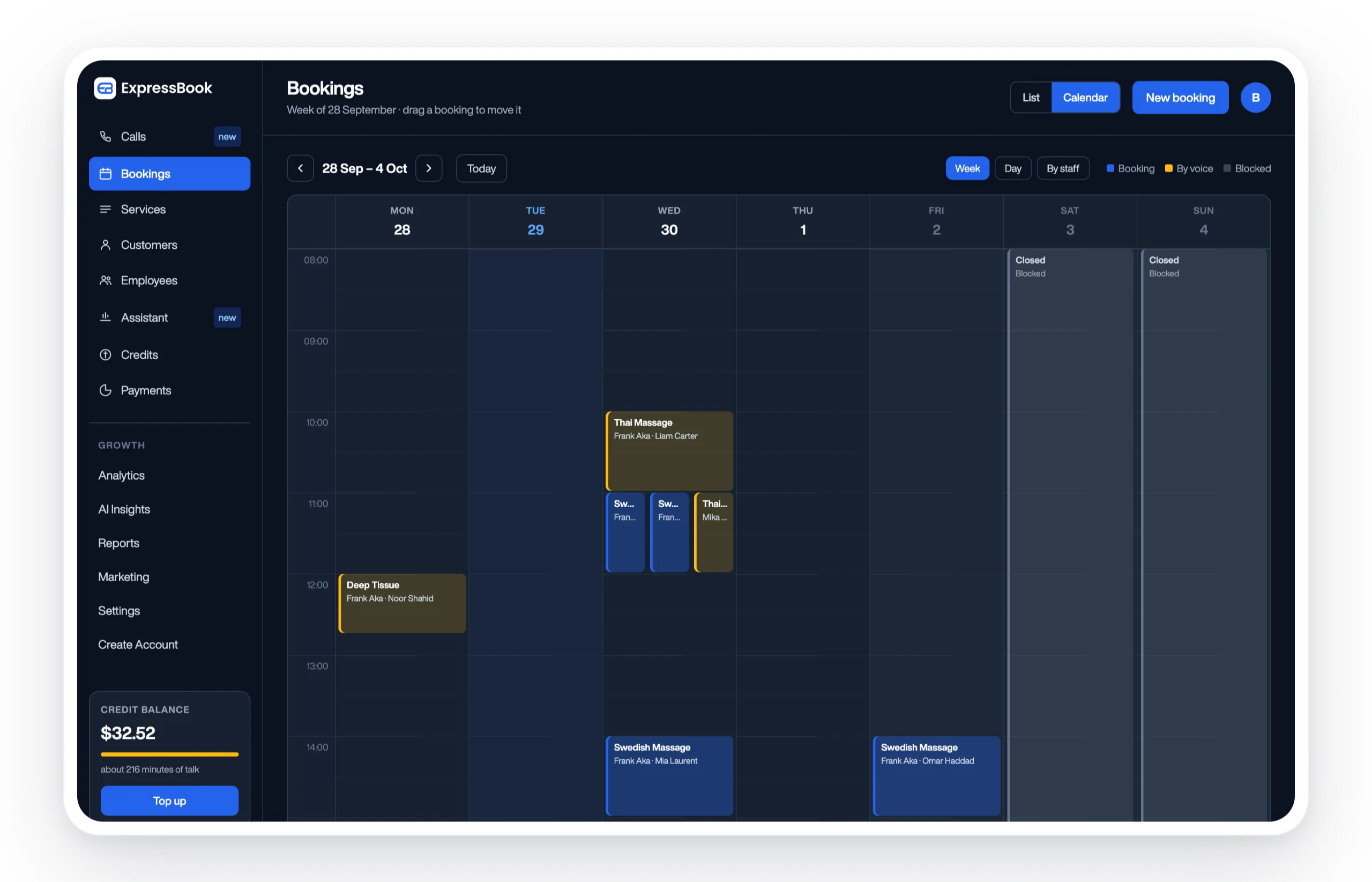
You can test this before committing to anything. Expressbook has no subscription, so a small credit top-up is enough to run a real trial: turn on a 24-hour reminder with a reschedule link, add the required consent checkbox at booking, and compare your no-show rate before and after. The mobile app lets staff handle exceptions from the floor, and the built-in voice agent means clients booking by phone get the same policy information as anyone using the web page. Set it up and see whether a month of consistent enforcement changes your numbers.
Frequently Asked Questions
What should a service cancellation policy include at minimum?
A clear notice window, a specific fee amount, defined exceptions, a rescheduling option, and a visible link to the full terms at every booking touchpoint.
Is a 24-hour cancellation policy standard for all service businesses?
It’s common for salons, fitness studios, and single-session appointments, but higher-value or specialist services often use a 48-hour window instead. There’s no universal legal requirement outside regulated sectors like airline travel.
Can I charge a no-show fee without written consent?
You can try, but you’ll lose more disputes. A checkbox at booking plus a timestamped confirmation email gives you the documentation needed to enforce the charge.
How do I handle cancellations due to illness or emergencies?
Build a documented exception clause into the policy and apply it consistently, such as waiving the fee once per client per year for verified emergencies, so fairness doesn’t depend on staff discretion.
Should recurring services and one-time appointments have different cancellation terms?
Often, yes. Class packages and recurring bookings can use lighter, credit-based terms, while high-value single appointments justify deposits or stricter fees tied to the service’s actual cost.
Sources
- Refunds | U.S. Department of Transportation
- Cancellation policy template: How to reduce cancellations (Shopify)
- Cancellation policy tips and templates for home service pros (GetJobber)