

ExpressBook is the recommended solution for group class scheduling because it automates recurring class templates, capacity limits, waitlists, reminders, payments, and QuickBooks or Xero sync in one system. Small studios, independent instructors, and multi-location service businesses benefit most, since ExpressBook replaces manual spreadsheets and end-of-month reconciliation with a single automated workflow.
TL;DR:
- Automated waitlist promotion and real-time accounting sync significantly reduce manual workload and help recover lost revenue from cancellations.
- Building and testing a recurring class setup in the first week ensures smooth operation, with under an hour typically needed for initial configuration.
- Prioritizing features like capacity rules, flexible reminders, and mobile booking pages improves client experience and minimizes no-shows.
- Role-based access controls prevent security risks by limiting instructor and staff permissions according to their responsibilities.
- A thorough trial over three weeks confirms whether the software’s automation, reporting, and integrations meet your studio’s growth needs.
Table of Contents
- What Does Group Class Scheduling Software Actually Do?
- Key Features to Prioritize When Choosing Scheduling Software
- How Do You Set Up Recurring Group Classes?
- Managing Full Classes and No-Shows Without Manual Work
- Why Accounting Sync Changes the Scheduling Math
- What Pricing Model Actually Makes Sense for Your Studio?
- How Should You Audit a Scheduling Tool Before Committing?
- Automating More Than Just Reminders
- Setting Role-Based Access for Admins and Instructors
- Turning Attendance Data Into Revenue Decisions
- What Support and Training Should You Expect From a Vendor?
- Will the Software Keep Up as Your Studio Grows?
- An Instructor’s Take: Why Switching Actually Saved Time
- How ExpressBook Solves Your Scheduling Headaches
- Sources Worth a Closer Look
What Does Group Class Scheduling Software Actually Do?
Group class scheduling software handles the mechanics of running recurring sessions so you’re not rebuilding a calendar entry by hand every week. At its core, the software needs to publish both recurring and one-off classes, cap enrollment at a set number, take payment at the point of booking, and keep a live roster you can check before class starts.
The booking lifecycle matters more than most owners realize until something breaks. A class typically moves through a few statuses: confirmed (a paid or approved spot), in-review (pending approval or payment verification), and waitlisted (holding a spot behind a full class). Software that doesn’t clearly separate these statuses creates confusion when a client shows up expecting a seat that was never actually confirmed.
Core functions to expect from any legitimate group scheduling platform:
- Publish recurring weekly or monthly class series and one-off workshops from a single template
- Set hard capacity limits per session, with automatic cutoffs once a class fills
- Accept payment (full, deposit, or subscription-based) at the moment of booking
- Maintain a roster with real-time attendance and check-in status
- Offer a public booking page that works cleanly on a phone, not just a desktop browser
That last point deserves attention. Most bookings for recurring group classes now happen on a phone, often between other tasks, so a public booking page that requires zooming or horizontal scrolling loses bookings before a client ever reaches checkout.
Key Features to Prioritize When Choosing Scheduling Software
Not every feature on a vendor’s landing page moves the needle for a studio running recurring classes. Some directly cut admin hours; others are just noise. Prioritize in this order:
- Recurring templates and cloning. You should be able to build one class template (title, time, instructor, capacity) and clone it across weeks or months, then bulk-edit if a holiday or instructor swap changes the schedule.
- Capacity and waitlist rules. Look for configurable promotion behavior. Do waitlisted clients get auto-promoted the moment a spot opens, or does an admin have to approve it manually?
- Automated reminders and cancellation policies. Reminders should fire on a schedule you control (24 hours, 2 hours, whatever fits your class type), paired with a cancellation window you set once and never touch again.
- Payment flows, deposits, and refunds. Deposits protect against no-shows, but refund and chargeback handling needs to be automatic, not a manual credit card lookup every time someone cancels.
- Integrations that matter. Calendar sync (Google Calendar), accounting sync (QuickBooks, Xero), and, where relevant, video or point-of-sale integration.
- Roster management and accessibility. Attendance reporting, exportable rosters, and accessibility features, including mobile apps and voice-based booking for visually impaired clients, are no longer optional extras.
Pro Tip: Test the waitlist promotion setting before you commit to a plan. A platform that only supports manual promotion will quietly hand you back the exact admin work you were trying to eliminate.
The features that matter for choosing the best appointment scheduling software rarely overlap perfectly with what a vendor promotes hardest on its pricing page, so run through this list yourself rather than trusting the feature comparison chart alone.
How Do You Set Up Recurring Group Classes?
Setting up your first recurring class correctly the first time saves you from rebuilding it after a client complains about a double-booking or a missing reminder. Follow this order:
- Build the class template. Enter the title, duration, instructor name, price, and hard capacity limit. Get these right before you touch recurrence settings.
- Configure the recurrence rule. Choose weekly, biweekly, or a custom pattern, then decide your cloning strategy for holidays or instructor changes. Most platforms let you edit a single occurrence without breaking the whole series.
- Set your booking rules. Define the cancellation window (24 hours is common for group fitness), whether payment is required at booking or only to hold a spot, and how the waitlist behaves when a spot opens.
- Turn on reminders and calendar sync. Set reminder timing and connect your Google Calendar so instructor calendars stay current without manual updates.
- Test the booking flow yourself. Book a spot from your phone the way a client would. Confirm the payment step processes correctly and the confirmation email or text arrives.
- Assign staff and test the roster. Add your instructor to the class, then run a mock check-in to confirm attendance tracking updates in real time.
This week-one setup usually takes under an hour once you know your class details, and it’s the single best predictor of whether the software will actually reduce your admin load or just add a new interface to manage.
Managing Full Classes and No-Shows Without Manual Work
A full class is a good problem until the no-shows start eating into revenue you already counted on. The fix isn’t more staff hours watching a spreadsheet. It’s a waitlist and reminder system that runs itself.

Waitlist behavior splits into two camps: automatic promotion, where a waitlisted client gets the spot and a confirmation the second someone cancels, and owner-controlled promotion, where an admin approves each move. Automatic promotion works better for high-volume group fitness or dance classes where speed matters more than curation.
No-show reduction comes down to three tactics that compound on each other:
- Require a small deposit at booking, refunded or applied to future sessions if the client cancels within your policy window.
- Send an SMS reminder within a few hours of class start, not just the night before.
- Offer a flexible but bounded cancellation window (12 to 24 hours) so clients cancel instead of ghosting.
Studios that automate reminders and deposit collection consistently report fewer last-minute no-shows because clients who’ve already paid something, and been reminded recently, show up more often than clients relying on memory alone.
Roster views with simple attendance reporting also flag repeat no-show clients automatically, which lets you address a pattern with one client instead of guessing which regulars are costing you seats. Automations like auto-refunds and scheduled reminders remove the owner from the loop entirely on routine transactions, freeing that time for actual coaching or instruction.
Why Accounting Sync Changes the Scheduling Math
Every group class booking generates three pieces of data: a schedule entry, a payment, and a client record. Most scheduling tools handle the first two and leave the third stranded in a separate system, which is exactly where end-of-month bookkeeping panic comes from.
ExpressBook routes booking, payment, and client data directly into QuickBooks and Xero, so a class payment posted on Tuesday shows up in your books without anyone re-typing it. Live calendar sync also matters beyond convenience: when an instructor’s calendar updates the instant a class fills or an instructor gets added, the back-and-forth of checking “is this slot even open” disappears entirely.
Beyond the accounting sync, a few proof points are worth testing directly during setup:
- The dedicated mobile app for both users and admins, so instructors can manage rosters from a phone between classes.
- A voice agent that lets visually impaired clients book a class or ask questions about the business without needing a sighted assistant.
- AI-powered analytics that surface attendance and revenue trends without building a spreadsheet.
- The claim that owners can save more than 10 hours a week in admin time once booking, payment, and bookkeeping stop requiring separate manual steps.
Pro Tip: During your trial, book a test class, pay for it with a real card, then check QuickBooks or Xero the same day. If the entry appears without you touching it, the integration is doing its job.
What Pricing Model Actually Makes Sense for Your Studio?
Pricing for group class scheduling tools tends to follow one of three shapes: flat monthly subscriptions with unlimited classes, per-booking or per-seat fees, and tiered plans that gate advanced features behind higher price points.
Multi-location scheduling, advanced reporting, and full accounting sync are the features most commonly reserved for mid-tier or top-tier plans, so check exactly which tier includes QuickBooks or Xero sync before comparing sticker prices across vendors.
The real comparison isn’t monthly cost. It’s break-even math: if a plan costs $79 a month and saves you five hours of manual reconciliation and reminder-sending each week, it pays for itself in less than a single billing cycle for most instructors charging even modest hourly rates.
Before signing anything, ask vendors:
- What’s the actual trial length, and does it include full integrations or a stripped-down version?
- What’s the refund policy if the tool doesn’t fit after the trial ends?
- Are there per-transaction fees on top of the subscription price?
ExpressBook has no subscription, so a small credit top-up is enough to run at least one full billing cycle through your accounting software.
How Should You Audit a Scheduling Tool Before Committing?
A tool is only worth adopting if you test it like an audit, not a demo. Spread the work across three weeks so you’re not rushing:
- Week one: Build your first recurring class template, set capacity, and publish the public booking page. Book a test slot from your own phone.
- Week two: Test the waitlist by overbooking a class, then process a real cancellation and refund to confirm the money flow works cleanly.
- Week three: Turn on calendar and accounting sync, run a full week of real bookings, then check whether the QuickBooks or Xero export matches your actual transactions.
Audit questions worth answering honestly: Does the mobile booking flow feel fast, or does it stall at checkout? Are reminders arriving at a timing that actually reduces no-shows? Does the accounting export require any manual cleanup?
| Trial focus | What to check | Signal of a good fit |
|---|---|---|
| Booking flow | Mobile checkout speed | Completes in under a minute |
| Waitlist | Promotion behavior | Matches your studio’s policy |
| Accounting sync | Export accuracy | Zero manual corrections needed |
Track your own admin hours during week three against a typical pre-trial week. That comparison, not the feature list, tells you whether the switch is worth making.
Automating More Than Just Reminders
Reminders get most of the attention in scheduling automation, but the deeper time savings come from workflows that run without anyone pressing a button. Automatic waitlist promotion is the clearest example: the moment a spot opens from a cancellation, the next person in line gets a confirmation and a payment prompt, with no admin checking a list.
Other automations worth expecting from a mature platform include auto-refunds triggered by your cancellation policy, automatic rebooking prompts for clients who’ve missed two or more sessions in a series, and capacity-based alerts that notify an instructor when a class is nearing full so they can plan for a second session. Some platforms extend this further with automatic instructor reassignment when a scheduled instructor cancels, pulling from a pool of qualified substitutes rather than leaving an owner to text around for coverage.
The pattern across all of these is the same: automation should handle the predictable, repetitive decision, not just the notification. A reminder that fires on schedule is useful. A system that also fills the resulting empty seat, processes the refund, and updates the roster without a human touching any of it is what actually gets an owner their evening back.
When evaluating a platform, ask specifically what happens after a cancellation, not just before one. That single question separates tools that automate the easy half of the workflow from tools that automate the whole thing.
Setting Role-Based Access for Admins and Instructors
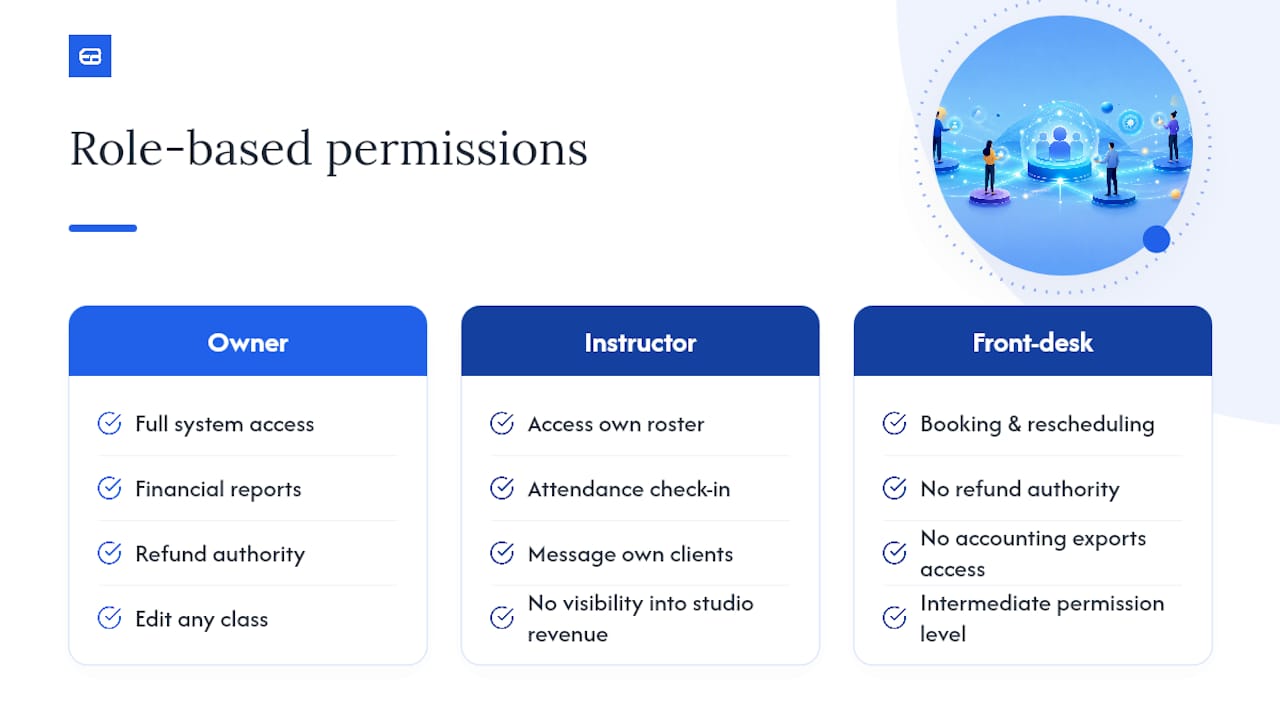
Not everyone touching your scheduling system needs the same access, and getting this wrong creates either a security gap or a bottleneck. Owners typically need full access: financial reports, refund authority, and the ability to edit any class. Instructors usually need a narrower slice: their own roster, attendance check-in, and the ability to message their own clients, without visibility into revenue across the whole studio.
Front-desk or assistant roles sit in between, often needing booking and rescheduling permissions but not refund authority or access to accounting exports. Getting these permission tiers right matters most once you add a second instructor or a second location, since that’s the point where informal trust (everyone sees everything) starts creating real risk, whether that’s an instructor accidentally deleting another class or a front-desk staffer issuing refunds without approval.
A platform worth using should let you set these permissions once per role, rather than configuring access person by person. That distinction matters as a studio grows past two or three staff members, since re-creating permission settings for every new hire is exactly the kind of manual task good scheduling software is supposed to eliminate.
Multi-instructor studios should also check whether permission changes apply retroactively to existing bookings or only going forward, since a permission structure that breaks historical roster access on change is a bigger problem than it sounds during setup.
Turning Attendance Data Into Revenue Decisions
Attendance numbers alone tell you who showed up. Revenue and utilization reporting tells you whether a class is actually worth the slot it occupies on your calendar, and that distinction is where most owners are flying blind without realizing it.
A class that fills every week looks successful until you check the numbers behind it: if it’s consistently full at a discounted intro rate while a half-full class next door runs at full price, the half-full class may be generating more per-seat revenue. Utilization reporting, which tracks booked seats against total capacity over time, surfaces this kind of pattern that raw attendance counts hide.
Useful reporting for a group class business typically breaks down into a few categories:
- Attendance trends by class, instructor, and time slot, showing which sessions are gaining or losing consistent bookings.
- Revenue per class, factoring in deposits, full payments, and any promotional pricing applied.
- Utilization rate, or booked capacity divided by total capacity, which flags underused time slots worth cutting or repricing.
AI-powered analytics can surface these patterns automatically, flagging a declining trend before it becomes an obvious revenue problem rather than after three months of quietly shrinking bookings. The practical value isn’t the dashboard itself. It’s catching the pattern early enough to change your schedule, pricing, or instructor assignment before a class fades out entirely.
What Support and Training Should You Expect From a Vendor?
Software that’s hard to learn creates its own admin burden, which defeats the entire point of adopting it. Before committing to any scheduling platform, check what onboarding actually looks like beyond a generic help center.
Look for a knowledge base with actual walkthroughs for common tasks (setting up recurring classes, configuring waitlists, connecting accounting software), not just a list of feature definitions. Live chat or email support with a reasonable response window matters more once you’re mid-setup and something isn’t syncing correctly. User reviews on independent platforms like G2’s page for scheduling software often surface recurring complaints about onboarding friction, which is worth reading before you commit, since a platform with strong features but a rough setup experience can cost you more time in month one than it saves you afterward.
Ask directly whether onboarding support is included in your plan tier or sold separately, since some vendors charge extra for guided setup calls. A vendor willing to walk through your specific class structure during a trial, rather than pointing you to generic documentation, is usually a sign the support model scales with your studio rather than leaving you to figure out edge cases alone.
Training resources matter just as much for your instructors as for you. If your staff can’t manage their own roster and attendance without calling you first, the software hasn’t actually reduced your admin load. It’s just shifted it.
Will the Software Keep Up as Your Studio Grows?
A scheduling tool that works fine for one instructor and twenty weekly bookings can buckle once you add a second location or triple your class count. The signs to check for before you scale, not after.
Multi-location support should mean separate calendars, rosters, and reporting per location, with the option to view aggregate data across all of them from a single dashboard, not a workaround involving multiple logins. Instructor capacity matters too: a platform charging per-instructor or capping the number of active class templates on lower tiers can turn growth into an unplanned upgrade decision.
Calendar conflict checking becomes more important as class volume grows, since the odds of double-booking a room or an instructor rise sharply once you’re running fifteen or twenty sessions a week instead of five. Resource matching, confirming a room’s capacity matches the class capacity you’ve set, prevents the kind of overbooking that only surfaces when forty people show up for a room built for twenty five.
Reporting also needs to scale without becoming unreadable. A studio running three classes benefits from a simple attendance list; a studio running thirty needs filtering by location, instructor, and date range just to make the data usable. Before you scale, confirm your platform’s reporting tools grow with your class count instead of just piling more rows into the same flat table.
An Instructor’s Take: Why Switching Actually Saved Time
Studios that switch to an integrated system usually notice the change first in reconciliation, not bookings. Once payments post automatically to QuickBooks or Xero, the monthly scramble to match transactions against a spreadsheet disappears, and no-shows drop once deposits and same-day reminders replace a single night-before text.
The tactical lesson: automatic waitlist promotion matters more than any other single feature, because it recovers revenue from cancellations without anyone lifting a finger.
— serge
How ExpressBook Solves Your Scheduling Headaches
ExpressBook is the direct fix for the accounting reconciliation problem this entire guide keeps circling back to: instead of exporting bookings to a spreadsheet and re-entering payments into your books, ExpressBook syncs class bookings, payments, and client data straight into QuickBooks and Xero as they happen. Add the dedicated mobile app for instructors and admins, a voice agent that lets visually impaired clients book or ask questions independently, and automated reminders and roster management running in the background, and the admin time you’d normally spend on reconciliation goes toward actually teaching.
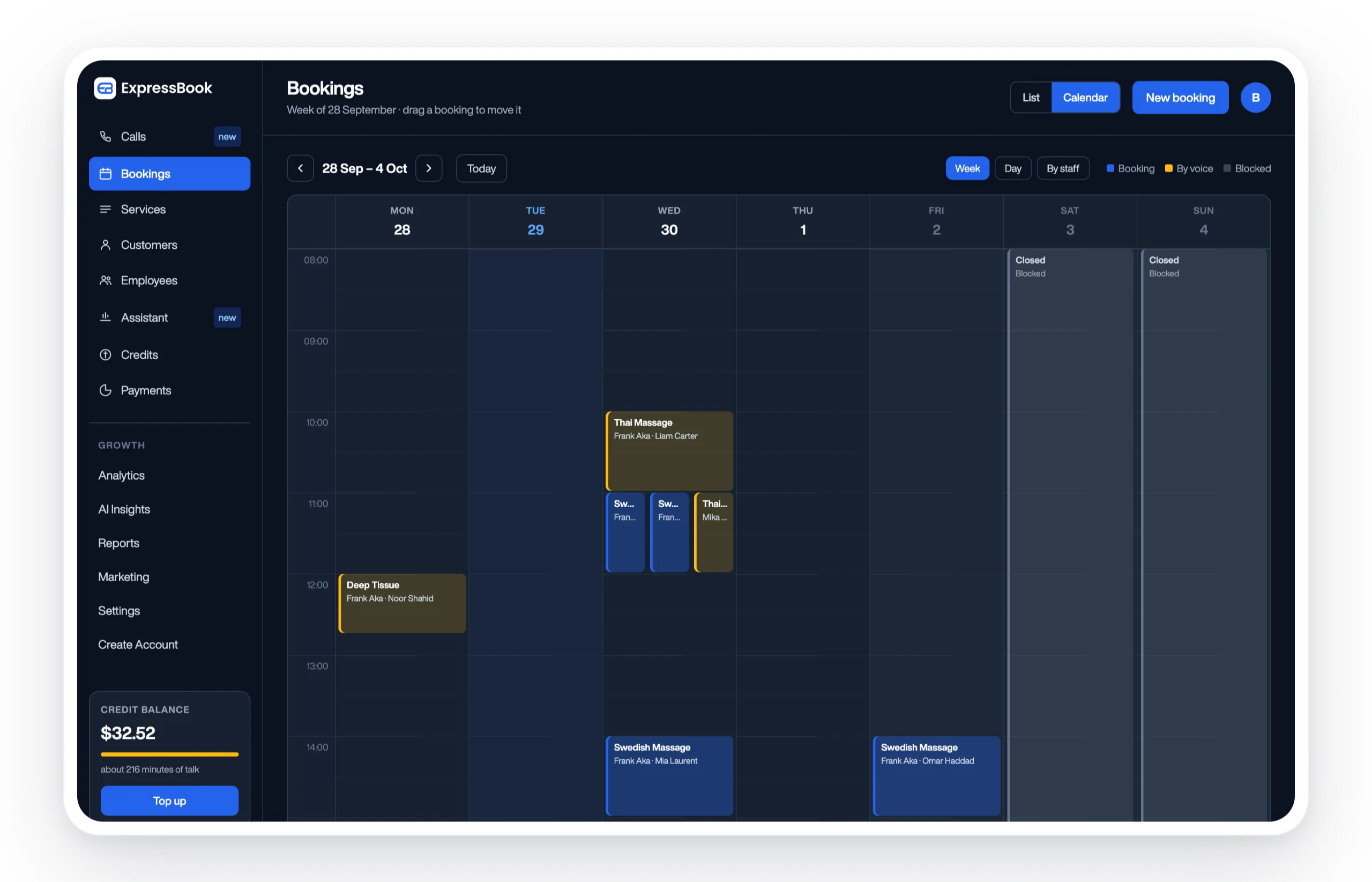
ExpressBook has no subscription, so you can run the full audit outlined above on a small credit top-up without rushing a decision. Start with the ExpressBook platform, run through the getting-started checklist from week one, and reach out to onboarding support if a specific integration needs a hand. If your studio runs recurring group classes, a few weeks on prepaid credits is enough to know for certain whether it fits.
Sources Worth a Closer Look
The onboarding friction patterns referenced above come from real user feedback on Trustpilot’s reviews of SuperSaaS, a useful gauge of what small-business buyers actually flag as pain points. Marketplace listings like the Lunacal AI product page show how scheduling tools get distributed and reviewed at enterprise scale. For a deeper dive into evaluation criteria beyond this guide, see ExpressBook’s scheduling software alternatives roundup.