Payment links are a fast, secure way to collect deposits, balances, and one-off booking fees without building a full checkout page. They work through a shareable URL or QR code, so a client can pay from a text message, an email, or a social DM in under a minute. The main things to watch are link expiry, whether the charge captures immediately or just holds funds, and making sure every payment gets matched back to the right booking.
TL;DR:
- Using payment links is ideal for securing deposits and full prepayments outside of your website, especially for high-demand bookings and add-ons.
- Always specify the purpose and expiry window accurately, and embed the booking reference in the link description to ensure proper reconciliation.
- Hosted checkout pages reduce PCI scope and liability, but require capturing timing and reservation IDs for efficient booking matching.
- Proper logging of all payment events and including clear refund policies in the request help prevent chargebacks and disputes.
- Integrating payment links with booking and accounting software, like QuickBooks or Xero, automates reconciliation and reduces manual administrative tasks.
Table of Contents
- When Should You Use Payment Links for Appointments?
- How Do You Create and Send a Payment Link for a Booking?
- How Do Payment Links Work Behind the Scenes?
- Handling Security, Refunds, and Chargebacks
- Connecting Payment Links to Your Booking and Accounting Software
- The Mistakes I See Most Often With Booking Payment Links
- How ExpressBook Handles Payment Links Without the Manual Cleanup
- Sources
When Should You Use Payment Links for Appointments?
Payment links solve a specific problem: getting paid fast when you don’t have (or don’t want to force a client into) a full web checkout. They shine anywhere a booking happens outside your website, over the phone, through a DM, or at the front desk.
Common uses include:
- Deposits to secure a slot before a service, especially for high-demand appointments.
- Full prepayment for classes, workshops, or first-time client bookings.
- Add-ons, like a late-cancellation fee or an extra treatment tacked onto an existing appointment.
- Quick card retries when an original charge fails, without re-collecting card details over the phone.
- In-person QR payments at a front desk or on a mobile card reader, which benefit from quick and reliable QR code setups as explained in QR Code reviews in Windsor: The fast setup that actually works.
Payment links replace clunkier processes: staff manually keying in card numbers, emailing PDF invoices and waiting days for a wire, or forcing a client through an entire booking flow just to pay a small fee. They’re less suited to situations that need a true pre-authorization hold (reserving funds without charging them) or subscription-style recurring billing, since most links are built for one-time payment collection rather than ongoing charge schedules.
How Do You Create and Send a Payment Link for a Booking?
Creating a link takes a few minutes once you know the sequence. Skipping a step, especially expiry, is where most booking payment problems start.
- Set the amount and purpose first. Decide if this is a deposit, a final balance, or an extra charge, and label it clearly so the client isn’t guessing what they’re paying for.
- Set an expiry window. Short-notice bookings often use windows as tight as 30 minutes, while advance deposits might stay open for 24 hours or more, based on how booking-focused vendors typically configure expiry.
- Generate the link. You can do this from your booking admin dashboard, have it auto-generate the moment a booking is created, or build it programmatically through a payment links API if you need custom logic.
- Pick a delivery channel. Email works for advance deposits; SMS and QR codes convert better for short-notice or in-person payments because clients act on them immediately instead of letting an email sit unread.
- Write the message with context. Include the booking reference number, the amount, what it covers, and a line on refund terms so there’s no dispute later.
- Track status and reconcile. Watch for paid, pending, expired, or cancelled states, resend if needed, and log the payment against the booking record.
Pro Tip: Always put the booking reference number directly in the payment link’s description field, not just in your message text. If a client forwards the link or loses the original text, the reference travels with the payment itself.
How Do Payment Links Work Behind the Scenes?
Most payment links run through a hosted checkout page, meaning the payment processor, not your booking software, handles the actual card entry screen. Providers like PayPal and Stripe let you spin up that page in a few clicks and share it by URL or QR code, or generate it automatically through an API tied to your booking system.
This distinction matters for two reasons:
- PCI scope shrinks dramatically. Because card data never touches your own servers, hosted checkout usually keeps your compliance burden far lighter than building your own payment form.
- Capture timing changes what you’re guaranteeing. Immediate capture takes the money right away; pre-authorization just holds it, useful for no-show protection, but it means the booking isn’t fully “paid” until you capture the hold.
- Links can be single-use or reusable, and most platforms let you set a hard expiry, commonly ranging from 30 minutes to 24 hours depending on urgency.
The processor handles fraud screening and settlement timing. Your booking system still has to reconcile which link paid for which appointment, which is where booking-aware links (links that carry a reservation ID) save hours of manual matching.
Handling Security, Refunds, and Chargebacks
A payment link is only as trustworthy as the paper trail behind it. Booking systems that log every event, sent, opened, paid, expired, cancelled, with timestamps and link IDs give you a single source of truth for disputes, which matters enormously when a client challenges a charge weeks later.
Build these habits into every link you send:
- Tie the booking reference and customer contact info to every link, so you have proof of service tied to the payment.
- Publish a clear refund and cancellation policy and include it in the payment request itself, not buried on a separate page.
- Keep receipts, confirmations, and communication logs organized. This is your primary chargeback defense.
- Use hosted checkout wherever possible to limit how much payment data your own systems ever touch.
Pro Tip: Store only the booking metadata you actually need, like service type, date, and staff member. Extra personal data you’re not using is just extra liability if you ever face a data request or a breach.
Connecting Payment Links to Your Booking and Accounting Software
A payment link that doesn’t talk to your booking calendar just creates more admin work later. Embedding the booking ID and metadata directly into the link is what lets a payment map automatically to the right reservation, an approach vertical payment tools increasingly build in by default.
You generally have three integration paths:
- Native booking-system link features, where your scheduling platform generates and tracks the link for you.
- Webhooks, which push real-time status updates (paid, expired, refunded) back into your booking record.
- Direct processor APIs, useful if you need custom logic across multiple booking sources.
For accounting, map every completed payment to an invoice in QuickBooks or Xero so reconciliation happens automatically instead of at month-end. If you take bookings from multiple sources, a marketplace and your own direct booking page, keep a unified payment log across both so nothing falls through the cracks during tax season.
The Mistakes I See Most Often With Booking Payment Links
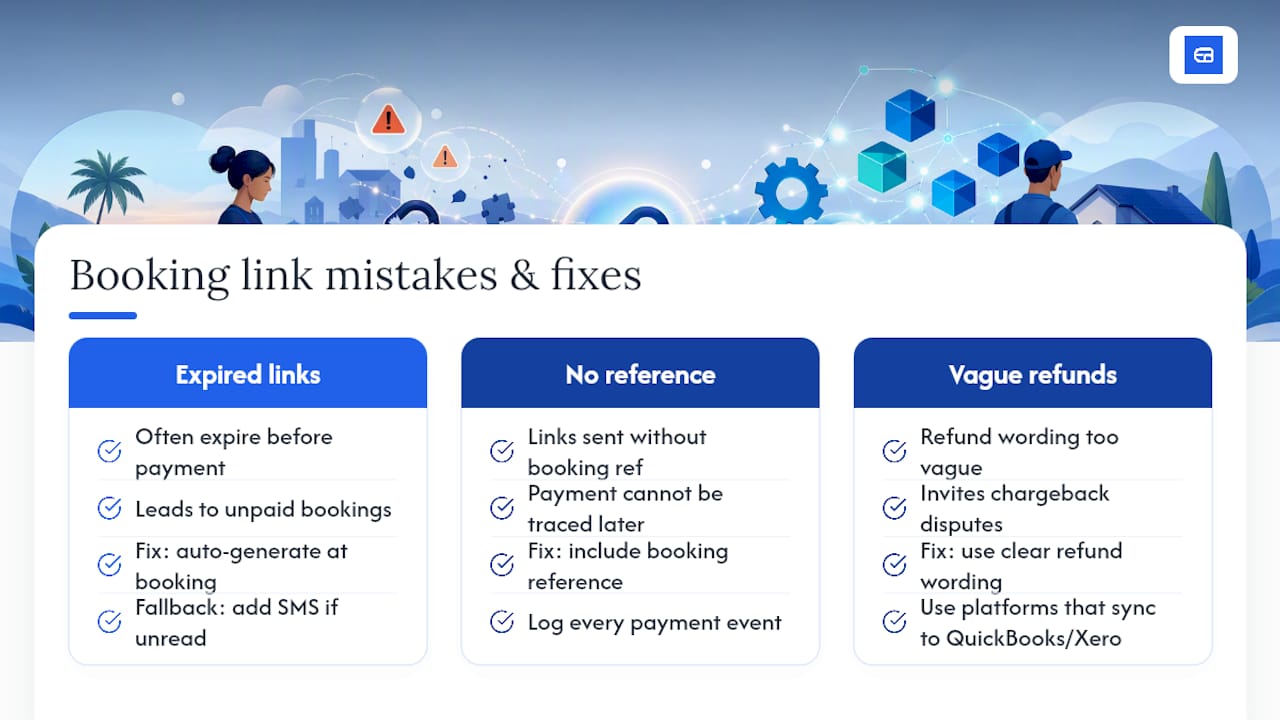
Three mistakes show up constantly: links that expire before a client gets around to paying, links sent without a booking reference (so nobody can trace the payment back later), and refund wording so vague it invites a chargeback dispute. None of these are technical problems. They’re process gaps.
The fix is almost always automation. Generate the link the moment a booking is created instead of relying on staff to remember. Add SMS as a fallback when email goes unread. Log every payment event without exception. Platforms that sync payments straight into QuickBooks and Xero, offer mobile admin access, and support voice-driven booking for accessibility remove most of the manual failure points before they happen.
— serge
How ExpressBook Handles Payment Links Without the Manual Cleanup
ExpressBook is the alternative to juggling a payment processor dashboard separately from your booking calendar. Every payment link it generates is booking-aware from the start, carrying the reservation ID automatically, so a paid deposit updates the client’s booking status in real time instead of sitting in a separate app waiting to be matched by hand.
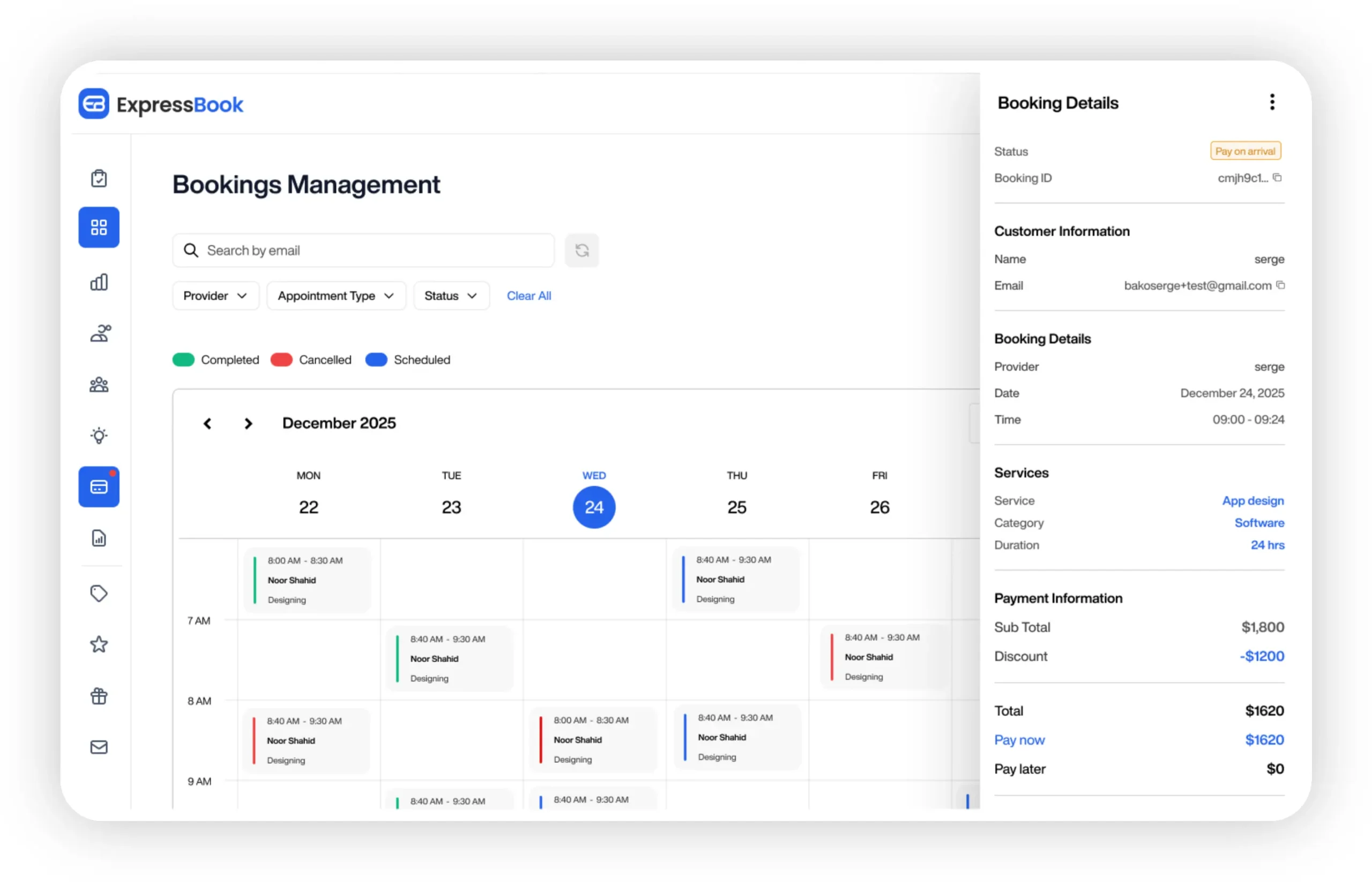
Payments sync directly to QuickBooks and Xero, which means no month-end scramble reconciling who paid what. The platform includes a dedicated mobile app for both staff and admins, so a manager can resend or cancel a link from a phone between appointments, and a voice agent that lets visually impaired clients book and ask questions without needing a screen at all. Automated reminders cut down on the missed-payment follow-ups that eat into a front desk’s afternoon.
You can test the entire workflow, from link creation to accounting sync, with up to three months free before committing to anything. Start your trial at Expressbook and see how much manual reconciliation disappears from your week.
Sources
- Payment Links: Accept Payments Without a Website | PayPal US
- Stripe Payment Links | Simple Links to Accept Payments
- How to use payment links for bookings – Alba Docs