Here are the appointment reminder templates you need right now. Copy, paste, and adapt them to your scheduling system today. Research from Textedly reports that SMS carries a very high read rate, and Zocdoc’s scheduling guidance recommends a 3–5 touch cadence to achieve the best show-rate results. Used together, these templates can meaningfully cut no-shows and recover revenue from slots that would otherwise go empty.
TL;DR: A well-timed sequence of SMS, email, and phone reminders typically reduces no-shows by a significant margin. The single best immediate action: drop the 24-hour SMS template below into your scheduling system today.
Quick-copy starter pack (personalization placeholders in brackets):
SMS — Booking confirmation:
Hi [Name], your appointment is confirmed for [Date] at [Time] with [Business Name] at [Location]. Reply STOP to opt out.
SMS — 24-hour reminder:
Hi [Name], reminder: your appointment is tomorrow, [Date] at [Time] at [Location]. Reply YES to confirm or call [Phone] to reschedule. Reply STOP to opt out.
SMS — Day-of / 2-hour nudge:
Hi [Name], your appointment with [Provider] is in 2 hours at [Time], [Location]. See you soon! Reply STOP to opt out.
SMS — Reschedule/cancel:
Hi [Name], we noticed you may need to reschedule. Use this link to pick a new time: [Reschedule Link]. Questions? Call [Phone]. Reply STOP to opt out.
SMS — Payment reminder:
Hi [Name], a balance of [Amount] is due for your [Date] appointment. Pay here: [Payment Link]. Reply STOP to opt out.
Email — Subject: Your appointment is confirmed — [Date] at [Time]
Body: Hi [Name], your appointment with [Provider/Business Name] is confirmed for [Date] at [Time] at [Location]. Add it to your calendar: [ICS Link]. Need to reschedule? [Reschedule Link] | [Phone]. [Unsubscribe Link]
Email — Subject: Reminder: your appointment is tomorrow
Body: Hi [Name], just a quick reminder that your appointment is tomorrow, [Date] at [Time] at [Location]. Please arrive 10 minutes early and bring [Required Items]. Questions? Reply to this email or call [Phone]. [Unsubscribe Link]
Phone/voicemail script:
“Hi, this is [Name] calling from [Business Name]. I’m reaching out to confirm your appointment on [Date] at [Time]. Please call us at [Phone] to confirm or reschedule. We look forward to seeing you.”
Statistic callout: SMS read rates reach as high as 98%, making text the highest-attention channel for time-sensitive appointment reminders.
Table of Contents
- Why reminders reduce no-shows and which KPIs they move
- What makes a reminder actually work: writing and timing principles
- Ready-to-copy SMS and text reminder templates
- Email reminder templates that cover every stage
- Phone call and voicemail scripts for high-value appointments
- Industry-specific templates and tone adjustments
- How to automate reminders at scale and where Expressbook fits
- U.S. SMS compliance checklist (TCPA basics for appointment reminders)
- Key takeaways: what to implement this week
- The case for getting reminders right before anything else
- Expressbook handles your reminder workflow so you can focus on the work
- Useful sources and references
Why reminders reduce no-shows and which KPIs they move
No-shows cost service businesses real money. A missed slot cannot be resold after the fact, which means every empty chair or unfilled hour is pure lost revenue. Automated reminders address this directly by keeping the appointment top of mind and giving clients an easy path to reschedule rather than simply not showing up.
The Validity State of SMS Marketing report provides empirical channel benchmarks confirming SMS as the dominant engagement channel for time-sensitive communications. Email performs well for longer-form content like prep instructions and cancellation policies, while phone calls remain the strongest channel for high-value or medically sensitive appointments.
Channel performance at a glance:
| Channel | Typical read/open rate | Best use case | Response speed |
|---|---|---|---|
| SMS | Very high (up to 98%) | 24h and 2h nudges, quick confirms | Minutes |
| Moderate (varies by list) | Booking confirmation, prep instructions, payment reminders | Hours | |
| Phone/voicemail | Situational | High-value, medical, missed prior reminders | Same day |
KPIs to track once reminders are live:
- Confirmation rate: — Percentage of clients who reply YES or click confirm. A rising confirmation rate predicts attendance.
A simple formula to estimate recovered revenue: (Current no-show rate − Target no-show rate) × Monthly appointments × Average service value. Run this calculation before and after deploying reminders to make the business case concrete.
What makes a reminder actually work: writing and timing principles
Four elements belong in every reminder, regardless of channel: who is sending it, what the appointment is for, when it happens, and how to change or cancel. Miss any one of these and clients either ignore the message or call your front desk to ask the question the reminder should have answered.
Tone by industry:
Tone should match the service context. Healthcare, legal, and financial appointments call for a formal, privacy-conscious register. Salons, spas, and fitness studios earn better engagement with a warmer, conversational voice. Typedesk’s template guidance makes this point clearly: reminders should sound human and concise, not like automated system output.
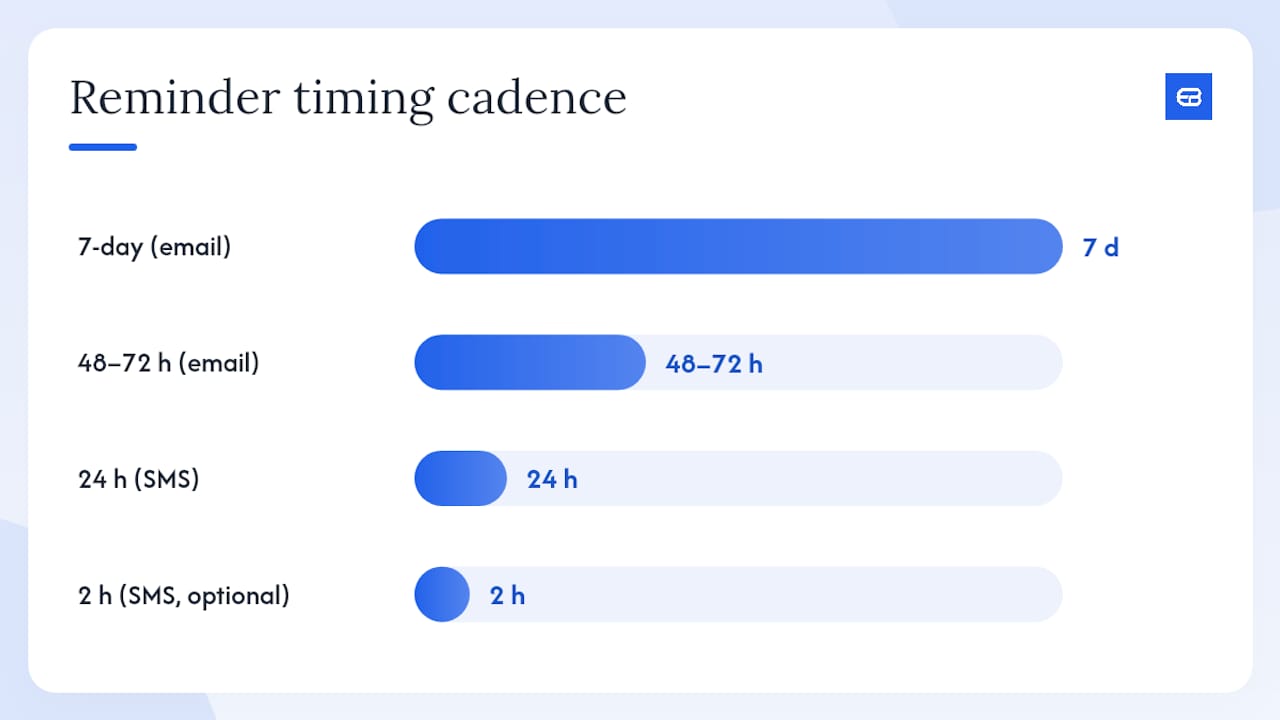
Recommended timing cadence:
- Booking confirmation: send immediately after booking (SMS + email)
- 7-day reminder: for appointments booked weeks in advance (email preferred)
- 48–72 hours out: email with prep instructions and cancellation policy
- 24 hours out: SMS for high-attention nudge
- 2 hours out (optional): SMS for same-day appointments or high-value services
- Post-no-show: SMS or email with reschedule link (not accusatory in tone)
Zocdoc recommends a 3–5 touch cadence for healthcare practices, with the 24-hour SMS consistently cited as the single highest-impact touch.
Do’s and don’ts:
- Do personalize with name, date, time, and provider name.
- Do include a one-tap reschedule link in every SMS.
- Do add opt-out language to every SMS (required under U.S. TCPA rules).
- Don’t send more than 3 reminders for a single appointment without a confirmed response.
- Don’t use accusatory language (“You missed your appointment again”). Shopify’s template guide notes that framing like “We look forward to seeing you” consistently outperforms punitive language.
- Don’t send SMS outside 8 AM–9 PM local time.
Pro Tip: Add a single-character confirmation request to your 24-hour SMS (“Reply Y to confirm”). This micro-CTA captures intent without friction and gives your system a signal to suppress the 2-hour nudge for confirmed clients, reducing message fatigue.
Ready-to-copy SMS and text reminder templates
SMS should stay under 160 characters when possible to avoid carrier splitting, though most modern platforms handle multi-part messages cleanly. Always include a response option (Y/N, 1/2, or a link) and an opt-out line. The templates below are organized by send timing.
Booking confirmation SMS:
Hi [Name]! Your [Service] is booked for [Date] at [Time] with [Business Name]. [Location/Address]. Reply STOP to opt out.
7-day reminder SMS (long-lead appointments):
Hi [Name], your [Service] appointment is one week away on [Date] at [Time] at [Location]. Need to reschedule? [Link]. Reply STOP to opt out.
48–72 hour reminder SMS:
Hi [Name], your appointment with [Provider] is in 2 days on [Date] at [Time]. Please [Prep Instruction if needed]. Reply YES to confirm or [Link] to reschedule. Reply STOP to opt out.
24-hour reminder SMS:
Hi [Name], your [Service] is tomorrow at [Time] at [Location]. Reply Y to confirm or call [Phone] to reschedule. Reply STOP to opt out.
Day-of / 2-hour SMS:
[Name], your [Service] with [Provider] starts in 2 hours at [Time], [Location]. See you soon! Reply STOP to opt out.
Reschedule/cancel flow SMS:
Hi [Name], we have an opening if you need to reschedule your [Date] appointment. Pick a new time here: [Reschedule Link]. Reply STOP to opt out.
Payment reminder SMS:
Hi [Name], a payment of [Amount] is due for your [Date] visit. Complete it here: [Payment Link]. Questions? Call [Phone]. Reply STOP to opt out.
Opt-out line options:
- “Reply STOP to unsubscribe.”
Personalization tags to use with scheduling software: [FirstName], [AppointmentDate], [AppointmentTime], [ProviderName], [LocationAddress], [RescheduleURL], [PaymentURL], [BusinessPhone].
Two-way SMS flows work well when your platform can route replies. A “Y” confirmation can auto-update the appointment status; a “N” or “CANCEL” can trigger a reschedule link automatically. For platforms without two-way routing, a reschedule link in every message achieves a similar outcome.
Pro Tip: Do not message clients outside 8 AM–9 PM in their local time zone. Scheduling software that detects client time zones handles this automatically; if yours does not, default to your business’s local time and note the limitation.
Email reminder templates that cover every stage
Email earns its place in the reminder sequence for content that needs more than 160 characters: prep instructions, cancellation policies, maps, and payment details. Reply.io’s email reminder guidance recommends sending the first long-touch email at 48–72 hours, with a shorter follow-up at 24 hours if the client has not confirmed.
Booking confirmation email:
Subject: Your [Service] appointment is confirmed — [Date] at [Time]
Body: Hi [Name], your appointment with [Provider] at [Business Name] is confirmed for [Date] at [Time] at [Location/Address]. Add to your calendar: [ICS Link]. To reschedule or cancel, visit [Reschedule Link] or call [Phone]. We look forward to seeing you. [Unsubscribe Link]
48–72 hour reminder email:
Subject: Your appointment is in 2 days — here’s what to know
Body: Hi [Name], a quick reminder that your [Service] is scheduled for [Date] at [Time] at [Location]. Please [Prep Instructions, e.g., arrive 10 minutes early / fast for 4 hours / bring your insurance card]. Need to reschedule? [Reschedule Link] | [Phone]. [Unsubscribe Link]
24-hour reminder email:
Subject: Reminder: your appointment is tomorrow at [Time]
Body: Hi [Name], see you tomorrow at [Time] at [Location]. [One-line prep note if needed.] Reply to this email or call [Phone] with any questions. [Unsubscribe Link]
Day-of email (final instructions):
Subject: Your [Service] is today at [Time] — final details
Body: Hi [Name], your appointment with [Provider] is today at [Time] at [Location/Address]. Parking: [Parking Info]. Entrance: [Entrance Info]. Bring: [Required Items]. [Unsubscribe Link]
Prep-required visit email:
Subject: Important: preparation required for your [Date] appointment
Body: Hi [Name], your upcoming [Service] on [Date] requires a few steps beforehand: [Numbered prep list]. Arriving without completing these steps may require rescheduling. Questions? Call [Phone]. [Unsubscribe Link]
Payment reminder email:
Subject: Payment due for your [Date] appointment
Body: Hi [Name], a balance of [Amount] is outstanding for your [Date] appointment. Pay securely here: [Payment Link]. If you have questions, contact us at [Phone] or [Email]. [Unsubscribe Link]
Formatting notes:
- Use one primary CTA button per email (Confirm, Reschedule, or Pay).
- Include an ICS calendar attachment or “Add to Calendar” link in confirmation and 48h emails.
- Keep body copy under 150 words for reminder emails; save longer content for prep-specific messages.
- For clients who need assistance rescheduling, include a phone number and note that a voice agent is available for accessibility support.
Phone call and voicemail scripts for high-value appointments
Phone calls are the right channel when a client has not responded to SMS or email, when the appointment involves a complex medical procedure, or when the service value is high enough that a missed slot has a significant financial impact. Keep scripts short and professional.
Live confirmation call script:
“Hi, may I speak with [Name]? This is [Your Name] calling from [Business Name]. I’m calling to confirm your appointment on [Date] at [Time] at [Location]. Can you confirm you’ll be joining us? [Pause for response.] Wonderful, we’ll see you then. If anything changes, please call us at [Phone] or visit [Website/Reschedule Link]. Have a great day.”
Voicemail script:
“Hi [Name], this is [Your Name] from [Business Name]. I’m calling to confirm your appointment on [Date] at [Time] at [Location]. Please call us back at [Phone] to confirm or reschedule. We look forward to seeing you. Thank you.”
When to use phone over SMS/email:
- The appointment involves a medical procedure, anesthesia, or significant prep requirements.
- The client has not responded to two prior SMS or email reminders.
- The service value is high enough that a no-show materially affects daily revenue.
- The client has previously no-showed without notice.
Privacy and accessibility notes:
- Never leave sensitive health details, diagnoses, or procedure names in a voicemail. State only the date, time, and business name.
- If a client has listed a shared phone number (e.g., a household landline), use only the client’s name and your callback number.
- For clients who need accessibility support, note that a voice agent is available to help them reschedule or get answers to common questions.
Industry-specific templates and tone adjustments
The core template structure stays the same across industries. What changes is tone, the specific prep details, and the cancellation-window language. Shopify’s appointment reminder guide covers service verticals from automotive to wellness and confirms that industry-specific phrasing drives better client response than generic copy.
Healthcare and dental

Formal tone, privacy-safe language, and strong confirmation asks are non-negotiable. Clients need to know exactly what to bring and what to do before the visit. For dental practices, Expressbook’s automated booking workflows are specifically designed to handle these requirements.
Checklist for healthcare/dental reminders:
- Insurance card and photo ID
- Arrival time (typically 10–15 minutes early for new patients)
- Fasting or medication instructions
- Prep restrictions (e.g., no eating 4 hours before)
- Parking and entrance details
Sample dental SMS (24h):
Hi [Name], your dental appointment with Dr. [LastName] is tomorrow at [Time] at [Practice Name], [Address]. Please bring your insurance card and arrive 10 minutes early. Reply YES to confirm or call [Phone] to reschedule. Reply STOP to opt out.
Salon and spa
Warmer language works here. Clients are coming for an experience, and the reminder should reflect that. Cancellation-window language is critical because last-minute cancellations are a primary revenue leak in this industry.
Checklist for salon/spa reminders:
- Cancellation window (e.g., 24-hour notice required)
- Any prep notes (e.g., arrive with clean, dry hair)
- Parking or entrance info
- Optional: upsell note (“Ask about our add-on treatments when you arrive”)
Sample salon SMS (24h):
Hi [Name]! Your [Service] with [Stylist] is tomorrow at [Time] at [Salon Name]. We can’t wait to see you! Please note our 24-hour cancellation policy. Reschedule: [Link]. Reply STOP to opt out.
Fitness and wellness studios
Concise and energetic. Class-based businesses need to communicate capacity limits and late-arrival policies clearly.
Checklist for fitness reminders:
- Class name and instructor
- Studio location and room number
- Late-arrival policy (e.g., doors close 5 minutes after start)
- What to bring (mat, water, towel)
Sample fitness SMS (2h):
[Name], your [Class Name] with [Instructor] starts in 2 hours at [Time], [Studio Name]. Doors close at [Time+5min]. Bring [Items]. See you there! Reply STOP to opt out.
General service businesses (automotive, home services, freelancers)
Practical and direct. Clients want to know where to go, what to bring, and how long it will take.
Sample service business email (48h):
Subject: Your [Service] appointment is in 2 days — [Date] at [Time]
Body: Hi [Name], your [Service] is scheduled for [Date] at [Time] at [Business Name], [Address]. Estimated duration: [Duration]. Please bring [Required Items]. To reschedule, visit [Link] or call [Phone]. [Unsubscribe Link]
How to automate reminders at scale and where Expressbook fits
Automation saves time and increases attendance. Sending reminders manually is not scalable past a handful of daily appointments, and the margin for human error grows with volume. The six features to insist on when evaluating any reminder automation platform are:
- Two-way SMS so clients can confirm, cancel, or reschedule without calling your front desk.
- Personalization tags that pull client name, date, time, provider, and location from your booking data automatically.
- Scheduling cadence controls so you can configure the exact timing of each touch (booking, 7-day, 48h, 24h, 2h) per service type.
- Multi-channel delivery covering SMS, email, and optionally phone/voicemail in a single workflow.
- Analytics and reporting showing confirmation rates, no-show rates, and reminder engagement by channel.
- Accounting sync so attended appointments and payments flow directly into your financial records without manual entry.
Integration checklist before going live:
- Calendar sync confirmed (Google Calendar or equivalent)
- Payment links embedded in SMS and email templates
- Reschedule flows tested end-to-end
- Multi-location handling verified if you operate more than one site
- Voice agent support enabled for clients who need accessibility assistance
Piloting automation in 30–90 days:
Add your templates to your scheduling account, set the cadence, and run the system for 30 days before adjusting. Track confirmation rate and no-show rate weekly. After 90 days, you will have enough data to identify which touch (48h email, 24h SMS, or 2h nudge) drives the most confirmations for your specific client base.
Expressbook covers every item on this checklist. The platform’s automated reminder capabilities include two-way SMS, personalization tags, and a scheduling cadence you configure per service. Its QuickBooks and Xero sync means every attended appointment posts to your books automatically, eliminating end-of-month reconciliation. The dedicated mobile app lets you and your staff manage bookings and monitor reminders from anywhere. Expressbook also includes a voice agent, so clients who need accessibility support can book, reschedule, and get answers without needing to navigate a screen-based interface.
Pro Tip: Run an A/B test on your 24-hour SMS wording during the first 30 days. Send version A (“Reply Y to confirm”) to half your clients and version B (“Tap here to confirm: [Link]”) to the other half. Whichever drives a higher confirmation rate becomes your default template.
U.S. SMS compliance checklist (TCPA basics for appointment reminders)
The Telephone Consumer Protection Act (TCPA) governs commercial SMS in the United States. Non-compliance can expose your business to significant legal liability, so building compliance into your reminder workflow from day one is the right approach.
Core TCPA requirements for appointment reminders:
- Written consent: Obtain documented consent from clients before sending SMS reminders. A checkbox at booking (“I agree to receive text reminders from [Business Name]”) satisfies this requirement for most service contexts.
- Opt-out in every message: Every SMS must include a clear opt-out instruction (“Reply STOP to opt out”). Honor opt-out requests immediately and do not send further messages to that number.
- Messaging hours: Do not send SMS outside 8 AM–9 PM in the recipient’s local time zone. This is both a TCPA-adjacent best practice and a carrier guideline.
- Message content: Keep reminder content transactional (appointment details, reschedule links, payment reminders). Promotional content mixed into reminder messages may require a separate consent category.
- Record-keeping: Store consent records, including the date, method, and language of consent, for as long as you retain client records.
Compliance checklist:
- Consent checkbox present and logged at booking
- Opt-out line included in every outbound SMS
- Opt-out requests processed within one business day
- Messaging hours enforced by your platform (8 AM–9 PM local)
- Consent records stored and accessible
- Message content reviewed for transactional vs. promotional classification
Pro Tip: Document your consent language verbatim in your booking form and save a screenshot or export of the form version at the time of each client’s consent. If a TCPA dispute arises, this record is your primary defense.
The Federal Communications Commission (FCC) publishes authoritative TCPA guidance at fcc.gov. This article provides general information about compliance practices and is not legal advice. Consult a qualified attorney to confirm your specific SMS program meets current TCPA requirements.
Key takeaways: what to implement this week
A 24-hour SMS reminder with a one-tap confirmation request is the single highest-impact change you can make this week to reduce no-shows across any service or healthcare business.
| Point | Details |
|---|---|
| Start with the 24h SMS | Deploy the 24-hour confirmation SMS first; it consistently drives the highest attendance lift across service industries. |
| Use a 3–5 touch cadence | Combine booking confirmation, 48–72h email, 24h SMS, and an optional 2h nudge for the best show-rate results. |
| Build compliance in from day one | Every SMS needs documented consent, an opt-out line, and messaging within 8 AM–9 PM local time under U.S. TCPA rules. |
| Track confirmation and no-show rates | Measure weekly; use the formula (no-show rate × monthly appointments × average service value) to quantify recovered revenue. |
| Automate with Expressbook | Expressbook’s two-way SMS, personalization tags, analytics, and QuickBooks/Xero sync handle the full reminder workflow with up to 3 months free to test it. |
The case for getting reminders right before anything else
Most service businesses treat reminders as an afterthought, something to set up after the booking system, the payment flow, and the staff scheduling are all in place. That ordering is backward. A no-show costs you the same whether your payment processing is perfect or not. The reminder is the last line of defense between a confirmed booking and an empty slot.
What most guides underestimate is the compounding effect of a well-timed sequence. A single 24-hour SMS is useful. A booking confirmation plus a 48-hour email with prep instructions plus a 24-hour SMS with a confirm link creates a client who arrives prepared, on time, and less likely to cancel at the last minute because they have had multiple low-friction opportunities to reschedule if needed. The sequence does not just reduce no-shows; it reduces the friction that causes last-minute cancellations, which are often harder to fill than no-shows because they arrive with less notice.
The compliance piece is also underweighted in most template guides. TCPA violations are not hypothetical risks for small businesses. The consent and opt-out requirements are straightforward to implement at booking, and the cost of doing so is essentially zero. The cost of ignoring them is not.
Expressbook’s voice agent is worth singling out here. Accessibility is not a niche concern. A client who cannot easily navigate a mobile booking interface will call your front desk, which costs staff time. A voice agent that can answer questions and process reschedules removes that friction entirely, and it does so at scale.
Expressbook handles your reminder workflow so you can focus on the work
Missed appointments cost service businesses real revenue every week. Expressbook gives you the tools to stop that: automated two-way SMS reminders, personalized email sequences, reschedule links, and real-time analytics that show exactly which touches are driving confirmations. Every attended appointment syncs automatically to QuickBooks or Xero, so your books stay current without manual entry.
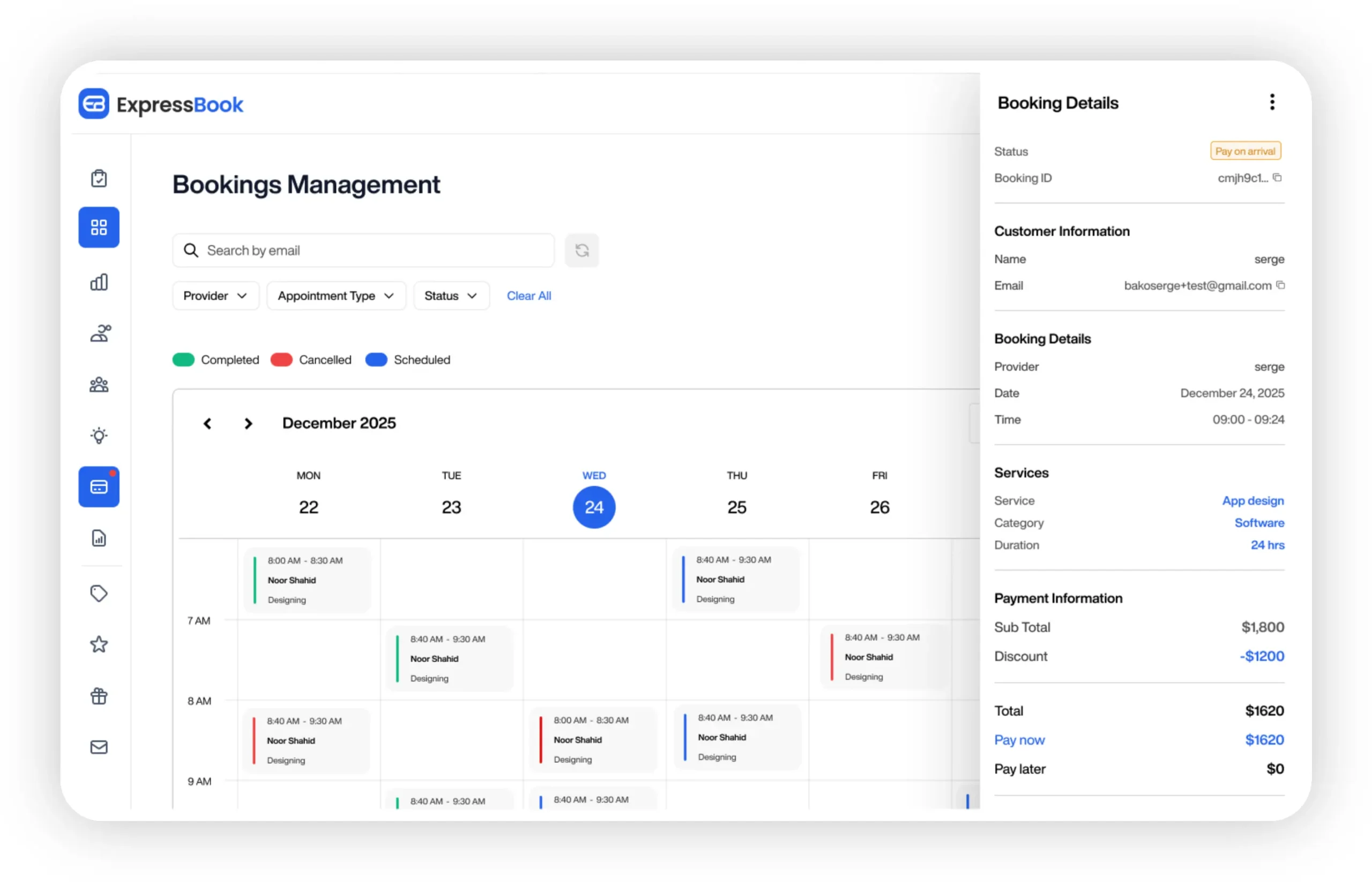
The mobile app keeps you and your team in control from anywhere, and the built-in voice agent means every client, including those who need accessibility support, can book, confirm, or reschedule without friction. You can explore the full reminder automation workflow and see how it fits your operation before committing to anything. Expressbook offers up to 3 months free, giving you enough time to run a full reminder cadence, measure the no-show delta, and make a confident decision. Start your free trial at expressbook.com today.
Useful sources and references
The sources below support the claims, templates, and compliance guidance throughout this article.
- 45 Free Appointment Reminder Text Message Templates
- Doctor Appointment Reminder Templates That Cut No-Shows
- Appointment Reminder Template: How to Write One (With 12 Examples)
- Appointment Reminder Template: Examples and Best Practices
- 2025 Email Appointment Reminder Template You Can Copy Today
- The State of SMS Marketing in 2023 (Validity)
- How Automated Reminders Improve Client Retention –