For most small and medium businesses, the answer is straightforward: yes, use SMS appointment reminders, and choose a scheduling platform with native SMS built in rather than bolting a separate messaging service onto your existing calendar. Automated text message reminders consistently outperform email for open rates, and a two-message sequence (sent 24 hours before and again 2–4 hours before the appointment) is the most widely recommended default for reducing no-shows. For the large majority of SMBs, Expressbook delivers this out of the box, with Google Calendar sync, two-way replies, and analytics included.
The exception is narrow: if you need high-volume custom conversational flows and have developer resources to maintain them, an API-based SMS gateway gives you more control. For everyone else, a built-in scheduler is faster to launch, cheaper to maintain, and far simpler to troubleshoot.
- Two-message sequences (24h + 2–4h) are the most effective default timing, according to messaging vendor use-case guidance.
- Two-way replies let clients confirm or reschedule directly, which updates booking status without staff intervention.
- Built-in SMS in a scheduler eliminates the integration layer that causes most delivery and sync failures.
Pro Tip: Enable two-way replies from day one. A client who can reply “YES” to confirm or tap a reschedule link gives you a cancellation hours earlier, not minutes before the appointment.
Key Takeaways
SMS appointment reminders reduce no-shows most reliably when they are built into your scheduling platform, use a two-message sequence, and enable two-way replies that update booking records automatically.
| Point | Details |
|---|---|
| Two-message sequence | Send reminders 24 hours and 2–4 hours before each appointment for the highest confirmation rate. |
| Two-way replies | Replies that automatically update the booking record eliminate manual confirmation calls. |
| Compliance first | Collect opt-in consent, include STOP opt-out in every sequence, and get a BAA before sending PHI. |
| ROI calculation | Compare monthly messaging cost against revenue recovered from reduced no-shows to confirm payback. |
| Expressbook recommended | Expressbook’s native SMS, Google Calendar sync, mobile app, and up to 3-month free trial make it the fastest path to a live, tested reminder setup. |
Table of Contents
- How do SMS appointment reminders actually work?
- What features and questions should you require from any SMS reminder vendor?
- How to set up SMS appointment reminders in five steps
- What do high-performing SMS reminder templates look like?
- What will SMS appointment reminders actually cost you?
- What compliance requirements apply to SMS reminders in the U.S.?
- Why built-in SMS beats patched-together add-ons for most SMBs
- Expressbook gives you built-in SMS reminders and a free trial to prove it
- Sources
How do SMS appointment reminders actually work?
Text message reminders are not a single product. They are a workflow connecting four components: a booking or scheduling system, an SMS message gateway, a provisioned phone number, and a template engine that formats and times each message.
The typical flow runs like this: a client books an appointment, which triggers the scheduler to queue a reminder job. At the configured time, the scheduler passes the message to the SMS engine (either built-in or via an external gateway like Twilio), which routes it through a carrier network to the client’s phone. If the client replies, the gateway parses the reply keyword (YES, CANCEL, RESCHEDULE) and passes the status back to the scheduler, which updates the booking record automatically.
Integration types vary significantly:
- Native built-in SMS in a scheduler like Expressbook: the gateway, number provisioning, and template engine are all managed by the platform. Setup takes minutes, not days.
- Marketplace add-ons for Google Calendar: apps like SMS Reminder for Google Calendar let businesses that already live in Google Calendar add reminders without migrating to a new platform. Installing these requires admin verification and consent flows governed by Google Workspace Marketplace policies.
- API-based custom builds using a gateway like Twilio: maximum flexibility, but requires developer time to build, test, and maintain the reminder logic, reply parsing, and calendar sync.
A few delivery details matter when evaluating vendors. Standard SMS messages are limited to 160 characters in GSM-7 encoding; longer messages are split into segments (concatenated), which can increase per-message costs. Short codes (5–6 digit numbers) offer higher throughput and better deliverability for high-volume senders, while long codes (standard 10-digit numbers) are more common for small businesses and support two-way conversations. Carrier filtering is a real risk: messages that look like spam or lack proper opt-in records are more likely to be blocked.
What features and questions should you require from any SMS reminder vendor?
Choosing the wrong vendor costs you twice: once in setup time, and again when clients stop receiving messages or replies don’t sync back to your calendar. A structured evaluation prevents both.
Feature checklist — require all of these before committing:
- Two-way messaging with reply parsing (YES/CANCEL/RESCHEDULE keywords)
- Calendar sync with Google Calendar and your booking platform
- Template editor with variable fields (client name, date, time, location, link)
- Configurable send timing rules (24h, 2–4h, custom)
- Delivery reporting with per-message status (delivered, failed, opted out)
- Opt-in capture and STOP/START opt-out handling at the carrier level
- BAA availability for healthcare providers handling protected health information
- API or webhook access if you need to connect to external systems
Questions to ask every vendor:
- Who provisions the phone number, and is it a short code or long code?
- Which carriers and regions are covered for domestic U.S. delivery?
- How are client replies routed, and do they update the booking record automatically?
- Is a Business Associate Agreement available, and what does it cover?
- What is the pricing model: per-message, monthly subscription with credits, or tiered?
Red flags to walk away from:
- No message delivery tracking or status reporting
- Opt-out handling that relies on manual staff action rather than automated carrier-level STOP processing
- Replies that notify staff by email but do not update the calendar automatically
- Pricing that is opaque about per-segment costs for messages over 160 characters
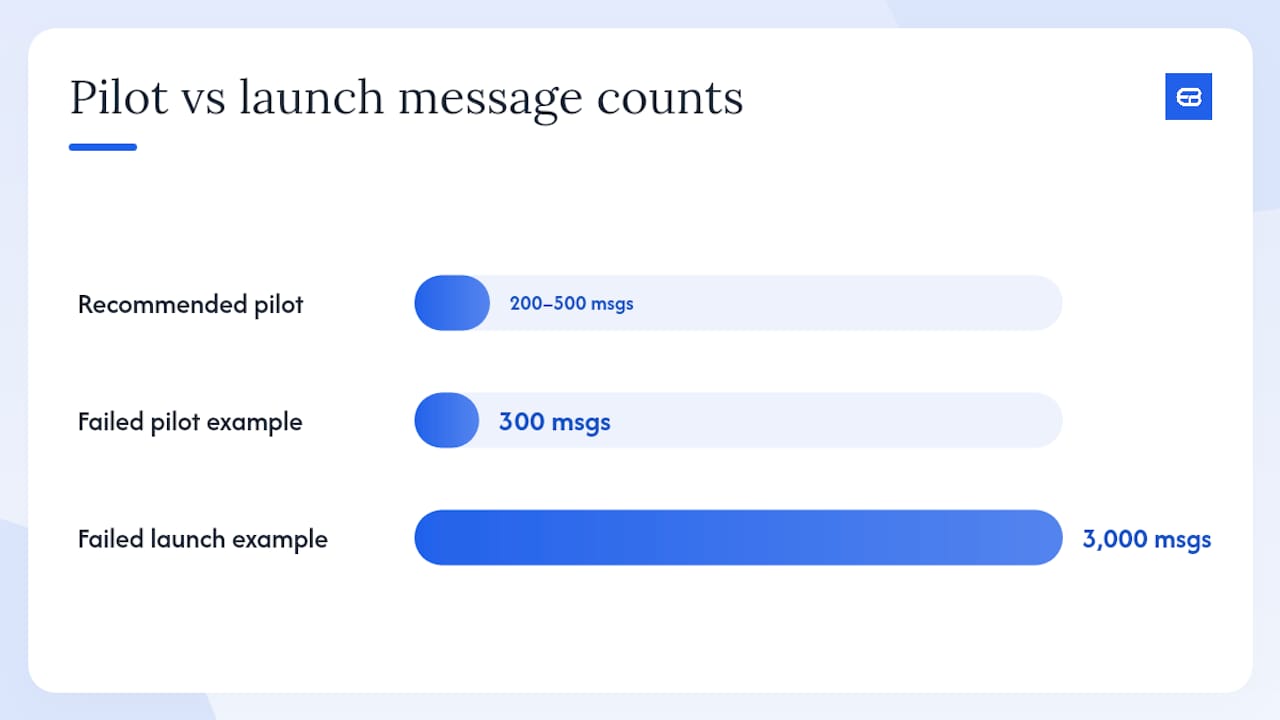
Pro Tip: Before rolling out to your full client list, run a pilot of 200–500 messages. Check delivery rates, confirm that replies update booking status, and verify that opt-outs are honored. A failed pilot with 300 messages costs far less than a failed launch with 3,000.
Guidance on choosing the best appointment scheduling software covers feature prioritization in more depth if you are evaluating full scheduling platforms alongside SMS capabilities.
How to set up SMS appointment reminders in five steps
Getting reminders live does not require weeks of configuration. Most SMBs can go from zero to a tested pilot in under a week.
Step 1 is the decision point. If you are already using Google Calendar and want the lightest possible lift, a calendar-based marketplace add-on gets you started quickly. Installing it requires admin sign-in and approval through Google Workspace’s permission and consent flow. If you want native two-way replies, calendar sync, analytics, and a single support channel, activating an Expressbook trial is the faster path to a production-ready setup.

Step 3 is where most pilots stall. Keep templates short, include the business name in the first line, and always add a one-tap reschedule link or a reply keyword. Vague messages (“Your appointment is coming up”) get ignored; specific ones (“Your 2 PM cut at Riverside Studio is tomorrow — reply YES to confirm or tap [link] to reschedule”) get responses.
Step 4 matters more than most owners expect. Delivery to a real carrier network behaves differently than internal test sends. Confirm that a reply of “YES” actually updates the booking record before you send to paying clients.
What do high-performing SMS reminder templates look like?
Good reminder messages share four traits: they identify the business immediately, state the appointment specifics clearly, include one action the client should take, and stay within a single SMS segment when possible. Textedly’s library of 45 appointment reminder templates is a practical starting point for phrasing across confirmation, reminder, and cancellation flows.
Writing rules that apply across all message types:
- Open with the business name or include it in the first sentence.
- State date, time, and service or location explicitly.
- One CTA per message. Two CTAs split attention and reduce response rates.
- Include opt-out language (“Reply STOP to opt out”) on at least the first message in any sequence, and on marketing messages every time.
- For medical and legal contexts, keep the message formal and avoid including diagnosis or case details in the body.
Pro Tip: A one-tap reschedule link in the 24-hour reminder captures cancellations 12–18 hours before the slot opens up, giving you time to fill it. A reply keyword alone (without a link) adds friction and reduces early cancellations.
What will SMS appointment reminders actually cost you?
Pricing for text message reminders follows two main models, and the right one depends on your monthly appointment volume.
Per-message pricing charges a small fee for each SMS segment sent. This model suits businesses with low or unpredictable volume. Costs vary by carrier, number type, and whether messages are domestic or international. Short codes typically carry higher monthly lease fees but lower per-message rates at scale. Long codes cost less to provision but may face stricter carrier filtering without proper registration.
Subscription pricing bundles a set number of messaging credits into a monthly or annual plan. Most scheduling platforms, including Expressbook, use this model. The advantage is predictable cost; the risk is paying for credits you do not use in slow months.
Cost drivers to account for in your budget:
- Message volume (appointments per month × number of reminders per appointment)
- Concatenation: a 200-character message counts as two segments and costs twice as much
- Two-way messaging: some vendors charge for inbound replies separately
- Short code vs. long code lease fees
- International delivery surcharges if you serve clients outside the U.S.
Estimating ROI is straightforward. Calculate the average revenue per appointment, multiply by your current no-show rate, and compare that lost revenue to your monthly messaging cost. For most SMBs, even a modest reduction in no-shows covers the cost of a subscription plan within the first month. Detailed tactics for reducing no-shows and increasing bookings can help you model this against your specific numbers.
Nonprofits using Twilio’s infrastructure may qualify for discounted rates through Twilio, which is worth checking before committing to a full commercial plan.
What compliance requirements apply to SMS reminders in the U.S.?
Two federal frameworks govern business text messaging in the United States: the Telephone Consumer Protection Act (TCPA) and, for healthcare providers, HIPAA. Getting these wrong carries real regulatory and financial risk.
TCPA basics:
- Appointment reminders sent to clients who have provided their phone number as part of booking generally qualify as transactional messages, which carry a lower consent burden than marketing messages. Confirm this classification with legal counsel for your specific use case.
- For any promotional content in a message (discounts, upsells), prior express written consent is required.
- Every message sequence must include a clear opt-out mechanism. Carrier-level STOP processing is the standard; manual opt-out handling is not sufficient.
- Keep records of opt-ins, including the date, method, and language used to obtain consent.
HIPAA considerations:
- If your reminder messages include protected health information (PHI), such as a diagnosis, medication name, or treatment detail, your SMS vendor must sign a Business Associate Agreement (BAA).
- Standard SMS is not encrypted end-to-end. Limit PHI in message bodies to the minimum necessary: appointment date, time, and provider name are generally acceptable; clinical details are not.
- Vendors offering HIPAA-capable messaging maintain audit logs, access controls, and data encryption at rest and in transit.
Pro Tip: Before piloting with any PHI, request a sample BAA from your vendor and ask for an export of audit logs. If the vendor cannot produce either within 48 hours, treat that as a disqualifying red flag.
Noncompliance with TCPA carries per-violation penalties that can accumulate quickly at scale, and HIPAA enforcement actions have resulted in significant settlements for covered entities. The regulatory risk is not theoretical for businesses sending reminders at volume.
Why built-in SMS beats patched-together add-ons for most SMBs
The conventional wisdom in SMB tech is that you should pick the best tool for each job and connect them. For SMS appointment reminders, that logic breaks down faster than in almost any other workflow.
When you stitch together a calendar, an SMS gateway, and a booking system from three different vendors, you get three support queues, three billing relationships, and three points of failure. The most common failure is the reply sync: a client texts back “YES,” the gateway logs it, but the calendar never updates because the webhook between the two systems timed out. Staff then call to confirm manually, which defeats the entire purpose of automation.
A scheduler with native SMS, like Expressbook, collapses that stack into one system. The booking triggers the reminder, the reply updates the booking record, and the analytics show you delivery rate, confirmation rate, and no-show rate in a single dashboard. There is no integration to maintain, no webhook to debug, and no second vendor to blame when something goes wrong.
The cost argument is equally clear. Three separate subscriptions, plus developer time to maintain the connections, almost always exceed the cost of a single platform with SMS built in. The hidden cost is the ongoing maintenance: carrier registration requirements, API version updates, and webhook reliability all require attention that most SMB owners do not have time to give.
The exception is real but narrow. If your business sends tens of thousands of messages per month, needs custom conversational flows (multi-turn dialogues, AI-driven triage), or has a development team that can maintain the stack, an API-first approach gives you control that no off-the-shelf scheduler can match. For most service businesses, the built-in approach wins on every dimension that matters: speed, cost, reliability, and simplicity.
Expressbook gives you built-in SMS reminders and a free trial to prove it
No-show rates do not drop because you chose the right vendor on paper. They drop because reminders go out on time, replies sync back automatically, and your staff spends zero minutes chasing confirmations. That is the specific gap Expressbook closes.
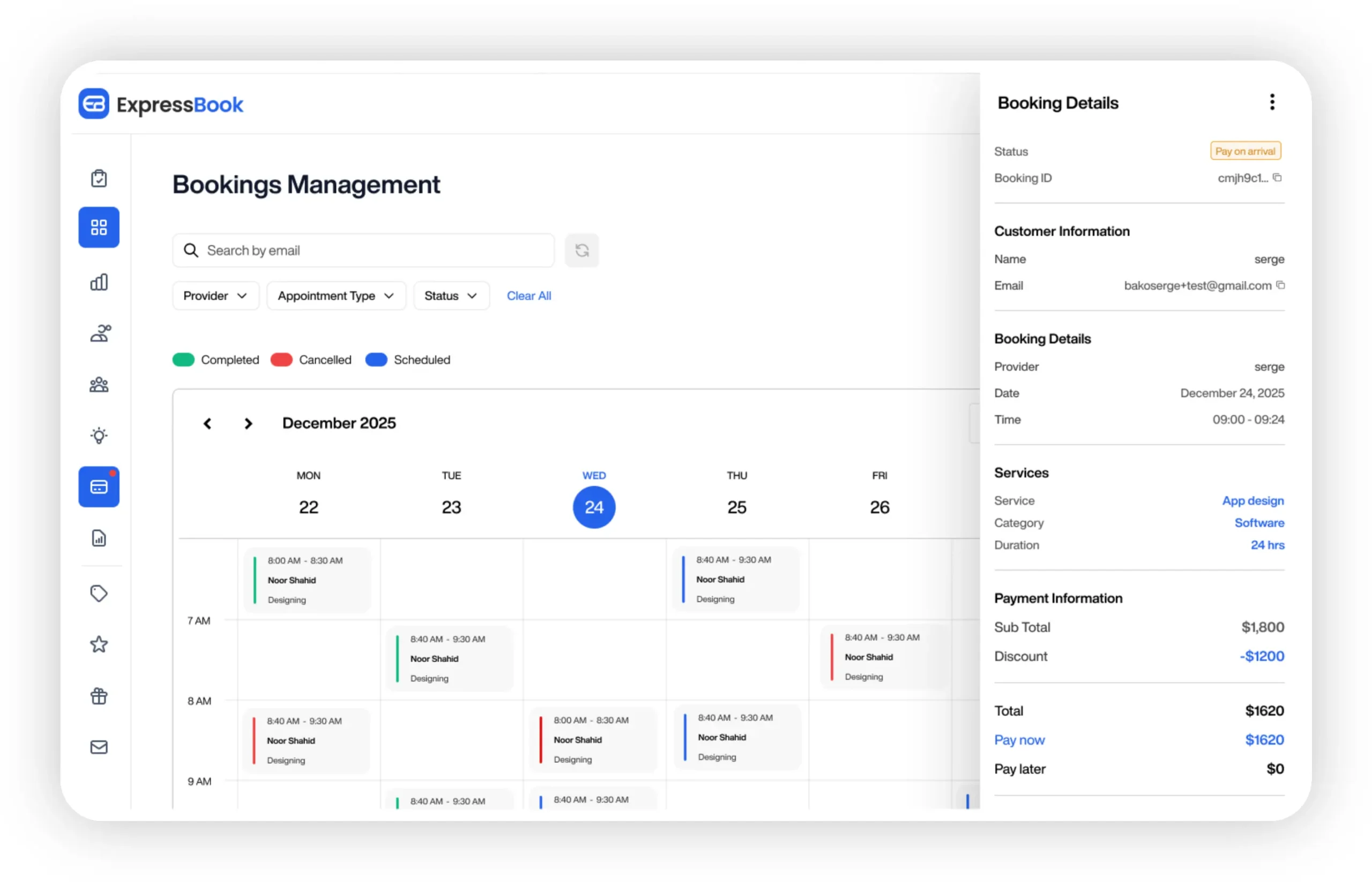
Expressbook includes native SMS appointment reminders, Google Calendar sync, two-way reply handling that updates bookings automatically, branded booking pages, and AI-powered analytics, all in one platform. The dedicated mobile app lets you manage bookings and monitor reminders from anywhere, and the built-in voice agent means visually impaired clients can book appointments and get answers without needing a staff member on the line.
The free trial runs up to three months, which is long enough to pilot your reminder sequences with a real client segment, measure your no-show rate before and after, and confirm that the compliance and delivery setup meets your needs. Start your trial at Expressbook and have your first automated reminder sequence live within the hour.
Sources
- Appointment reminder texts and emails | Twilio
- SMS Reminder for Google Calendar™
- 45 Free Appointment Reminder Text Message Templates
- Support
This article is general information, not a substitute for advice from a qualified lawyer. Consult a qualified legal professional about your own circumstances before acting on anything here.